Alerts
Price, line, channel, indicator and watchlist alerts with up to five conditions, a trigger and an expiry, sent to Telegram, your phone, e-mail or a webhook.
An alert watches a condition on a symbol and rings when it holds: at a price, on a drawing, on an indicator, or on every symbol of a watchlist. With an account the alerts are checked on our servers, so they ring with the tab closed; without one they live in this browser and ring while the page is open.
What it is#
| Kind | Watches |
|---|---|
| Price | The price crossing a level: either way, up, down, or getting above or below it. |
| Trend line, level, ray, extended line | The price breaking the line (either way, up or down) or coming near it. |
| Parallel channel, pitchfork | The price entering, leaving, inside or outside the band between the lines. |
| Indicator | A line of an indicator crossing a value or another line, moving by an amount, or a signal appearing, including the MillionAlgo studies. |
| Watchlist | One condition on every symbol of one of your lists; each symbol rings on its own (MillionChart Pro). |
Where it is#
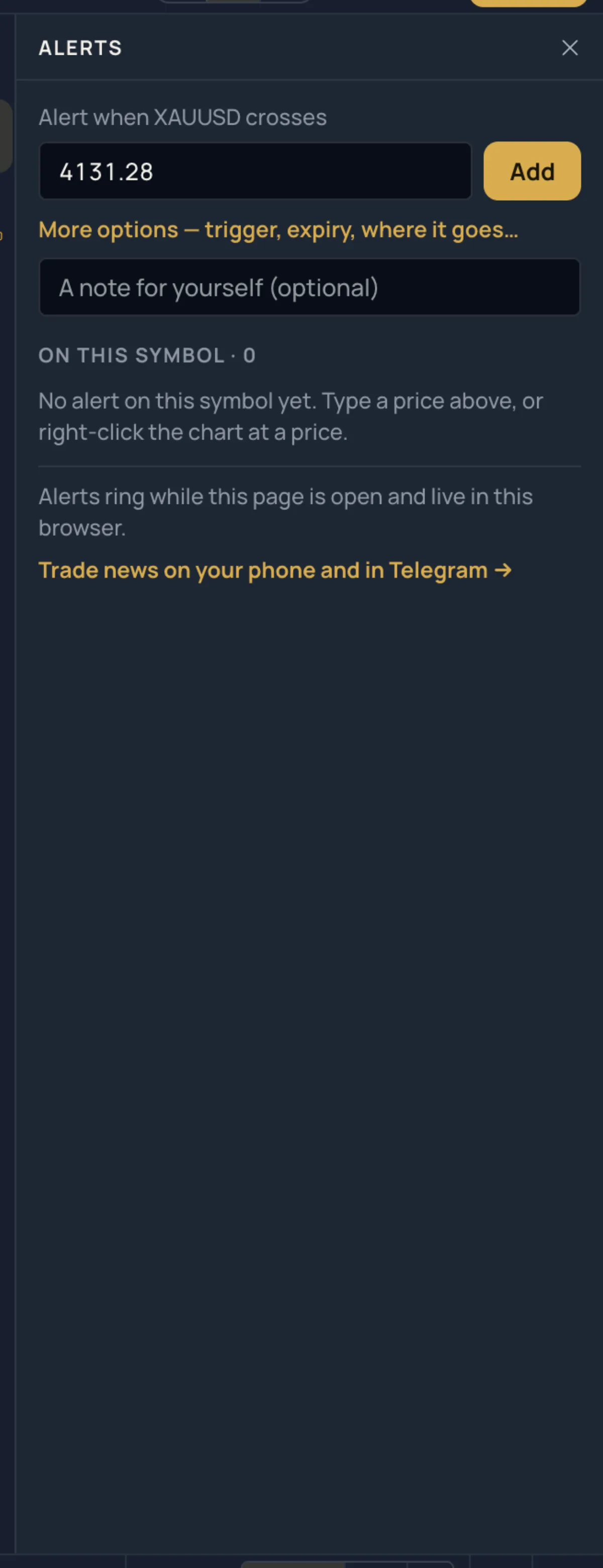
- Price: right-click the chart at a price › Add alert at …, or press Alt+A. The Alerts side list (the bell in the strip, "Price alerts on this symbol"; G then L on the Pro screen) takes a price and a note and adds the alert with one click; More options opens the full dialog. In the Lens,
>alert 4290 notedoes the same. - Drawing: right-click a line › Alert on break or Alert when near; a channel or pitchfork › Alert on the channel…. A selected trend line, channel or pitchfork also has an alert bell in its Halo bar.
- Indicator: right-click the indicator's chip in the legend, or the bell in its Inspector › Add alert….
- Watchlist: the side list › Watchlist › ⋯ › Add alert on this list….
- All of them: the alert centre — Alerts and notifications in the strip, More › Alerts & notifications, or Alerts in the phone's More sheet.
A price alert is drawn on the chart as an amber dashed line with a bell and its price. Drag it to move the alert; right-click it for Edit alert…, Pause alert, Price alerts… and Remove.
The alert dialog#
| Row | Choices |
|---|---|
| Symbol | This chart's symbol, or every symbol of a watchlist. |
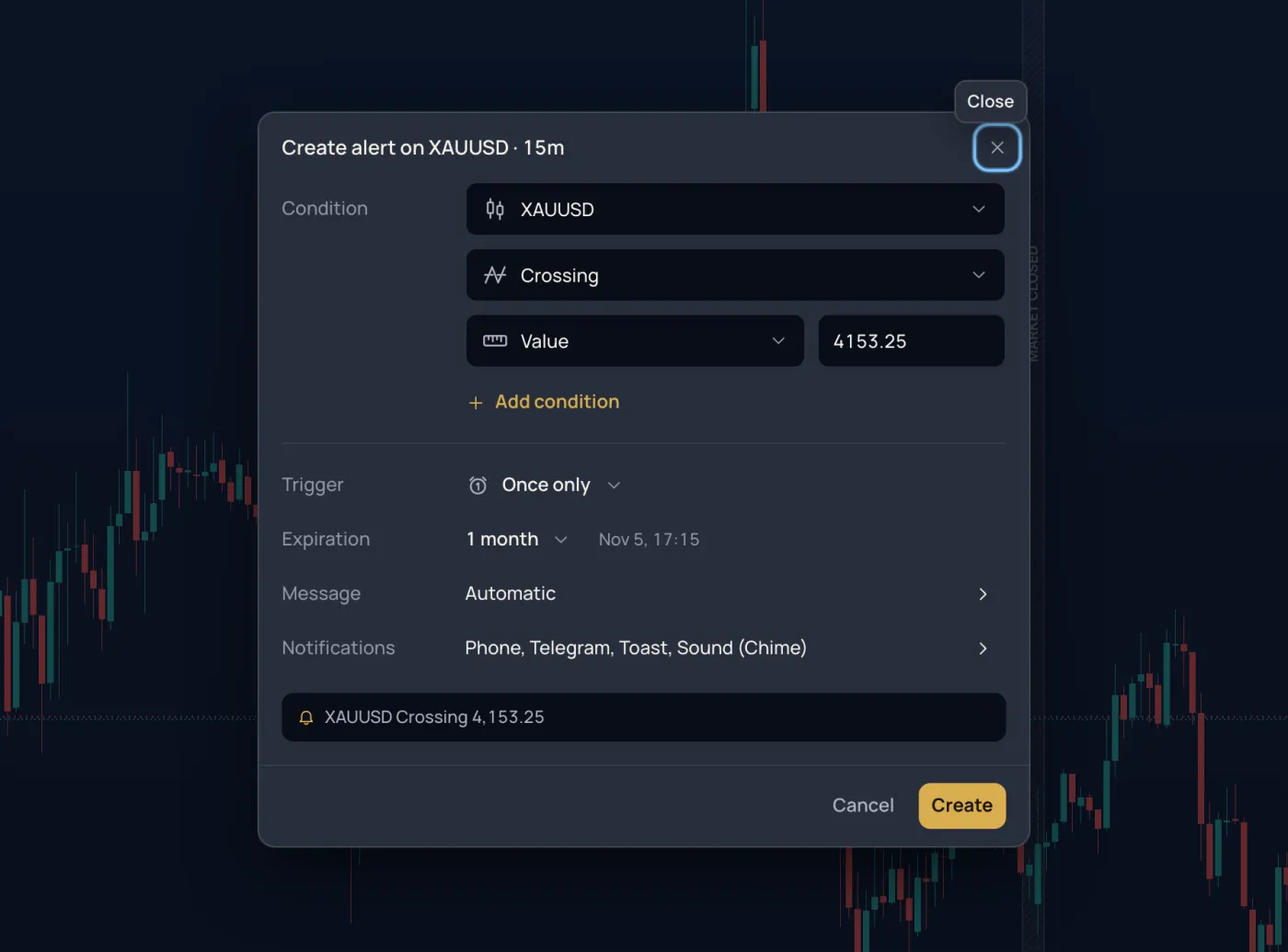
| Condition | Watch the price or an indicator line. The condition: Crossing, Crossing Up, Crossing Down, Greater Than, Less Than, Entering / Exiting / Inside / Outside Channel (an upper and a lower bound), Moving Up / Down by an amount or Moving Up % / Down %, within 1 to 500 bars. Compared with a value you type or another line. Add condition joins up to five; all must hold. |
| Trigger | Once only · Once per bar · Once per bar close · Once per minute (while the condition remains met). |
| Expiration | Open-ended · End of day · 1 week · 1 month (the default) · Custom date with a time. |
| Message | An alert name (up to 80 characters) and a message (up to 4,000). Empty: we write what happened and the price at that moment. Add placeholder inserts {{ticker}}, {{interval}}, {{close}}, {{price}}, {{time}}, {{alert_name}}, {{plot("Name")}} and the others, filled in when the alert rings. |
| Notifications | Push notification (phone and computer, even with the chart closed; turned on per device) · Telegram (a message with the chart, and buttons to snooze or stop the alert) · Show toast notification (the corner of the chart page) · Send e-mail (at most 30 an hour) · Webhook URL (a POST with the message; a JSON message goes as JSON; MillionChart Pro) · Play sound (Chime, Thin, Bell, Two notes, Beep-beep, Alarm clock, Soft or Rise; once, 3 times, 10 seconds or until you close it) · Notification schedule: every day, weekdays, or the days and hours you pick; outside them the alert still rings into its History, silently. |
The line at the foot of the dialog reads the alert back in words before you press Create.
How to use it#
- Right-click the chart at the price you want and choose Add alert at ….
- Check the condition, then pick a Trigger and an Expiration.
- Open Notifications, tick Telegram (press Connect Telegram if you have not yet) and Apply.
- Press Create. A toast says Alert set, and the alert's line appears on the chart.
Connecting Telegram#
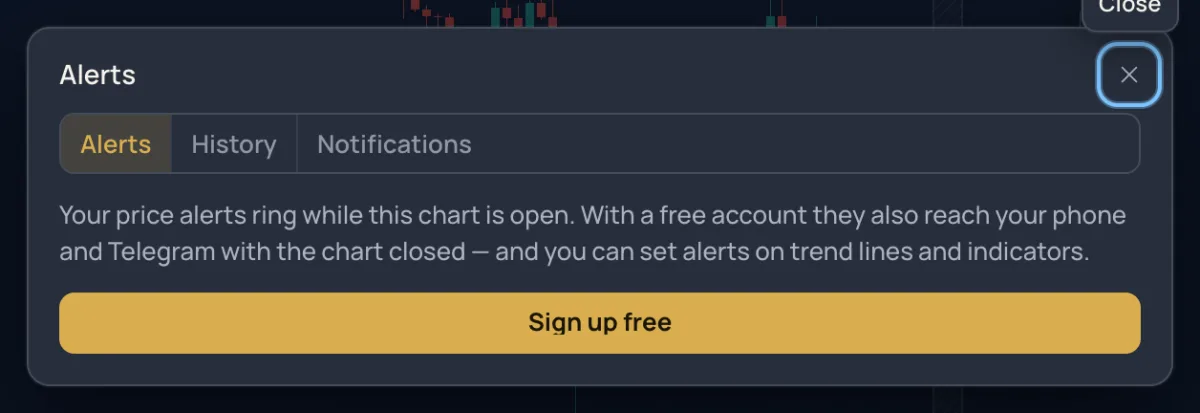
Open the alert centre and its Notifications tab. Under Telegram press Connect, scan the QR code with your phone or press Open Telegram, then press Start in the chat; the page notices by itself. Send a test proves it works. Mute… silences Telegram for 1 hour, 8 hours, 1 day or 1 week; Disconnect removes the link. The same tab holds Push on this device (on an iPhone, add the app to the Home Screen first) and a table of where each kind of news goes: chart alerts, trades and more, by phone, e-mail and Telegram.
The alert centre#
- Alerts lists every alert of your account with its state (once, every bar close, until 12 Oct, rang 3×, paused) and a bar with how many of your plan's alerts are running. Search; sort by Symbol, Newest, Last rang or Name; the ⋯ menu has Pause all, Resume all and Clear stopped. On each row: pause or resume, Edit…, Clone (a copy to change), Open its chart, Remove. Alerts that rang once, expired or could not run sit under Stopped · this week with Restart.
- History keeps every ring with the time, the price and its direction, and the chart picture taken at that moment (tap the thumbnail). Search it, Export CSV (the newest 200 rings) or Clear log.
A paused alert keeps its settings and frees its place in your plan. An alert the plan has no room for is paused until the plan has room; one on an indicator your package no longer includes is paused until it does.
Examples#
- A round number on gold. Right-click the chart at 4,300 › Add alert at 4,300… › trigger Once only, expiry 1 week, Telegram on. When the price crosses, Telegram shows the chart with the crossing and a button to snooze the alert.
- RSI leaving the overbought zone. Add RSI, right-click its chip › Add alert… › watch RSI › Crossing Down › value
70› trigger Once per bar close › message{{ticker}} RSI back under 70 at {{close}}.
Limits and plans#
| Without an account | Free account | MillionChart Pro | |
|---|---|---|---|
| Active alerts | price alerts, in this browser | 3 | 100 |
| Rings with the page closed | no | yes | yes |
| Conditions per alert | 1 (the price crossing a level) | up to 5 | up to 5 |
| Drawing and indicator alerts | — | yes | yes |
| Webhooks and watchlist alerts | — | — | yes |
The free Pro month includes everything in the Pro column. Alerts are not available on a tick chart. In a chart grid an alert rings once, however many charts show its symbol. See Plans.
Related#
- Watchlist: alerts on a whole list
- Indicators panel · Lines
- Your account: notification settings outside the chart
- Keyboard · On a phone