Linear Regression Channel (LRC)
What the regression channel fits, how its bands are set, its settings on MillionChart and a worked example on gold.
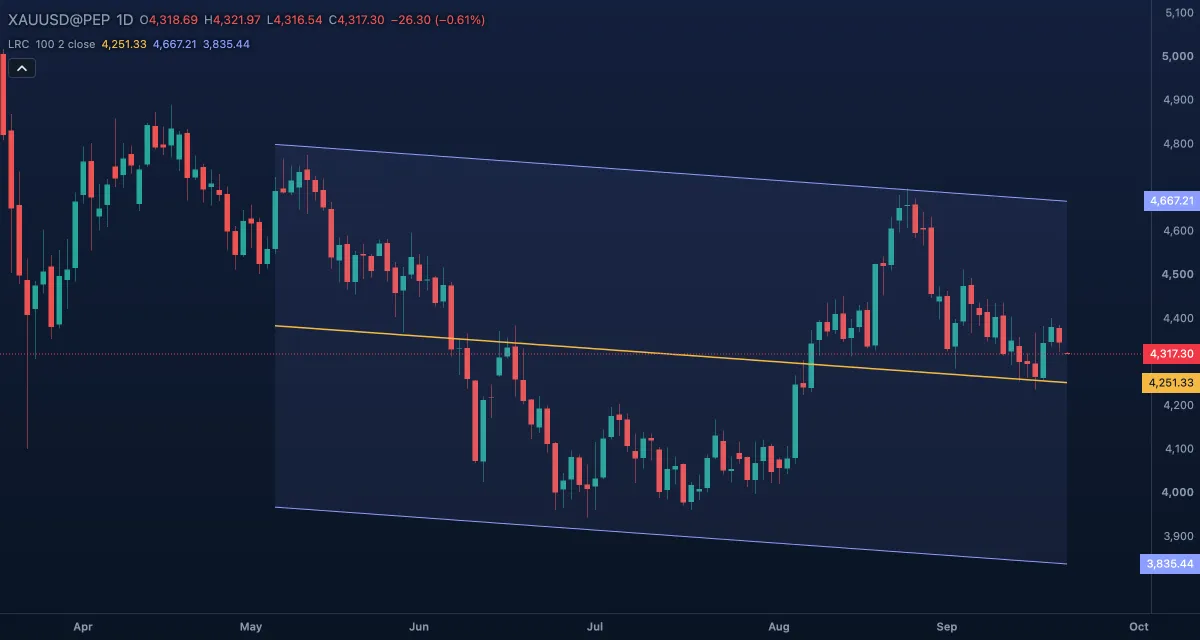
The Linear Regression Channel draws the straight line that fits the last 100 closes best (the least-squares line) and two parallel bands around it. It is a picture of the trend over a fixed window: the slope is the direction and pace of the move, the bands are how far price has strayed from that line. It is drawn over the candles in price units.
What it shows#
- Regression line — the best-fit line through the last 100 closes, drawn on those bars only. Rising means the window is, on balance, an uptrend; falling, a downtrend; flat, a range.
- Upper and Lower — parallel bands at the same distance above and below the line, with the space between them tinted (Channel fill).
- Nothing is drawn before the window, and the channel is refitted on every new bar, so the whole channel moves as bars arrive. Extend lines to the right continues the three lines past the last bar at the same slope.
How it is calculated#
Take the last Length values of the Source and find the straight line that keeps the squared distances of those values from it as small as possible (ordinary least squares). With Band width at Standard deviation the bands sit at Deviation multiplier × the standard deviation of those distances. With Maximum distance they sit at the furthest any bar's high or low got from the line, so every candle of the window fits inside and the multiplier is ignored; that is the channel Gilbert Raff described.
How traders use it#
- Read the slope first: a channel that points up says the last 100 bars were a net uptrend; a flat one says range.
- In a rising channel, a dip to the Lower band is where pullback buyers look; a touch of the Upper band is where rallies have tended to stall.
- The Regression line is the mean price of the window: price far from it tends to come back.
- A close outside the channel says the window's trend is accelerating (same direction) or breaking (opposite direction); wait for the next bar before trusting either.
- Watch out: the channel is refitted on every bar, so yesterday's lines are not today's. It describes the last 100 bars; it does not predict the next one. One extreme candle also widens the Maximum distance bands for as long as it stays in the window.
Settings#
| Setting | Default | What it changes |
|---|---|---|
| Length | 100 | How many bars the line is fitted to (2 to 5,000). Shorter follows the recent swing; longer describes the bigger trend. |
| Source | Close | The price the line is fitted to: Open, High, Low, Close, Mid (HL2), Typical (HLC3) or Average (OHLC4). |
| Band width | Standard deviation | Standard deviation: bands at a multiple of the spread around the line. Maximum distance: bands at the furthest high or low of the window. |
| Deviation multiplier | 2 | How many standard deviations the bands sit from the line (0.1 to 10); Standard deviation only. |
| Extend lines to the right | Off | Continues the line and the bands past the last bar to the right edge of the chart. |
| Colours and style | — | The Regression line, Upper band, Lower band and Channel fill colours. |
Example on gold#
Gold has climbed from about $4,000 to $4,300 over five months, and the daily channel (100, 2 standard deviations) slopes up. Price pulls back and touches the lower band near $4,220 while the slope is still clearly positive. For example, a buyer who trades with the trend treats that touch as a place to look for a long entry, with a stop a little below the band and a first target at the regression line around $4,270.
What would invalidate it: a daily close below the lower band, especially if the next refit flattens the slope. Then the window is no longer a clean uptrend, and the lower band is no longer a floor.
Add it to your chart#
- Click Indicators in the top strip (on the Pro screen, I does the same).
- Type
lrcand click the indicator. - Click its chip in the legend to open the Inspector and change the settings; drag the chip to reorder; the dot hides it; × removes it.
Related#
- Least Squares Moving Average — the end point of the same fit, drawn bar by bar
- Bollinger Bands — standard-deviation bands around a moving average instead of a fitted line
- Donchian Channels — a channel from the highest high and lowest low of the window
- Alerts — an alert when the price crosses a band
- Adding and tuning indicators