Standard Deviation (StdDev)
What the standard deviation of price measures, how it drives the Bollinger Bands, how to read it, its settings on MillionChart and an example on gold.
Standard deviation measures how far the price has been spreading around its own average over a recent window. It is in price units — dollars on gold — and it is the very number the Bollinger Bands are built from, so this pane shows what drives the width of those bands. Karl Pearson named the measure in 1894.
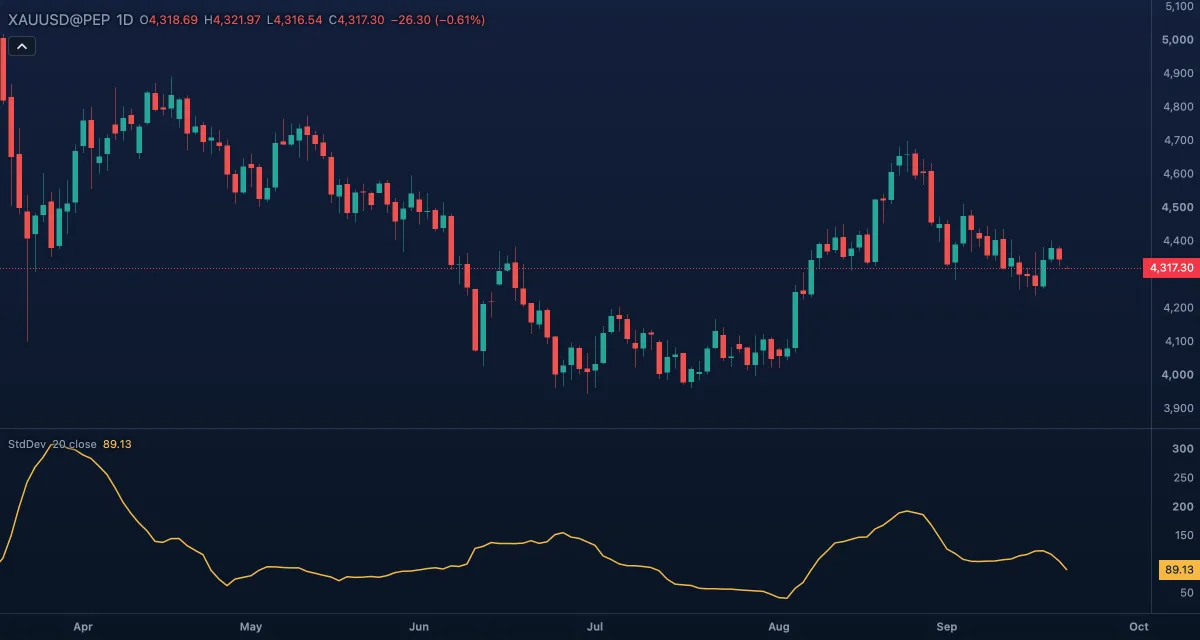
What it shows#
- StdDev — a line in its own pane, in the symbol's price units and digits. Rising means the last 20 closes are scattered more widely around their average; falling means they are clustered.
- There are no fixed levels, and the value grows with the price: a $60 deviation is 3% of $2,000 and 1.4% of $4,300. For a percent version see Historical Volatility.
How it is calculated#
Over the last Length bars of Source, the indicator takes the mean, then the average of the squared distances of each value from that mean, and finally the square root. It divides by the number of bars (the population form), exactly as the Bollinger Bands do, so at the default multiplier each band sits two of these deviations from the basis.
How traders use it#
- As a plain volatility gauge: a low, flat line is a quiet market; a rise says a move has started, whichever way it goes.
- Stops: a stop closer to the entry than one standard deviation sits inside the ordinary noise of the last 20 bars and can be hit by chance.
- Stretched readings: a close more than two deviations from the 20-bar average is far from its mean — the same thing as touching a Bollinger Band. In a range that often leads back to the mean; in a trend it does not, by itself.
- Compare it over time on one symbol, not between symbols: a deviation in dollars means different things at different prices.
- Watch out for: when the window holds a steady trend, the deviation measures the slope as much as the noise. A straight, calm rally reads as "high volatility" because its closes lie far from their average.
Settings#
| Setting | Default | What it changes |
|---|---|---|
| Length | 20 | Bars in the window. 20 matches the default Bollinger Bands. |
| Source | Close | The series measured: Close, Open, High, Low, Mid, Typical or Average. |
| Colours and style | — | The colour of the Standard deviation line. |
Example on gold#
For example, gold has moved quietly near $4,300 and StdDev (20) reads $25. Over two weeks of wide candles it climbs to $70. A trader who kept placing stops $15 from the entry now sees them inside the day's noise: at $70 of deviation, a $15 stop is a coin toss. Moving the stop out to about $70 — one deviation — and cutting the size so the money at risk stays the same keeps the trade's logic intact.
What would change the picture: StdDev falling back toward $30 as the wide candles leave the window; stops can come in again.
Add it to your chart#
- Click Indicators in the top strip (on the Pro screen, press I).
- Type
stdevand click Standard Deviation. - Click its chip in the legend to open the Inspector and change the settings; drag the chip to reorder; the dot hides it; × removes it.
Related#
- Bollinger Bands — the bands drawn two of these deviations from the average
- Bollinger BandWidth — the same deviation as a percent of the basis
- Historical Volatility — the deviation of returns, annualised, for comparing symbols
- Average True Range — the other common volatility measure in price units
- Alerts — an alert when the value crosses a level
- Adding and tuning indicators