WaveTrend (WT)
What the WaveTrend oscillator draws, how its two lines and its ±53 and ±60 levels are read, its settings on MillionChart and a worked example on gold.
WaveTrend is a smoothed oscillator of the typical price — a channel index in the spirit of the CCI, passed through two moving averages — drawn as two lines whose crossings near the overbought and oversold levels are the signals. It is drawn in its own pane around zero with levels at ±53 and ±60. It became popular through LazyBear's community script of 2014; MillionChart follows that definition.
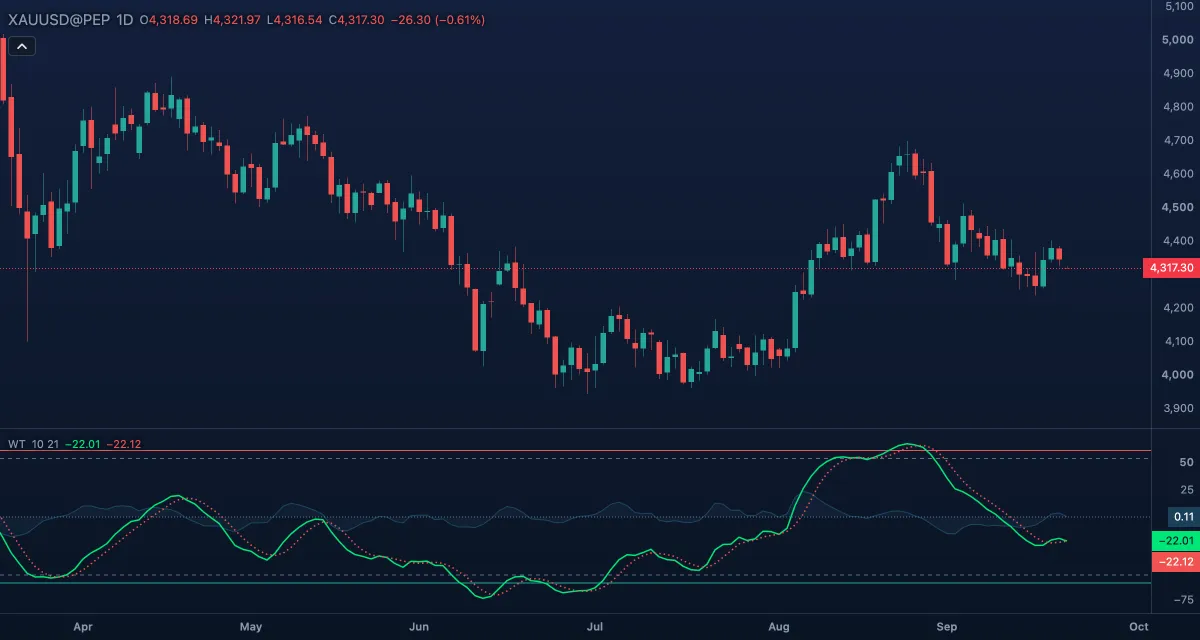
What it shows#
- WT1 — the main line (green), in its own pane. Rising means the typical price is pulling above its recent average; above the overbought levels the move is stretched, below the oversold ones washed out.
- WT2 — a 4-bar simple moving average of WT1 (red, dotted); the crossings of the two are the triggers.
- WT1 - WT2 — the gap between the lines as a light blue area from zero.
- Overbought 1 and Oversold 1 — solid levels at +60 (red) and −60 (green); Overbought 2 and Oversold 2 — dashed levels at +53 and −53; Zero — a dotted line at 0.
How it is calculated#
The typical price (the average of the high, the low and the close) is averaged with an exponential moving average over the Channel length (10); the distance of the typical price from that average is averaged the same way, and the channel index is the distance divided by 0.015 times its average — the CCI's construction with exponential averages. WT1 is the exponential moving average of that index over the Average length (21); WT2 is the simple 4-bar average of WT1. The indicator always works on the typical price; it has no source setting.
How traders use it#
- WT1 crossing above WT2 while both are below the oversold levels is the script's buy signal; WT1 crossing below WT2 above the overbought levels is its sell signal. Crosses in the middle of the range carry less weight.
- The ±60 levels are the stronger extremes and ±53 the earlier ones; a cross between the two is the common compromise.
- Divergence at the extremes — price at a new high, WT1 at a lower high — is one of the more popular readings of this oscillator.
- Watch out for: in a strong trend WT1 stays beyond the levels and gives crosses against the trend that fail; the two averages make the signals a few bars late, and the levels are fixed numbers from the script, not fitted to any market.
Settings#
| Setting | Default | What it changes |
|---|---|---|
| Channel length | 10 | Bars of the exponential averages that build the channel index; shorter makes WT1 react faster |
| Average length | 21 | Bars of the exponential average that smooths the index into WT1; longer is smoother |
| Colours and style | — | The colours of WT1, WT2 and the WT1 - WT2 area, and of Overbought level 1, Overbought level 2, the Zero line, Oversold level 2 and Oversold level 1 |
Example on gold#
Suppose gold has fallen for two weeks from $4,380 to $4,270 and WT1 has sunk to −70, under both oversold levels. Price holds $4,270 for three days, WT1 curls up and crosses above WT2 at about −62. For example, a trader looking for the end of the pullback could take that cross as the buy signal of the method, with a stop under $4,260. A new low that pushes WT1 back below WT2 would invalidate it; a cross of WT1 below WT2 above +53 would be the sell signal that closes the trade.
Add it to your chart#
- Click Indicators in the top strip (on the Pro screen you can press I).
- Type
wavetrendand click the indicator. - Click its chip in the legend to open the Inspector and change the settings; drag the chip to reorder; the dot hides it; × removes it.
Related#
- Commodity Channel Index — the channel index WaveTrend smooths
- Stochastic RSI — another fast oscillator read by crosses at the extremes
- Squeeze Momentum — another LazyBear indicator in the chart's set
- Alerts — an alert when the value crosses a level
- Adding and tuning indicators