ATR Trailing Stop
A stop line a set number of ATRs from the price with Buy and Sell marks: how it ratchets, its settings on MillionChart and an example on gold.
The ATR Trailing Stop draws a line a set number of ATRs away from the price that only moves in the trade's favour, and marks a Buy where the price crosses above it and a Sell where it crosses below. ATR, the average true range, measures how much the bars move, so the stop keeps a distance that fits the market's volatility. The logic follows the widely used community script "UT Bot Alerts" (2019).
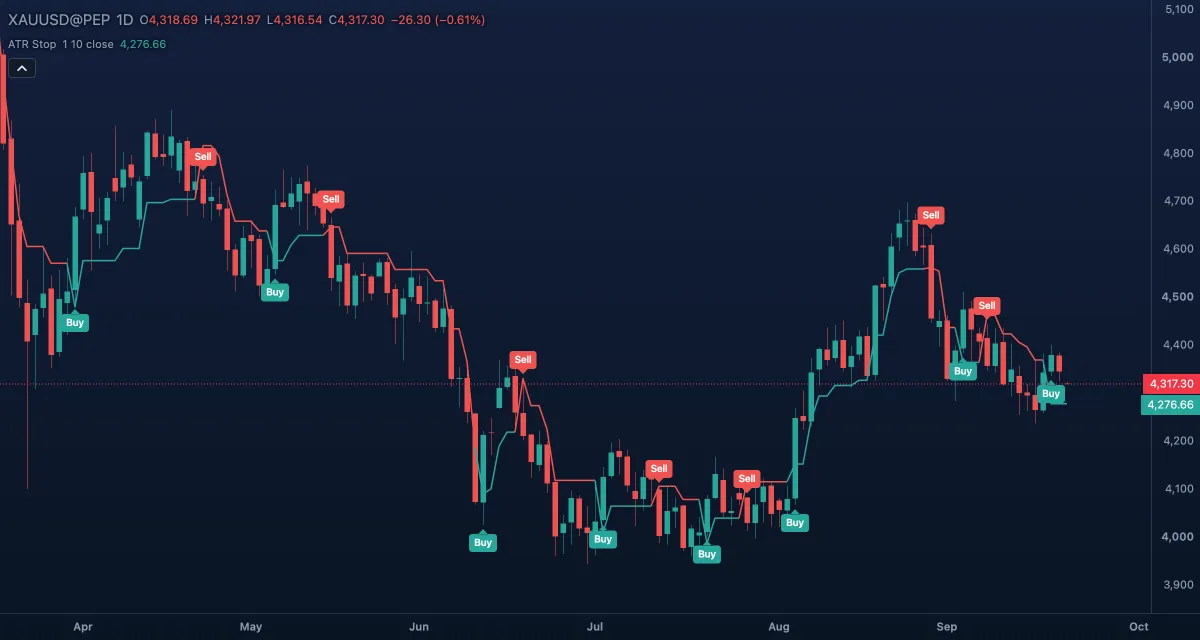
What it shows#
- Trailing stop — a line over the candles, under the price while the indicator is long and above it while short: green while long (the price last crossed above it), red while short, grey before the first cross.
- Buy — a green label under the bar where the source crosses above the stop.
- Sell — a red label above the bar where it crosses below.
How it is calculated#
The distance is Key value × ATR over ATR period bars — one ATR of 10 bars by default. While the Source (the close) and its previous value are both above the stop, the new stop is the higher of the previous stop and source − distance, so it only rises; while both are below, it is the lower of the previous stop and source + distance, so it only falls. When the source crosses the stop, the line jumps to the other side of the price. Setting Source to Average (OHLC4) is the script's Heikin Ashi option — the Heikin Ashi close, a smoother input with fewer crosses.
How traders use it#
- Long while the line is green and under the price, short while it is red and above: the line is the stop of the open trade, moved every bar.
- The Buy and Sell labels are the entries and exits of a simple trend-following system; wait for the close, since a cross can undo itself within the bar.
- Key value 1 is tight and signals often; 2 or 3 keeps the stop further away for fewer, later signals that survive more noise.
- Add a direction filter — only Buys above a 200-bar EMA, only Sells below it.
- Watch out: in a sideways market the labels alternate every few bars and each one loses a little. The stop reacts to what the price did; it does not predict.
Settings#
| Setting | Default | What it changes |
|---|---|---|
| Key value (sensitivity) | 1 | How many ATRs from the price the stop sits. Larger is looser. |
| ATR period | 10 | Bars in the ATR. |
| Source | Close | The price the stop follows: Close, Open, High, Low, Mid (HL2), Typical (HLC3) or Average (OHLC4). |
| Mark buy and sell signals | On | Draws the Buy and Sell labels at the crosses. |
| Colours and style | — | Stop: long, Stop: short and Stop: before a signal colour the line by its state; Buy mark and Sell mark colour the labels. |
Example on gold#
For example, gold's daily ATR is about $40. Gold has been falling under a red line; then it closes at $4,240, above the line, and a Buy label appears. The line jumps below the price to about $4,200 and turns green. Over the next month gold works up to $4,360 and the line ratchets up behind it, never falling, to about $4,320; a trader who bought the signal holds while the closes stay above it.
What invalidates it: a close under the line soon after the Buy — a Sell label and a small loss. If the next Buy follows within days, the market is ranging and a filter is needed.
Add it to your chart#
- Click Indicators in the top strip (on the Pro screen, press I).
- Type
atr stopand click ATR Trailing Stop. - Click its chip in the legend (ATR Stop 1 10 close) to open the Inspector and change the settings; drag the chip to reorder; the dot hides it; × removes it.
Related#
- Average True Range (ATR) — the volatility measure behind the stop's distance
- SuperTrend — an ATR stop that flips side when crossed
- Chandelier Exit — a stop hung from the highest close of the trade
- Chande Kroll Stop — two ATR stops drawn at once
- Alerts — an alert when the price crosses the stop, or on a Buy or Sell signal
- Adding and tuning indicators