Trend Strength Index
How straight the price has moved over the last bars, as the correlation of the close with time (−1 to +1): settings on MillionChart and an example on gold.
The Trend Strength Index measures how straight the price has moved over the last 14 bars: it is the correlation between the close and time, so it reads +1 for a steady rise, −1 for a steady fall and about 0 when there is no trend. It is drawn in its own pane with a fixed scale from −1 to +1. It is not the True Strength Index (TSI), a momentum oscillator with a similar name.
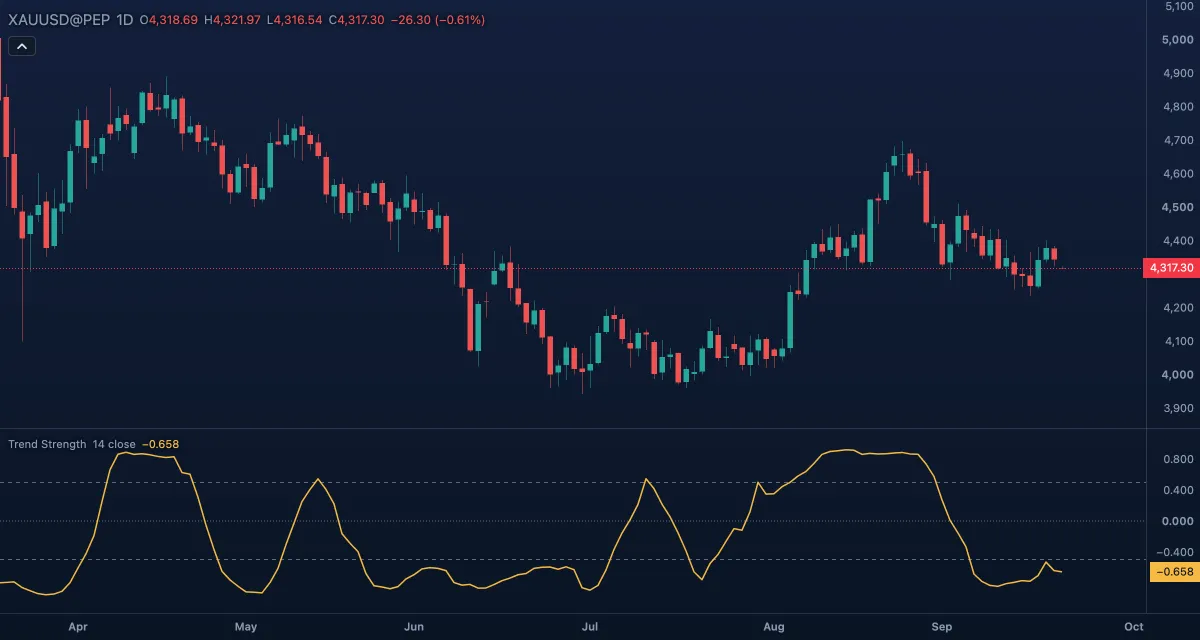
What it shows#
- Trend strength — the gold line in its own pane, between −1 and +1.
- Upper and Lower — dashed levels at +0.5 and −0.5; beyond them the trend is clear.
- Zero — a dotted line in the middle; a cross of it changes the direction read.
- Rising toward +1 means the closes line up ever more neatly in a rise; falling toward −1 the same in a fall; near zero the closes wander with no line through them. Shown with three decimals.
How it is calculated#
Take the last Length values of the Source (14 closes) and their positions 1 to 14; the index is the Pearson correlation of the two — how well a straight line through the closes explains them, with its sign giving the direction. The value is capped to ±1, needs at least 2 bars, and is empty while the window is flat.
How traders use it#
- Above +0.5 the market is trending up steadily enough to follow; below −0.5 it is trending down; between the levels it is choppy, and range tools work better than trend tools.
- A cross of zero is the earliest change of the reading; a cross of ±0.5 is the confirmation.
- Divergence: the price makes a higher high while the index tops lower — the rise is becoming less straight, often before it ends.
- Use it as a filter: take long signals from a faster tool only while the index is above zero, shorts only below.
- Watch out: it measures how straight a move is, not how large. A slow drift of a few dollars a day can read +0.9 while a sharp but jagged rally reads 0.3. It also lags by its window: 14 bars of a new direction are needed for the value to swing fully.
Settings#
| Setting | Default | What it changes |
|---|---|---|
| Length | 14 | Bars in the window (2 to 500). Longer measures a longer move and moves more slowly. |
| Source | Close | The price measured: Close, Open, High, Low, Mid (HL2), Typical (HLC3) or Average (OHLC4). |
| Colours and style | — | Trend strength colours the line; Upper level, Zero line and Lower level colour the levels. |
Example on gold#
For example, gold climbs from $4,200 to $4,330 over three weeks with only small down days; the index rises through +0.5 in the first week and holds near +0.85 after that. A trader treats the market as trending and buys pullbacks instead of selling the highs. In the fourth week gold makes a new high at $4,350, but with two sharp drops on the way the index tops at +0.6 — the rise is losing its shape, and the trader tightens the stop.
What invalidates the trend read: the index falling through zero. The last 14 closes no longer lean up, and the next move needs a fresh reading.
Add it to your chart#
- Click Indicators in the top strip (on the Pro screen, press I).
- Type
trend strengthand click Trend Strength Index. - Click its chip in the legend (Trend Strength 14 close) to open the Inspector and change the settings; drag the chip to reorder; the dot hides it; × removes it.
Related#
- Average Directional Index (ADX) — trend strength from directional movement instead of correlation
- Rank Correlation Index (RCI) — the same question asked with ranks instead of prices
- Linear Regression Channel — the straight line itself, drawn on the candles
- Chop Zone — a colour read of trend against chop
- Alerts — an alert when the index crosses +0.5, −0.5 or zero
- Adding and tuning indicators