Keyboard shortcuts
Every key the chart answers — the keys sheet, the Guided and Pro screens, Aurum keys and the keys of other chart sites, the Lens prefixes, one-key tools and G chords.
Most of the chart can be driven from the keyboard, and the keys sheet lists every key that works. Which letters do what depends on two settings: the screen (Guided or Pro) and the key set (Aurum keys or the keys of other chart sites).
What it is#
One key map feeds the tooltips, the menus, the keys sheet and the Lens, so a key the sheet shows is a key that works. Ctrl below is ⌘ on a Mac, where Delete is ⌫; the sheet prints the keys of your computer.
Where it is#
Press ? on the chart, or open More (⋯) and click Keys. The sheet is grouped as the sections below; on the Guided screen the Pro-only rows are greyed, with the note Greyed keys work on the Pro screen and a Switch to Pro link.
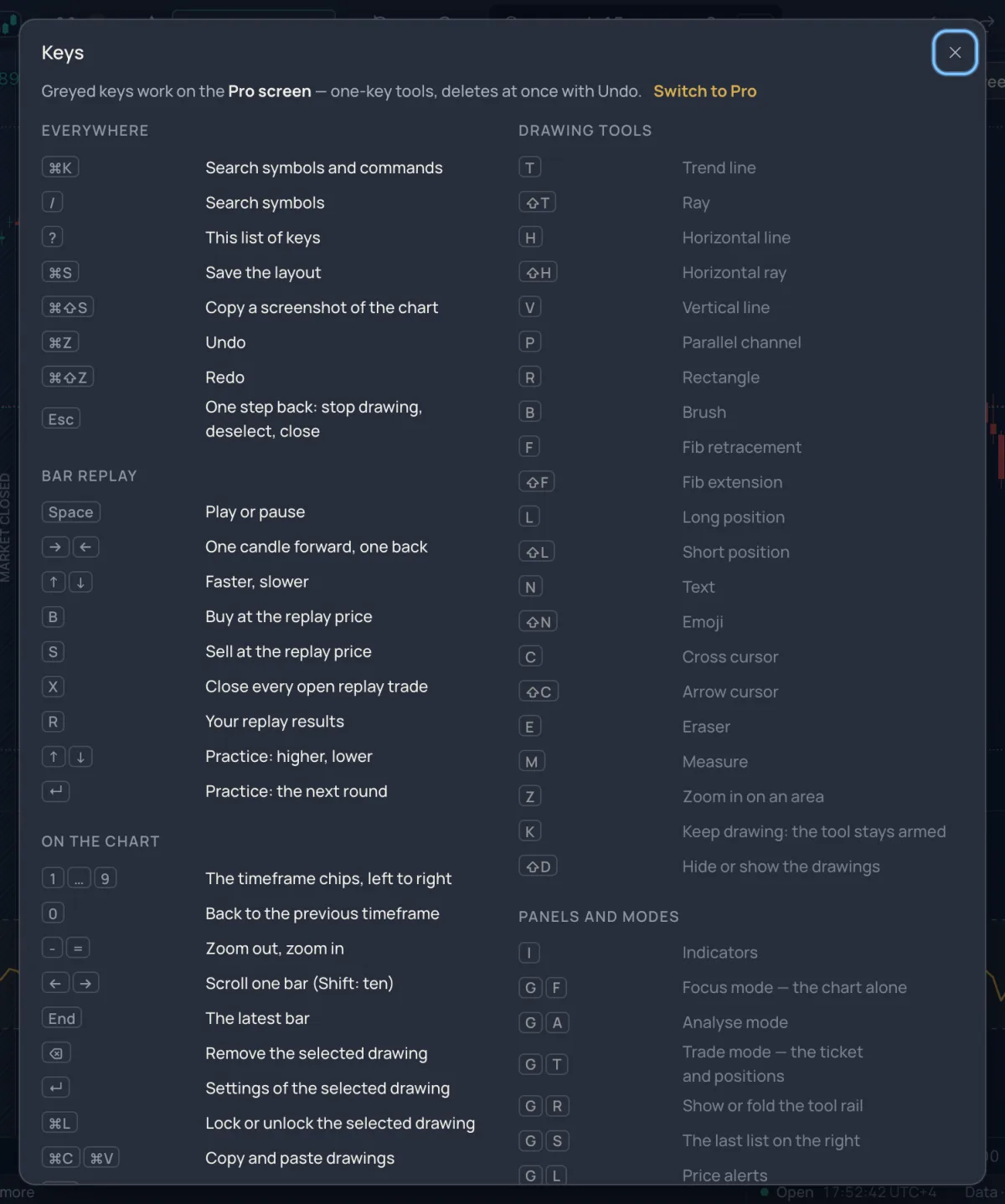
Guided and Pro#
More › Screen offers Guided — tips while you draw, asks before deleting and Pro — one-key tools, deletes at once with Undo; everyone starts Guided. On Guided a letter typed on the chart opens the Lens with that letter in the box; on Pro the letters arm tools and open panels, and an unbound letter still opens the Lens. Numbers, zoom and replay keys work on both.
Aurum keys and the keys of other chart sites#
More › Keyboard offers Aurum keys — numbers pick the timeframe and Keys of other chart sites. With the second set, Alt plus a letter arms the tool traders know from elsewhere, a digit opens the Lens to type a timeframe (5, 15, 60, 4h, D), and / opens the Indicators. Under Aurum keys those Alt keys only show a toast once per visit — ⌥T is the trend line on other chart sites · Use those keys — whose button switches the set.
| Other chart sites | Does |
|---|---|
| Alt+T / H / J / V / F | Trend line / horizontal line / horizontal ray / vertical line / Fib retracement |
| Alt+Shift+R | Rectangle |
| Alt+R | Reset the view |
The Lens#
Ctrl+K opens the Lens anywhere, even inside a text field; / opens it for symbols. The first character sets what it searches: @ symbols, + add an indicator, − remove one, > commands, # layouts, . tools, ? keys, : timeframes. ↑ ↓ move, Enter runs, Tab jumps to the next section, Esc clears and then closes. See Symbols and markets.
Everywhere#
| Keys | Does |
|---|---|
| Ctrl+K, / | Search symbols and commands; search symbols |
| ? | This list of keys |
| Ctrl+S | Save the layout |
| Ctrl+Shift+S | Copy a screenshot of the chart |
| Ctrl+Z, Ctrl+Shift+Z | Undo, redo |
| Alt+A | Add an alert at the price now |
| Esc | One step back: stop drawing, deselect, close |
On the chart#
The chart must have the pointer or the focus; on the Pro screen a letter pressed elsewhere shows T ignored — click the chart first in the status line.
| Keys | Does |
|---|---|
| 1 … 9 | The timeframe chips, left to right |
| 0 | Back to the previous timeframe |
| - = | Zoom out, zoom in |
| ← → | Scroll one bar (Shift: ten) |
| End | The latest bar |
| Delete | Remove the selected drawing |
| Delete | Remove the selected indicator (click its line first) |
| Enter | Settings of the selected drawing |
| Ctrl+L | Lock or unlock the selected drawing |
| Ctrl+C Ctrl+V | Copy and paste drawings |
| Ctrl+D | Clone the selected drawing |
| [ ] | Previous / next symbol of the watchlist |
| W | Add this symbol to the watchlist (Pro) |
Bar replay#
Space plays or pauses, → ← step one candle, ↑ ↓ change the speed, B buys and S sells at the replay price, X closes every open replay trade, R opens your replay results. In the practice game ↑ ↓ answer higher or lower and Enter starts the next round. See Bar replay.
Pro: one-key tools#
| Key | Tool | Key | Tool |
|---|---|---|---|
| T | Trend line | Shift+T | Ray |
| H | Horizontal line | Shift+H | Horizontal ray |
| V | Vertical line | P | Parallel channel |
| R | Rectangle | B | Brush |
| F | Fib retracement | Shift+F | Fib extension |
| L | Long position | Shift+L | Short position |
| N | Text | Shift+N | Emoji |
| C | Cross cursor | Shift+C | Arrow cursor |
| E | Eraser | M | Measure |
| Z | Zoom in on an area | K | Keep drawing: the tool stays armed |
| I | Indicators | Shift+D | Hide or show the drawings |
Shift plus a tool letter is the sibling tool. The rail prints these letters on its rows.
Pro: G chords#
Press G, then within a moment the second key; the status line shows the choices (G · then F A T R S L X O C P E M Q Z).
| Chord | Opens or switches |
|---|---|
| G F / A / T | Focus mode (the chart alone) / Analyse mode / Trade mode |
| G R | Show or fold the tool rail |
| G S / L / W / X | The last list on the right / price alerts / the watchlist / MillionAlgo signals |
| G O / C / P | Look / chart type / chart settings |
| G E / M / Q / Z | Bar replay / magnet off · weak · strong / time zone / full screen |
| G G, G 1 … 9 | The chart grid picker; chart 1 … 9 |
Pro: scale and trade mode#
Shift+A auto scale on or off, Shift+O logarithmic, Shift+P percent, Shift+I invert. In Trade mode, as a member, Shift+B arms a buy and Shift+S a sell in the ticket — nothing is sent until you press the ticket's button.
Several charts#
With more than one chart on screen: PageDown PageUp next / previous chart, Alt+Enter one chart large (again to go back), Esc back to the grid, Shift+Enter this symbol to the next chart, Tab Shift+Tab into the next / previous chart. See Layouts and the chart grid.
Related#
- The chart, part by part
- Look and settings — Screen and Keyboard under More
- How drawing works