Williams Fractals
What the up and down fractal triangles mark, Bill Williams' five-bar rule, the setting on MillionChart and an example on gold.
Williams Fractals marks the local tops and bottoms of the chart with small triangles: an up fractal above a bar whose high is the highest of the five bars around it, a down fractal below a bar whose low is the lowest. Bill Williams introduced them in Trading Chaos (1995) as a building block of his trading system; on their own they are a quick, mechanical way to see where the price turned.
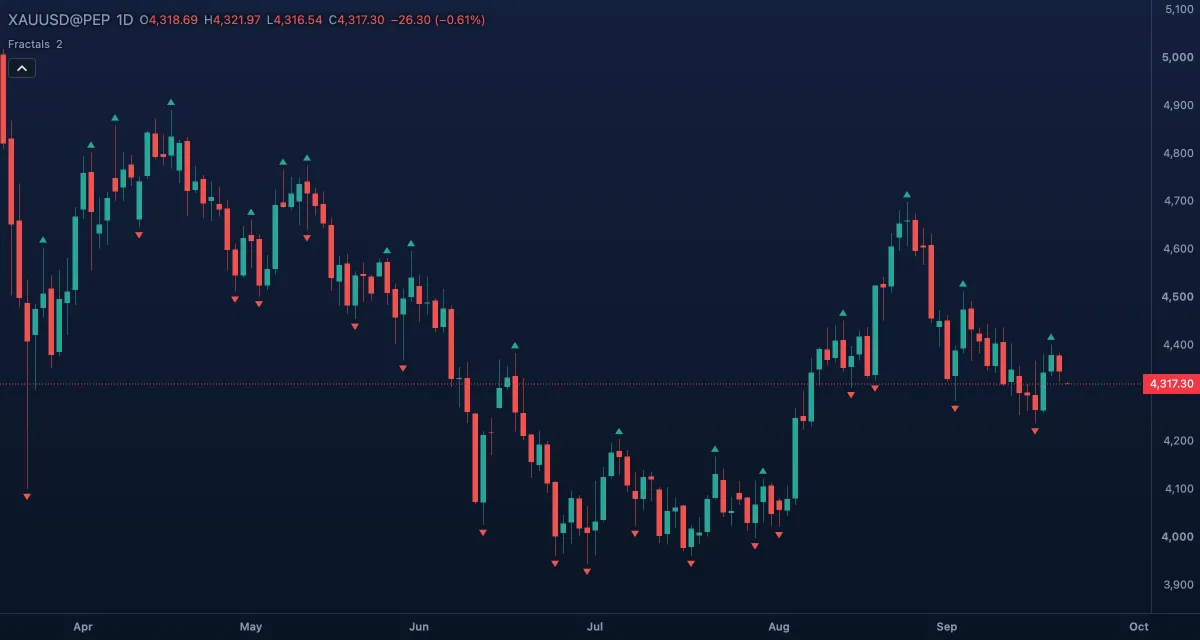
What it shows#
- Up fractal — a tiny green triangle above a bar that is a local high: a potential resistance and the level a breakout has to clear.
- Down fractal — a tiny red triangle below a bar that is a local low: a potential support.
- A triangle is placed only once the bars to its right have closed, so the newest fractal is always Periods bars behind the last candle, and no triangle sits on the forming bar.
How it is calculated#
With Periods = 2, the default, a bar is an up fractal when its high is above the highs of the two bars on each side — Williams' five-bar pattern. The bars after it must all be lower; before it, a flat top of equal highs counts once, marked on its last bar. A down fractal is the mirror with lows. A larger Periods asks for more bars on each side and finds bigger, rarer turning points.
How traders use it#
- Breakouts: in Williams' system a buy is a close above the most recent up fractal and a sell a close below the most recent down fractal, taken in the direction of the Alligator; see Alligator.
- Stops: the last down fractal under a long, or the last up fractal over a short, is a natural stop — the point where the local structure has failed.
- Structure: a sequence of higher up fractals and higher down fractals is an uptrend; the first down fractal under the previous one is the first crack in it.
- Trend lines: joining two up fractals (or two down fractals) gives an objective trend line.
- Watch out for the number of marks. On the default setting there are many, and most are noise in a trend; use them with a trend filter, or raise Periods to 3 or 4 to keep only the larger swings. And remember the delay: a fractal is known two bars late.
Settings#
| Setting | Default | What it changes |
|---|---|---|
| Periods | 2 | Bars on each side of the fractal bar that must be lower (for an up fractal) or higher (for a down fractal). 1 to 100. |
| Colours and style | — | Up fractal (green) and Down fractal (red) triangles, under Lines in the Inspector. |
Example on gold#
For example, gold's daily chart shows up fractals at $4,290 and $4,322 and down fractals at $4,236 and $4,262, each higher than the last — an uptrend. Price has pulled back to $4,284. A trader who follows Williams buys on a daily close above the last up fractal, $4,322, with a stop under the last down fractal at $4,262, and moves the stop up to each new down fractal as the trend goes on. A close below $4,262 before the breakout would print a lower down fractal and cancel the plan.
Add it to your chart#
- Click Indicators in the top strip (on the Pro screen, press I).
- Type
fractaland click the indicator. - Click its chip in the legend to open the Inspector and change the settings; drag the chip to reorder; the dot hides it; × removes it.
Related#
- Alligator — the trend filter fractals were designed to work with
- Pivot Highs and Lows — the same idea with any number of bars on each side, and the prices shown
- Zig Zag — swings filtered by size rather than by bar count
- Alerts — an alert when the price crosses a fractal's level
- Adding and tuning indicators