Balance of Power (BOP)
What Balance of Power reads from each candle's open, high, low and close, how to read its histogram, its smoothing setting and an example on gold.
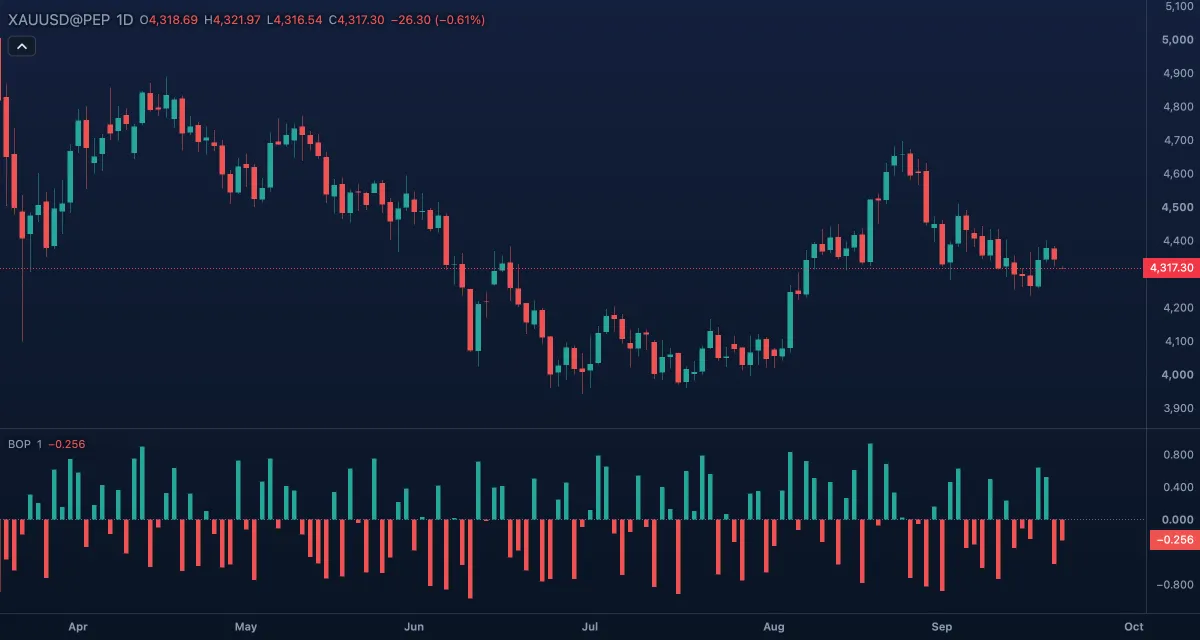
Balance of Power measures who won each candle: the distance from open to close divided by the distance from low to high. It reads +1 when a candle opened at its low and closed at its high, −1 for the reverse, and near 0 when the close ended near the open whatever happened in between. Igor Livshin published it in 2001. It is drawn as a histogram around zero in its own pane.
What it shows#
- BOP (histogram): green bars at or above zero, where the close is above the open and buyers won the candle; red bars below zero, where sellers won. The height shows how decisively.
- Zero: a dotted line at 0.
With the default Smoothing of 1 each bar is the raw value of that candle, so the histogram jumps about. With smoothing it becomes a wave that mostly stays within a few tenths of zero. The pane has no fixed scale; it fits the values.
How it is calculated#
BOP = (close − open) / (high − low), and 0 when the high and low are equal. The result is then averaged with a simple moving average over Smoothing bars; 1 means no averaging. Livshin usually read it with a 14-bar average. It uses the four prices of each bar; there is no source option, and volume plays no part.
How traders use it#
- Sign: a run of green bars, candles closing well above their opens, supports an up move; a run of red bars the reverse.
- Smoothed trend: set Smoothing to 14 to read the balance over time. Crossings of zero then mark a shift of control from buyers to sellers or back.
- Divergence: price makes a new high while the smoothed histogram peaks lower, so buyers are winning the candles less convincingly than before.
- Extremes: a raw bar near +1 or −1 is a candle with almost no wicks, a sign of one-sided pressure on that bar.
- Watch out for: the raw value ignores the size of the candle. A tiny candle that opens at its low and closes at its high reads +1 just like a huge one. Smoothed, it lags like any moving average.
Settings#
| Setting | Default | What it changes |
|---|---|---|
| Smoothing | 1 | Bars of the simple moving average applied to the raw value. 1 is the raw candle-by-candle reading; 14 is Livshin's usual reading. |
| Colours and style | — | The colours of the bars above and below zero and of the zero line. |
Example on gold#
Suppose gold is grinding higher on the daily chart, from about $4,250 toward $4,300, for example, and the raw BOP shows green bar after green bar, most of them above 0.5: each session is closing near its high. A trader following the trend reads that as buyers in control and holds. Then price makes a marginal new high above $4,300 on a candle whose BOP is barely positive, followed by a deep red bar near −0.8: the day opened high and closed near its low. That is the first candle in weeks where sellers won clearly, a reason to tighten stops. If the next sessions print green bars again and price closes above the high, the warning is cancelled.
Add it to your chart#
- Click Indicators in the top strip (on the Pro screen, press I).
- Type
bopand click Balance of Power. - Click its chip in the legend to open the Inspector and change the settings; drag the chip to reorder; the dot hides it; × removes it.
Related#
- Elder-Ray (Bull and Bear Power) — the bulls' and bears' reach against a moving average
- Chaikin Money Flow — where the close sits in the range, weighted by volume
- Awesome Oscillator — another histogram around zero, from two averages
- Alerts — an alert when the smoothed BOP crosses zero
- Adding and tuning indicators