Session Volume Profile (SVP)
What the Session Volume Profile draws over the candles, how the point of control and value area are found, its settings on MillionChart and an example on gold.
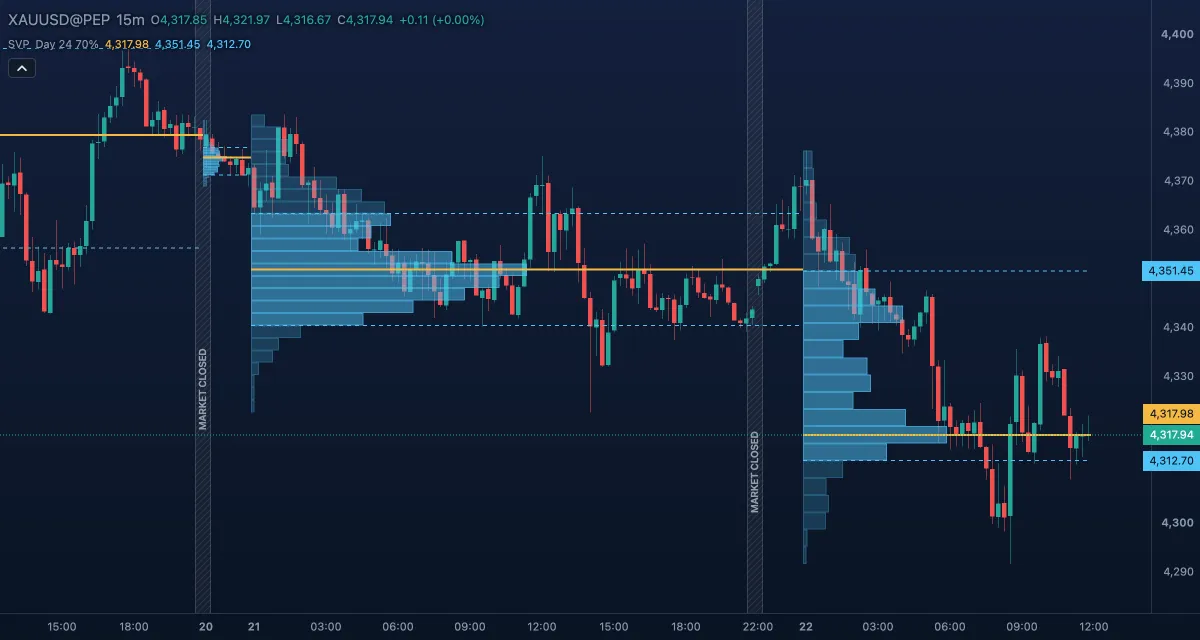
The Session Volume Profile (SVP) draws, for each session, a sideways histogram of how much volume traded at each price — where, not when — with the session's point of control (the price with the most volume) and its value area (the prices that held most of the volume). It follows J. Peter Steidlmayer's Market Profile (Chicago Board of Trade, 1980s), with volume in place of time. It draws over the candles, not in its own pane.
What it shows#
- Rows — for each of the newest 20 sessions, horizontal boxes from the session's left edge, one per price row, as wide as the row's share of the session's volume. A thick row is a price where the market traded a lot, a thin row one it passed through quickly.
- Value area rows — the rows inside the value area, in a brighter colour.
- POC — the point of control, a solid line across the session at the middle of the fullest row.
- VAH and VAL — the value area high and low, dashed lines at the top and bottom of the rows that together hold 70% of the session's volume.
- With Split up / down volume on, each row shows its up part (bars that closed at or above their open) in green and its down part in red.
A past session shows its final levels across the whole session, not the levels known while it was forming. The price column and the legend tag the newest session's POC, VAH and VAL.
How it is calculated#
A session is the UTC day starting at Session start (UTC hour), or the week. The chart cuts the session's low-to-high range into Rows equal rows (or rows of a fixed Row size) and spreads each bar's volume over the rows its range covers, in proportion to the overlap, so the rows add up to the session's volume. The fullest row is the POC. The value area grows from the POC row, adding the fuller of the next row above and the next row below, until it holds Value area % of the volume. On gold and other CFD or forex symbols the volume is the broker's tick volume.
How traders use it#
- The POC is the session's fair price: price tends to return to it, and a session that leaves its POC and does not come back is accepting new prices.
- Yesterday's VAH, VAL and POC are reference levels for today: an open inside yesterday's value area suggests rotation, an open above or below it that holds suggests a move.
- Thin rows between thick ones are gaps in volume; price tends to cross them fast, so they make poor stops and good targets.
- Watch out for the clock and the count: sessions follow UTC, not the broker's day, so set Session start (UTC hour) to the day you want; only the newest 20 sessions are profiled; too few rows hide the shape, too many scatter the volume.
Settings#
| Setting | Default | What it changes |
|---|---|---|
| Session | Day | One profile per UTC day or per week. |
| Session start (UTC hour) | 0 | The hour a day session begins, for example 22 for sessions that run from 22:00 UTC. |
| Sessions | 20 | How many of the newest sessions are profiled (1 to 100). |
| Rows | 24 | How many equal rows the session's range is cut into. |
| Row size (0 = use Rows) | 0 | Rows of a fixed height in price units instead, for example 1 for $1 rows on gold. |
| Value area % | 70 | The share of the session's volume inside the value area. |
| Width (% of the session) | 50 | How far the fullest row reaches across the session. |
| Split up / down volume | Off | Colours each row's up and down parts separately. |
| Colours and style | — | The POC, Value area high and Value area low lines, and the six row colours. |
Example on gold#
For example, on 15-minute candles yesterday's profile on gold has its POC at about $4,295 and a value area from $4,285 to $4,305. Today opens at $4,310, above yesterday's value, dips to $4,305 in the first hour and holds. A trader reads the hold at yesterday's VAH as acceptance above value and buys the retest, with the stop under $4,300 and a first target at the thin rows above $4,320, where little volume traded yesterday. A close back inside yesterday's value area, under $4,300, would invalidate the idea.
Add it to your chart#
- Click Indicators in the top strip (on the Pro screen the key is I).
- Type
svpand click the indicator. - Click its chip in the legend to open the Inspector and change the settings; drag the chip to reorder; the dot hides it; × removes it.
Related#
- VWAP — the session's volume-weighted average price, one line
- Relative Volume at Time — whether the session is busier than usual
- Anchors — the fixed-range volume profile, drawn by hand over any range
- Alerts — an alert when price crosses the newest session's POC, VAH or VAL
- Adding and tuning indicators