Chandelier Exit
A trailing stop hung from the highest close of a trade by a multiple of the ATR: how it trails, its settings on MillionChart and an example on gold.
The Chandelier Exit is a trailing stop that hangs from the highest point of a trade, a set number of ATRs below it — like a chandelier from a ceiling. (ATR, the average true range, measures how much the bars move.) Charles LeBeau designed it and Alexander Elder described it in Come Into My Trading Room (2002); MillionChart draws the trailing form of a widely used community script (2017), with a mark where the direction turns.
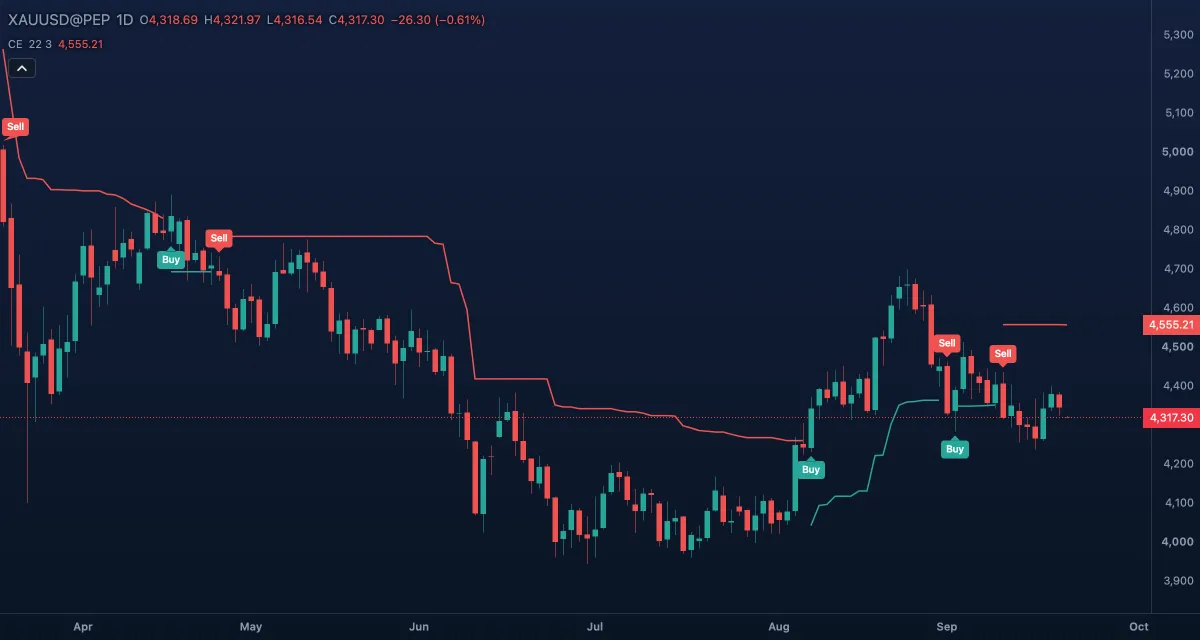
What it shows#
- Long stop — the green line under the price while the indicator is long: the highest close of the last 22 bars minus 3 ATRs. It only rises.
- Short stop — the red line above the price while it is short: the lowest close plus 3 ATRs. It only falls.
- Only one line is drawn at a time; Buy and Sell labels mark where the direction turns (on by default).
How it is calculated#
The long stop is the highest close over ATR period bars minus ATR multiplier × ATR of that period; while the previous close held above the previous long stop, the new stop is never lower than the old one, so it ratchets up. The short stop mirrors it: the lowest close plus the same distance, never higher while the close holds below it. The direction turns long on a close above the previous short stop and short on a close below the previous long stop; otherwise it stays. With Use close for extremes off, the highest high and lowest low replace the highest and lowest close, which places the stops a little further out.
How traders use it#
- The classic use is the exit of a long: hold while the closes stay above the green line, leave on the first close below it. The line rises with new highs and never gives back ground.
- Three ATRs is a loose stop meant to survive normal pullbacks; 2 or 2.5 gives back less in a reversal but is hit more often.
- The direction changes double as entries in a trend-following system — with a trend filter, since every range produces both labels.
- Watch out: the stop can only rise, so after a sharp spike it sits far below the price until the ATR shrinks, and a fast reversal can give back much of the move before the exit comes.
Settings#
| Setting | Default | What it changes |
|---|---|---|
| ATR period | 22 | Bars in the ATR and in the highest and lowest window. |
| ATR multiplier | 3 | How many ATRs below the high (or above the low) the stop hangs. |
| Use close for extremes | On | Measures from the highest and lowest close; off uses the highest high and lowest low. |
| Mark direction changes | On | Draws the Buy and Sell labels where the direction turns. |
| Colours and style | — | Long stop, Short stop, Buy mark and Sell mark set the colours of the lines and labels. |
Example on gold#
For example, a trader buys gold at $4,250 after a Buy label; the green line starts about $120 below the highest close (three ATRs of $40). Gold runs to $4,400 over six weeks, and the line follows up to about $4,280 and stays there through a two-week pause, because it cannot fall. Then gold closes at $4,270, below the line: the Sell label appears and the trader leaves with the bulk of the move.
What invalidates the reading: a Buy and a Sell within a few bars of each other — the stop crossed back and forth in a range. Wait for the price to leave the range before trusting the next label.
Add it to your chart#
- Click Indicators in the top strip (on the Pro screen, press I).
- Type
chandelierand click Chandelier Exit. - Click its chip in the legend (CE 22 3) to open the Inspector and change the settings; drag the chip to reorder; the dot hides it; × removes it.
Related#
- Average True Range (ATR) — the volatility measure the stop hangs by
- ATR Trailing Stop — a stop measured from the price, not from the trade's high
- Chande Kroll Stop — both stops drawn at once, from the highest high and lowest low
- SuperTrend — another ATR stop that flips side when crossed
- Alerts — an alert when the price crosses the stop, or on a Buy or Sell signal
- Adding and tuning indicators