Chop Zone
Coloured columns that read the slope of a 34-bar EMA in degrees — green rising, red falling, yellow flat: settings on MillionChart and an example on gold.
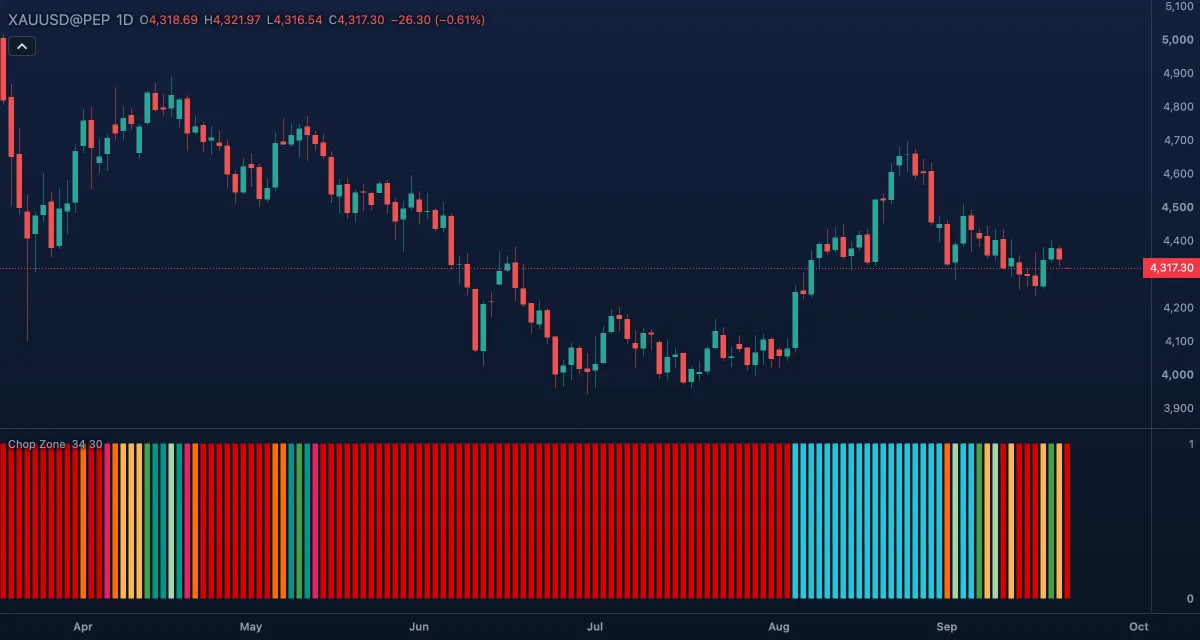
Chop Zone shows the slope of a 34-bar exponential moving average as a row of coloured columns under the chart: shades of green while the average rises, shades of red and orange while it falls, and yellow while it is flat — the "chop zone", where trend trades are not worth taking. It is a colour read, not a line: every column has the same height, and the colour is the reading.
What it shows#
- Chop zone — one column per bar in its own pane, all the same height, coloured by the EMA's angle on that bar.
- Four shades for a rising average: turquoise for Rising steeply (5° and more), dark green for Rising (3.57° to 5°), pale green for Rising gently (2.14° to 3.57°) and teal for Rising slightly (0.71° to 2.14°).
- Four for a falling one: dark red for Falling steeply (−5° and below), red for Falling (−5° to −3.57°), orange for Falling gently (−3.57° to −2.14°) and light orange for Falling slightly (−2.14° to −0.71°).
- Yellow for the Chop zone: an angle between −0.71° and 0.71°, and bars that have no value yet.
- The chip in the legend shows no number for it; the colour is the whole message.
How it is calculated#
The EMA of the close over EMA length bars is taken, and its change from the previous bar is divided by the typical price (the average of high, low and close) and scaled by the range of the last Range lookback bars, so the angle is comparable across price levels and symbols. The result is turned into an angle in whole degrees, negative while the average falls, and the angle picks the colour band. The form is the one the common chart platforms draw: EMA 34 and a 30-bar lookback.
How traders use it#
- Yellow means stand aside: the average is flat and trend tools whipsaw here.
- Greens are the long side, reds and oranges the short side; the deeper the shade, the steeper the slope.
- The first green after a run of yellow is a trend starting; the shades lightening — dark green to pale green to teal — is a trend tiring before the colour turns.
- As a filter: take long entries from another tool only on a green column, shorts only on a red or orange one.
- Watch out: it is the slope of a 34-bar average, so it turns well after the price does, and it says nothing about where the price is relative to that average.
Settings#
| Setting | Default | What it changes |
|---|---|---|
| EMA length | 34 | Bars in the average whose slope is measured. Shorter reacts sooner and shows more colour changes. |
| Range lookback | 30 | Bars in the high–low range that scales the angle. |
| Colours and style | — | Nine colours, one per band, from Rising steeply (>= 5°) to Chop zone (flat°). |
Example on gold#
For example, gold has gone sideways between $4,230 and $4,290 for three weeks and the pane shows a run of yellow columns. Then gold breaks higher: the columns turn teal, then pale green, then dark green as the 34-day average bends up, and gold reaches $4,380. A trader who waited through the yellow takes long entries from a faster tool only while the columns stay green, and reads the shade lightening back to teal as the time to tighten stops.
What invalidates it: the columns returning to yellow — the average has gone flat again, and the chart is back in the chop zone.
Add it to your chart#
- Click Indicators in the top strip (on the Pro screen, press I).
- Type
chop zoneand click Chop Zone. - Click its chip in the legend (Chop Zone 34 30) to open the Inspector and change the settings; drag the chip to reorder; the dot hides it; × removes it.
Related#
- Choppiness Index — the same question as a number between 0 and 100
- Average Directional Index (ADX) — trend strength as a line, with its own threshold
- Exponential Moving Average (EMA) — the average whose slope Chop Zone reads
- Trend Strength Index — how straight the last bars have moved, between −1 and +1
- Alerts — an alert on the price or another indicator; Chop Zone's own value is always 1, so it has nothing to alert on
- Adding and tuning indicators