Relative Volume at Time (RVOL)
What Relative Volume at Time compares, how to read a value above or below 1, its settings on MillionChart and a worked example on gold.
Relative Volume at Time (RVOL) compares the volume of the current session so far with the volume the previous sessions had reached by the same time of day. A value of 1 means the usual activity for this time, 2 twice the usual, 0.5 half of it. It is built for intraday candles, where the time of day matters: the first hour of New York is always busier than the Asian lunch.
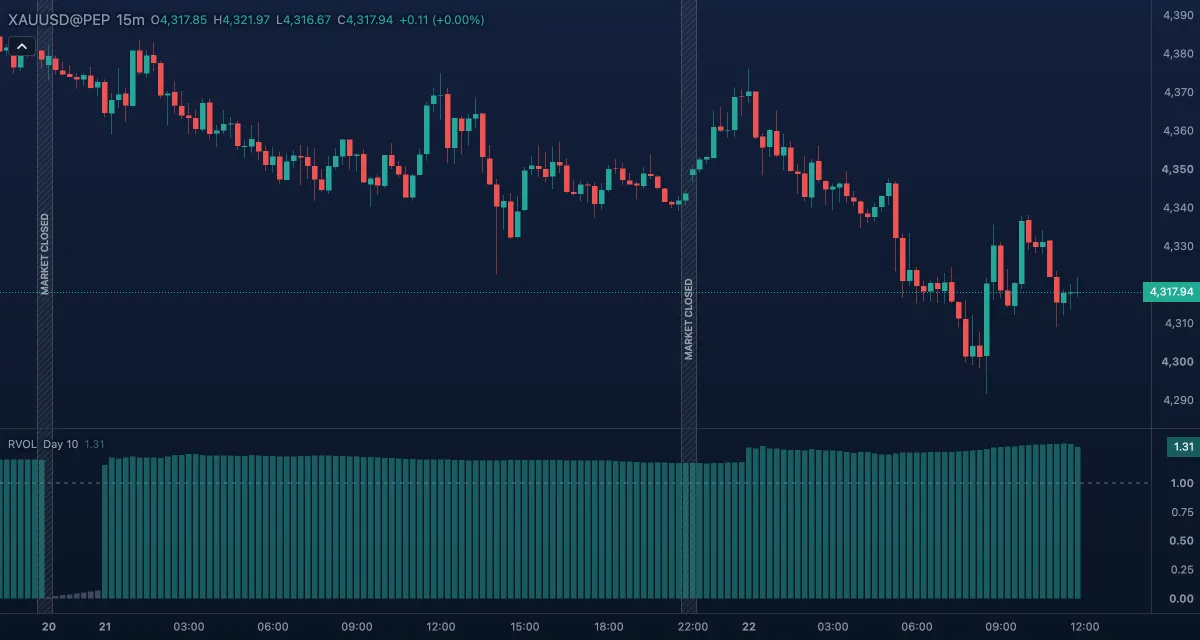
What it shows#
- Relative volume — one column per bar in its own pane under the chart. A column reaching above 1 is green by default (Above the usual volume); a column below 1 is grey (Below the usual volume).
- 1 — a dashed level at 1, the usual volume. Columns are drawn from zero, so their height is the ratio itself.
How it is calculated#
A session is the UTC day, or the week from Monday 00:00 UTC. In Cumulative mode the chart adds up the session's volume from its start through the current bar and divides it by the average of that running total at the same time of the previous 10 sessions. In Regular mode it divides the bar's own volume by the average volume of the bar at the same time in those sessions. Nothing is drawn until 10 complete sessions precede the bar in the loaded history. On gold and other CFD or forex symbols the volume is the broker's tick volume (the number of price changes in the bar), not contracts traded.
How traders use it#
- A breakout on a column well above 1 — 1.5, 2 or more — had unusual participation for the time of day; the same breakout at 0.6 is treated with doubt.
- The cumulative reading describes the whole session: above 1 all morning means a busy day, with wider ranges and faster moves likely.
- Switch to Regular to spot a single unusual bar, such as a news release, without the bars before it diluting the ratio.
- Watch out for the clock and the averages: sessions follow UTC, not your time zone or the broker's; a holiday among the last 10 sessions pulls the average down and makes the next days look busy; and the first 10 sessions of the loaded history show nothing.
Settings#
| Setting | Default | What it changes |
|---|---|---|
| Anchor (UTC) | Day | The session: the UTC day, or the week from Monday 00:00 UTC. |
| Sessions | 10 | How many previous sessions make the average (1 to 100). More sessions give a steadier but slower-changing "usual". |
| Calculation mode | Cumulative | Cumulative compares the session's volume so far; Regular compares the single bar. |
| Colours and style | — | The colours of the columns above and below 1 and of the Level 1 line. |
Example on gold#
For example, on 15-minute candles gold trades in a tight range around $4,300 through the Asian hours, with RVOL columns between 0.6 and 0.9: a quiet start. At the London open the range breaks upward, and within the first hour the columns climb from 0.8 to 1.6: the session is now running well above its usual volume for this time. A trader who only trades breakouts on busy sessions takes this as the green light and buys the retest of $4,300, with the stop under the range. The columns sinking back toward 1 while price sits just above the range would invalidate the reading: nobody followed the breakout.
Add it to your chart#
- Click Indicators in the top strip (on the Pro screen the key is I).
- Type
rvoland click the indicator. - Click its chip in the legend to open the Inspector and change the settings; drag the chip to reorder; the dot hides it; × removes it.
Related#
- Volume — the raw columns and their moving average
- Volume Oscillator — volume against its own recent average, without the time of day
- Session Volume Profile — where in the price range the session's volume went
- Alerts — an alert when relative volume crosses a level such as 2
- Adding and tuning indicators