Aroon
What Aroon Up and Aroon Down measure, how to read the 70 and 30 levels, the settings on MillionChart and a worked example on gold.
Aroon measures how recently the market made a new high and a new low, on a scale from 0 to 100. It does not care how big the moves were, only how fresh they are: a line near 100 says the extreme was set in the last bar or two, a line near 0 says it was set a full window ago. Tushar Chande published it in Technical Analysis of Stocks & Commodities in September 1995.
What it shows#
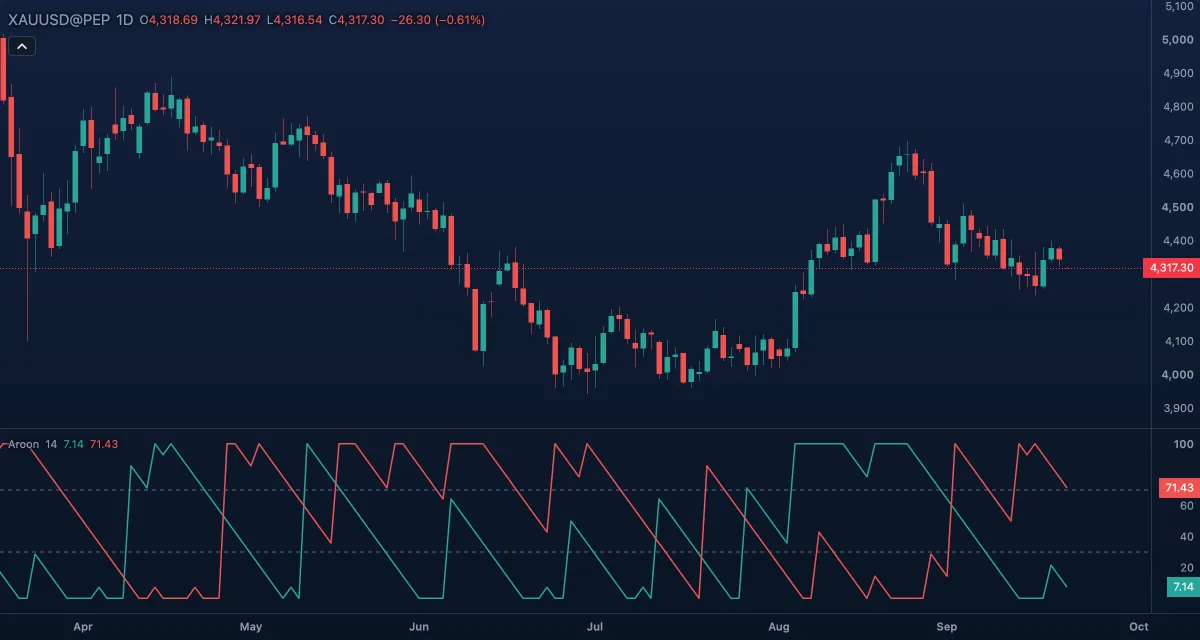
- Aroon Up (green) — in its own pane under the chart, 0 to 100. 100 means the current bar holds the highest high of the window; it drops by 100/14 with each bar that passes without a new high, and reaches 0 when the high is 14 bars old.
- Aroon Down (red) — the same for the lowest low.
- Upper (70) and Lower (30) — dashed levels: a line above 70 while the other is below 30 marks a strong move in that direction.
How it is calculated#
The window is the current bar and the Length bars before it. Aroon Up = 100 × (Length − bars since the window's highest high) / Length; Aroon Down is the same with the lowest low. When two bars share the extreme, the newer one counts. The lines use the high and the low only; the source cannot be changed.
How traders use it#
- Trend: Aroon Up above 70 with Aroon Down below 30 is an uptrend making fresh highs; the mirror image is a downtrend.
- Range: both lines low (under 50) means neither a new high nor a new low for a while; expect a breakout, not a trend trade.
- Crossings: Aroon Up crossing above Aroon Down says the latest extreme is now a high, an early sign of a turn up; it is a weak signal by itself and needs price confirmation.
- Watch out: one new high inside a range sends Aroon Up to 100 and tells you nothing about the next bar. The lines move in steps, so they look jumpy on short lengths. Aroon says when the extremes happened, never how far price travelled.
Settings#
| Setting | Default | What it changes |
|---|---|---|
| Length | 14 | The window (1 to 5,000). Chande used 25; 14 is the common chart setting. Longer lengths catch longer trends and step more slowly. |
| Colours and style | — | The Aroon Up, Aroon Down, Upper level and Lower level colours. |
Example on gold#
Gold breaks to a new high at about $4,300 after a month-long range, and the daily Aroon (14) shows Aroon Up at 100 with Aroon Down near 20. For example, a trend trader takes that as permission to buy pullbacks while Aroon Up stays above 70, with a stop below the range at around $4,220.
What would invalidate it: Aroon Up decaying through 70 without a new high while Aroon Down jumps to 100, which means price just set a new 14-day low. The fresh extreme is now on the downside, and the breakout has failed.
Add it to your chart#
- Click Indicators in the top strip (on the Pro screen, I does the same).
- Type
aroonand click the indicator. - Click its chip in the legend to open the Inspector and change the settings; drag the chip to reorder; the dot hides it; × removes it.
Related#
- Aroon Oscillator — the two lines folded into one: Up minus Down
- Average Directional Index — trend strength from the size of the moves instead of their timing
- Donchian Channels — the same highest high and lowest low, drawn on the price
- Alerts — an alert when a line crosses 70 or 30
- Adding and tuning indicators