MillionAlgo Lightning Strike
What Lightning Strike marks, how a strike is found, what we measured when we traded it, the guided lesson and its settings.
Lightning Strike is MillionAlgo's momentum breakout marker, and the one MillionAlgo study that is free for everyone, signed in or not. It puts a mark under a candle whose close broke above the most recent confirmed swing high, and a mark above a candle whose close broke below the most recent confirmed swing low. It draws over the candles and works on every symbol and timeframe.
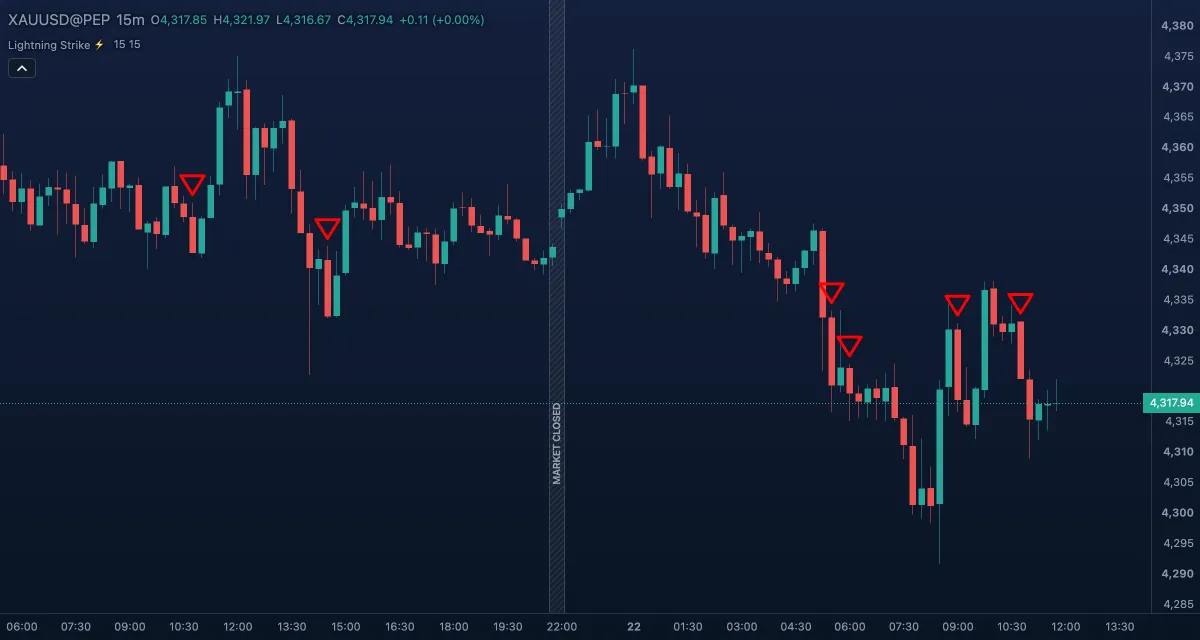
What it shows#
- Strike Up — a small hollow green triangle below the bar whose close broke above the last confirmed swing high: momentum has turned up and pushed through the top of the recent range.
- Strike Down — a small hollow red triangle above the bar whose close broke below the last confirmed swing low.
- With Style set to arrow or strike the same marks are drawn as arrows or as a ⚡ bolt; the bolt is drawn larger than the triangles.
- A mark is placed only once its bar has closed. The forming bar never shows a strike, because a cross can still undo itself before the close.
How it is calculated#
The study looks for swing points: a swing high is a bar whose high is above the highs of Strike Distance - Left bars before it and Strike Distance - Right bars after it; a swing low is the mirror with lows. A swing is known only Right bars after it was made, and from then on its price is the top (or bottom) of the channel the study watches. A strike up fires on the first bar whose close is above the channel top while the previous close was not; a strike down is the mirror at the channel bottom. The defaults, 15 and 15, mean a swing has to stand out over three weeks of daily bars, or about four hours of 15-minute bars, on each side.
The indicator draws the marks only, not the channel. The lesson below draws the channel for you.
Take the lesson on the chart#
A guided lesson runs on the chart itself, about five minutes: open the Lightning Strike lesson. It shows a real strike on gold's daily chart and where its line comes from, why strikes on small charts mostly fail, four questions to ask before you act, and four real strikes to take or skip with the future hidden in Bar Replay. It ends with the numbers below. You can also start it from the lesson button in the indicator's settings card. Nothing in the lesson is saved, and your chart is put back when it ends.
How to read a strike#
- An up strike after a run of down strikes says the swing structure has been broken to the upside. It is a candidate for a change of direction, nothing more.
- A second strike in the same direction without a strike in between means the channel moved up and price broke out again: a trend that keeps breaking its own highs.
- A strike says a level broke. It does not say how far price will go or whether it will hold above the level.
- Strikes are common on small charts and mostly undone there. Bigger charts give fewer, more meaningful ones.
- In a sideways market the close crosses the recent highs and lows often and the marks alternate. A larger Left and Right distance calms that down at the cost of later marks.
- Pair it with a trend filter and a stop: see Supertrend or an EMA.
What we measured#
We replayed every strike on past candles and measured the result in R, the distance from the entry to the protective stop, after an assumed typical spread. Entries are at the close of the strike candle; a candle that reaches both the stop and the target counts as stopped. As a control, the same rules were run from random candles.
| Chart | What we tried | Result |
|---|---|---|
| 15 minutes and 1 hour (about 1 to 3 years of data) | Entry on every strike, many stops and targets, filters: EMA 200, session, strong candle, strike of the higher timeframe, retest | Negative after the spread, a little worse than the random control |
| 4 hours | The same | About zero |
| Daily (gold from 2008, yen from 2000, euro from 2007, pound from 2003, bitcoin from 2023) | One trade at a time, stop at the other side of the channel, exit at the opposite strike, swing distance 20 | 157 trades, 36% won, average +0.26R, median −0.36R; without the single best trade the average is +0.10R |
The daily result looks positive but it is not reliable. Most of it came from a few long trends: gold made +0.66R a trade over 36 trades, but −0.06R without its best one. The yen made +0.21R, the euro +0.56R, and the pound lost −0.22R. Twelve of 26 calendar years were positive.
What this means: Lightning Strike has no proven edge as a mechanical entry. Treat a strike as a map of where structure broke, and let your plan, your position size (risk 1% of the account) and your patience do the earning. Expect to lose about two trades in three.
Settings#
| Setting | Default | What it changes |
|---|---|---|
| Strike Distance - Left | 15 | Bars to the left of a swing that must be lower (for a high) or higher (for a low). Larger: only bigger swings count. 1 to 999. |
| Strike Distance - Right | 15 | Bars to the right that must confirm the swing. Larger: fewer, later, better confirmed strikes. 1 to 999. |
| Show Lightning Strikes ⚡, Style, Size, colours | on · triangle · small · green / red | The switch hides every mark. Style: triangle, arrow or strike (the ⚡). Size from tiny to huge. Strike Up colour and Strike Down colour. |
The marks are styled with these inputs only; they have no rows under Lines in the Inspector.
Example on gold#
Gold's daily chart, swing distance 20. The swing high of 26 October 2018 stood at $1,243.73 and was confirmed 20 candles later, on 22 November. On 7 December a candle with a body of 0.89 ATR closed at $1,248.10, above it: a strike up. The last swing low, $1,180.74 (28 September), is 5.4% below the close and is where the idea is wrong. The trade was held for 91 candles until the opposite strike on 16 April 2019, which closed at $1,276.57: +0.42R. A trader who risked 1% of the account on it made about 0.4% — a small win, and no rule says the next strike will do the same.
Add it to your chart#
- Click Indicators in the top strip (on the Pro screen, press I), or click Signals and turn Lightning Strike on.
- Type
lightningand click the indicator. - Click its chip in the legend to open the Inspector and change the settings; drag the chip to reorder; the dot hides it; × removes it.
Related#
- Motion Matrix, Smart Money, VIP V6 — the other MillionAlgo studies
- Pivot Highs and Lows — the same kind of swing points, drawn with their prices
- Signals and the four MillionAlgo studies — the Signals panel, the tries and the Unlock sheet
- Alerts — an alert that rings on every strike
- Adding and tuning indicators