SMI Ergodic Oscillator (SMIO)
What the SMI Ergodic Oscillator's histogram shows, how it is read, its settings on MillionChart and a worked example on gold.
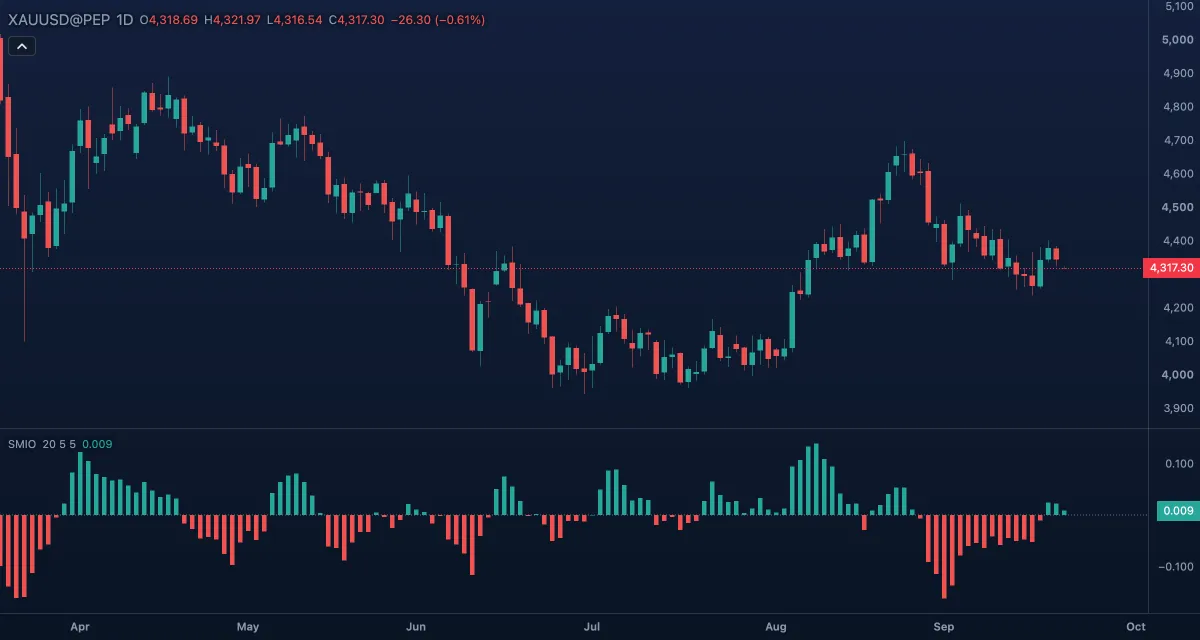
The SMI Ergodic Oscillator (SMIO) is the gap between the two lines of the SMI Ergodic Indicator — the SMI minus its signal line — drawn as a histogram around zero. It shows the same crossings as the indicator, but as columns changing sign, which makes the strength of each swing and its fading easier to see. It is drawn in its own pane and comes from William Blau's Momentum, Direction, and Divergence (1995).
What it shows#
- SMIO — a histogram in its own pane, green at or above zero and red below. A column above zero means the SMI is above its signal line, below zero under it; growing columns mean the lines are separating, shrinking ones that they are converging toward a cross. Values are shown with three decimals and are small, since the SMI runs between −1 and +1.
- Zero — a dotted level at 0.
How it is calculated#
The engine computes the SMI Ergodic Indicator — the bar-to-bar change of the close smoothed twice with exponential moving averages over the Long length (20) and the Short length (5), divided by the same smoothing of the absolute change — and its signal, an exponential moving average over the Signal line length (5). The oscillator is the SMI minus the signal. The indicator always uses the close; it has no source setting.
How traders use it#
- The histogram turning from red to green is the SMI crossing above its signal line, the buy trigger of the method; green to red is the sell trigger.
- The height of the columns measures the swing's strength; shrinking green columns while price still rises warn that the move is slowing before any cross happens.
- Divergence — price at a new high while the histogram's peaks are lower — is read as on MACD's histogram.
- Many traders show this oscillator and the SMI Ergodic Indicator together: the lines for the state, the histogram for the timing.
- Watch out for: in a flat market the columns flip sign every few bars, and like every double-smoothed indicator it reacts a few bars after a sharp turn.
Settings#
| Setting | Default | What it changes |
|---|---|---|
| Long length | 20 | The first exponential smoothing of the price changes; longer is smoother and slower |
| Short length | 5 | The second smoothing, applied to the result of the first |
| Signal line length | 5 | Bars of the exponential moving average the SMI is compared with; longer makes the histogram swing wider and cross later |
| Colours and style | — | The two histogram colours (above zero, below zero) and the Zero line |
Example on gold#
Imagine gold climbing from $4,250 to $4,320 over two weeks, with green columns that grew for the first week and have shrunk for four days while price still edged higher. For example, a trader who is long could read the shrinking columns as the rally losing pace and move a stop up under the last swing low near $4,290; the first red column would then be the sell trigger. If the columns start growing again, the pause was only a pause. A new high in price with the columns still shrinking would be a divergence worth noting, not a signal to sell by itself.
Add it to your chart#
- Click Indicators in the top strip (on the Pro screen you can press I).
- Type
smioand click the indicator. - Click its chip in the legend to open the Inspector and change the settings; drag the chip to reorder; the dot hides it; × removes it.
Related#
- SMI Ergodic Indicator — the two lines this histogram is the difference of
- MACD — the better-known line-minus-signal histogram
- True Strength Index — the indicator underneath, on a −100 to +100 scale
- Alerts — an alert when the value crosses a level
- Adding and tuning indicators