Lines
Trend lines, levels, rays, channels and the pitchfork: what each one marks, how to draw it and its settings.
The Lines group holds the tools that mark where the price turned and where it may turn again: sloped lines along the swings, a level at one price, a line at one moment, and two figures made of parallel lines. Hover the Lines tile at the top of the rail (the left tool bar) to open the list; the tile itself arms the tool you used last in the group. On a phone tap Draw, then Lines. The star next to a tool puts it on the favourites bar over the chart; the first five starred tools also sit at the top of the rail, and you can star ten at most. Every tool here except the vertical line is a smart line, explained next. Every drawing also has a Note field in the Inspector (its settings card); the note shows when you point at the drawing.
Smart lines#
A trend line, ray, extended line, horizontal line, horizontal ray, parallel channel or pitchfork is read against the price as soon as you draw it:
- Role. While the price is above the line it is support; while below, resistance. The role flips only once the price is clearly through, so it does not flicker while the price sits on the line.
- Colour. A line still in the default blue takes its role colour: teal for support, red for resistance. A colour you picked yourself is never replaced.
- Label. The chart writes
Support · 3 touchesalong the line, above a support and below a resistance. A touch is a candle whose wick came within about a fifth of an average candle of the line while it closed on the line's side; neighbouring candles count as one. Your own text on the line replaces the label. - Extend. A new trend line runs on to the right by itself, so it meets today's price.
- Price on the axis. A sloped line that reaches the last candle puts its price on the price column.
- Alerts. Right-click the line: Alert on break rings when the price crosses it, Alert when near when the price comes within about one average candle of it. Each rings once; a bell sits in front of the label while an alert is armed. See Alerts.
The five switches are in the same menu under Smart line settings and apply to all your lines at once. The chart can also find lines for you: the Helpers tile › Auto trend lines draws, dashed, the uptrend line through rising swing lows and the downtrend line through falling swing highs that the price respects right now (no close through them, at least three touches), labelled Auto trend · 4 touches. They are not saved or counted with your drawings; the eye hides them together with your drawings.
Trend line#
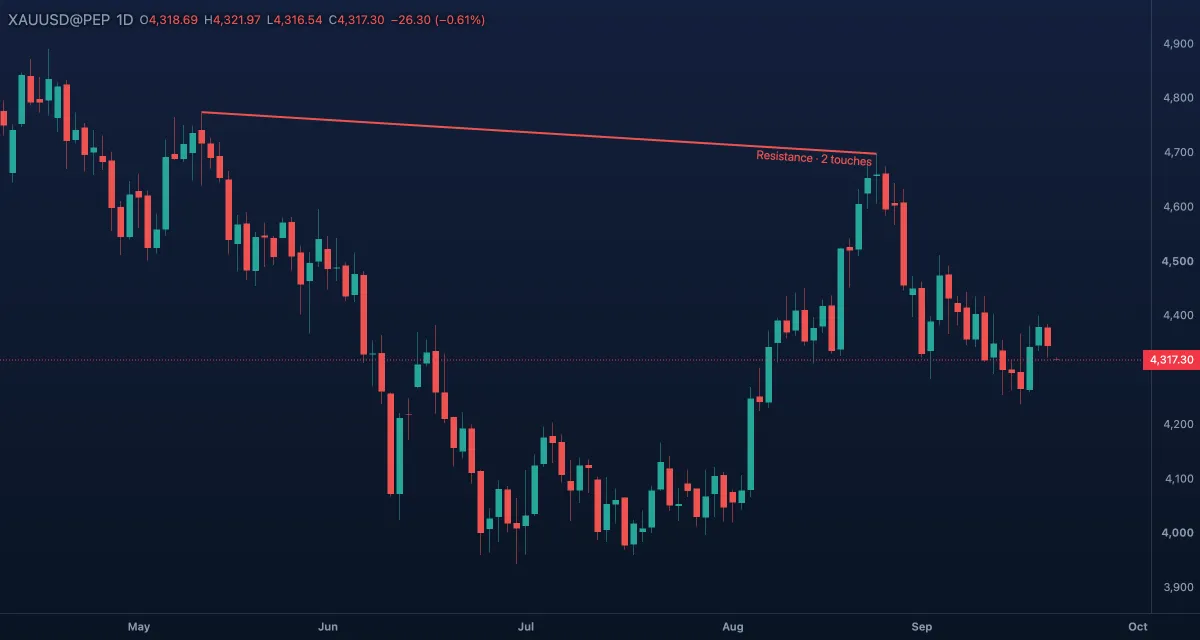
What it draws. A straight line through the two points you click, straight in candle space, so a weekend gap does not bend it. As a smart line it takes its role colour and touch count, and a new one runs on to the right until it meets the price.
What it is for. Two higher lows joined give the line an uptrend respects; two lower highs, a downtrend's. Price bouncing on it is support; a close through it can mean the trend is turning. The usual mistake is a line cutting through candle bodies: draw it along the wicks and let the touch count say how often the market respected it.
How to draw it. Click a low, then a higher low. Shift snaps the second point to horizontal, vertical or 45°; Esc cancels. A double-click opens the Inspector; drag a handle to move a point, drag the body to move all. On the Pro screen T arms it.
Settings.
| Setting | Default | What it does |
|---|---|---|
| Colour | blue | Replaced by the role colour until you pick your own |
| Width, Line style | 2, solid | 1 to 4; solid, dashed, dotted |
| Extend | None | None, Left, Right or Both; a new line gets Right by itself |
| Price on the scale | off | A price tag at each end |
| Length | off | +20.00 (+0.47%) · 20 bars: price change, percent, candles |
| Angle | off | The angle in degrees |
Example. On gold, daily candles, click the low of a pullback and the next higher low. The line runs on in teal with its touches. The day a candle closes below it, it turns red and reads Resistance: the trend line is broken. Arm Alert on break beforehand and the chart tells you.
Horizontal line#
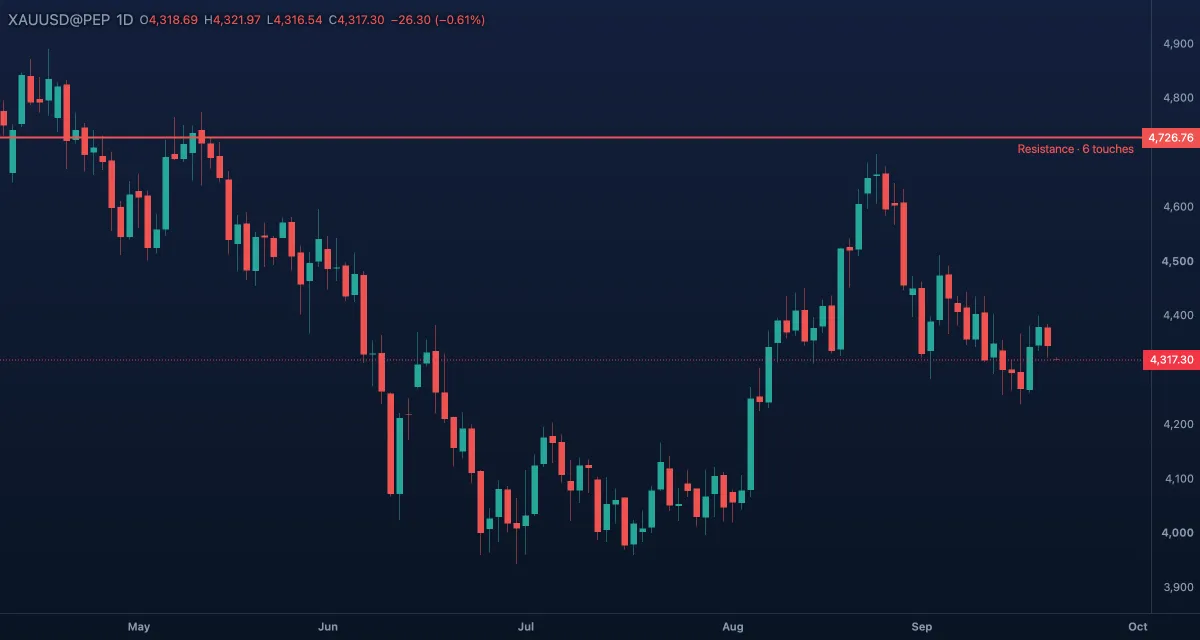
What it draws. A level across the whole chart at one price, with that price written on the price column in the line's colour. As a smart line it reads Resistance above the price and Support below it, with its touch count.
What it is for. The simplest support or resistance: a price the market turned at before. Expect a reaction the next time the price comes back; a close through it means the level has changed sides. The usual mistake is a level on the tip of one wick when the market really turned in a small zone: give it a few ticks and count the touches.
How to draw it. Click once at the price. No Shift; Esc cancels. A double-click opens the Inspector; drag the line to move it (its one handle stays on screen whatever candle you clicked). Shortcuts: right-click the chart at a price › Horizontal line here; on the Pro screen H; the Lens (Ctrl+K) has the same command and accepts a price.
Settings. Colour (blue until its role colours it), Width 2, Line style solid, and Price on the scale (on): the price label on the price column.
Example. Gold has turned twice at the same daily high. Draw the level there: while the price is below it the line is red and labelled with its two touches. Arm Alert when near on it and wait for the third test.
Horizontal ray#
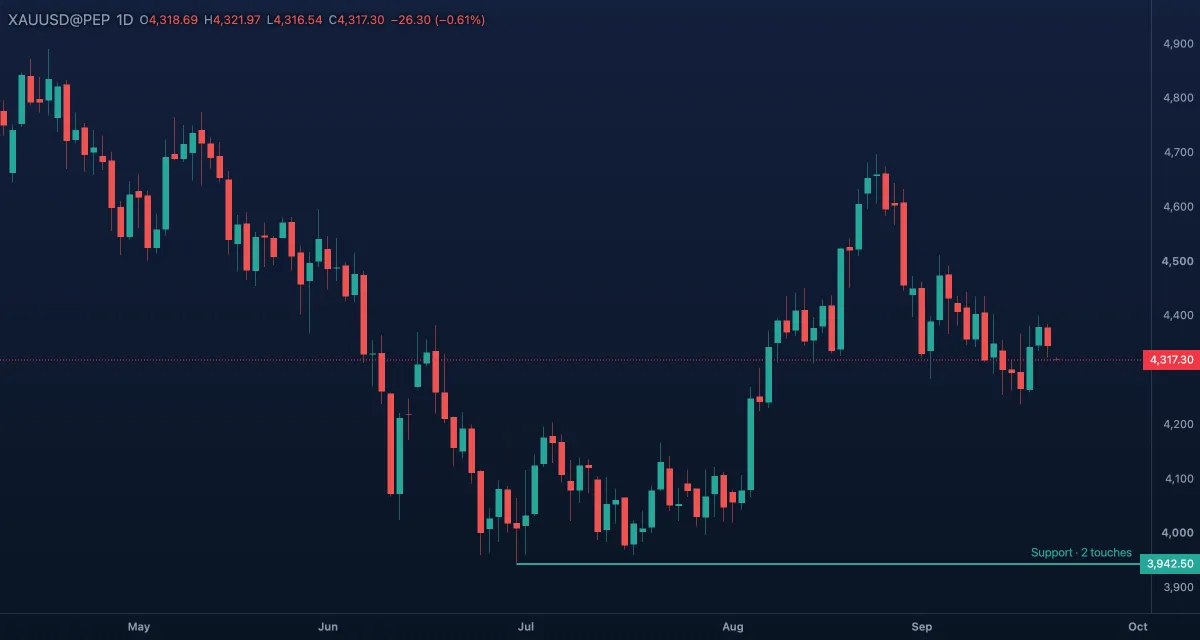
What it draws. A level that starts at the candle you click and runs to the right, with its price on the price column. A smart line, like the horizontal line.
What it is for. A level that only matters from a certain candle on: the high of a breakout candle, the open of a week, the low that started a move. Everything left of the candle stays clean. The reading and the usual mistake are the horizontal line's.
How to draw it. Click once where the level starts. No Shift; Esc cancels. A double-click opens the Inspector; drag the handle to move the start, drag the body to move the level. On the Pro screen Shift+H arms it.
Settings. Colour, Width 2, Line style solid, Price on the scale (on).
Example. The candle that broke gold out of a range closed well above its high. Start a ray at that high: on the next pullback the line is teal, Support, and a close under it would say the breakout failed.
Vertical line#
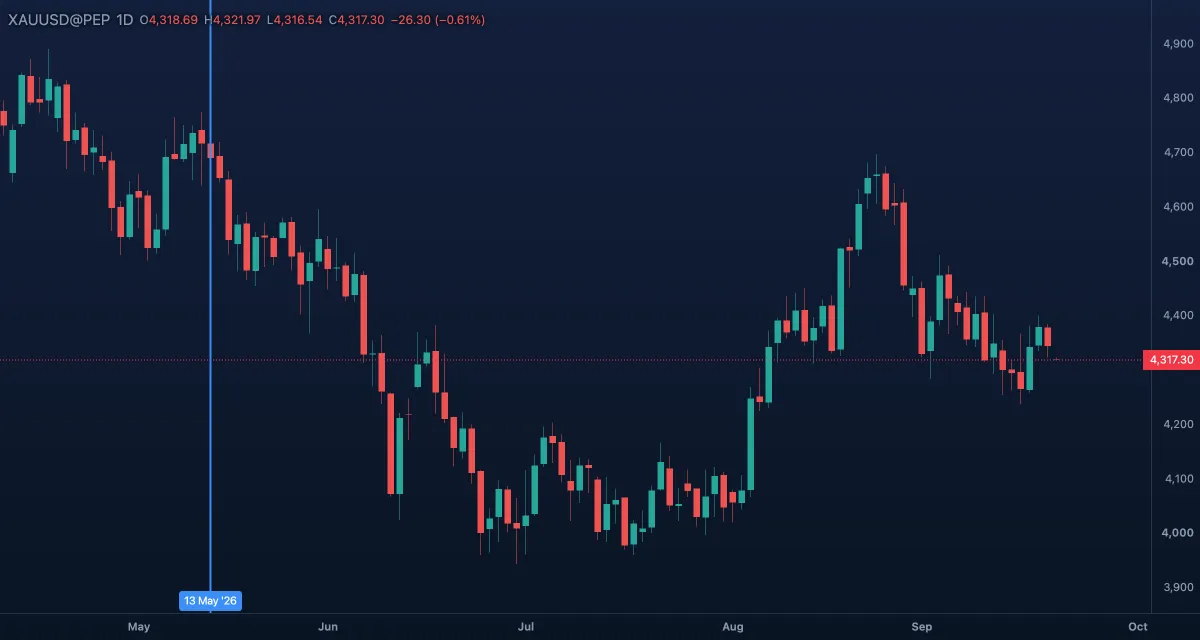
What it draws. A line through one moment, across the whole pane, with the date and time written at the bottom. It is the one tool of the group that is not a smart line: it has no price to read.
What it is for. Marking a time: a news release, a session open, your entry, the candle of a screenshot. Later you see at once what happened before and after it.
How to draw it. Click once on the moment. No Shift; Esc cancels. A double-click opens the Inspector; drag the line to move it (its handle stays on screen whatever price you clicked). On the Pro screen V arms it.
Settings. Colour blue, Width 2, Line style solid, and Time on the scale (on): the date and time tag at the foot of the line.
Example. Put a vertical line on the daily candle of a central-bank meeting and another on the next one. The candles between them show how gold behaved in the time between, and the lines stay when you change the timeframe.
Ray#
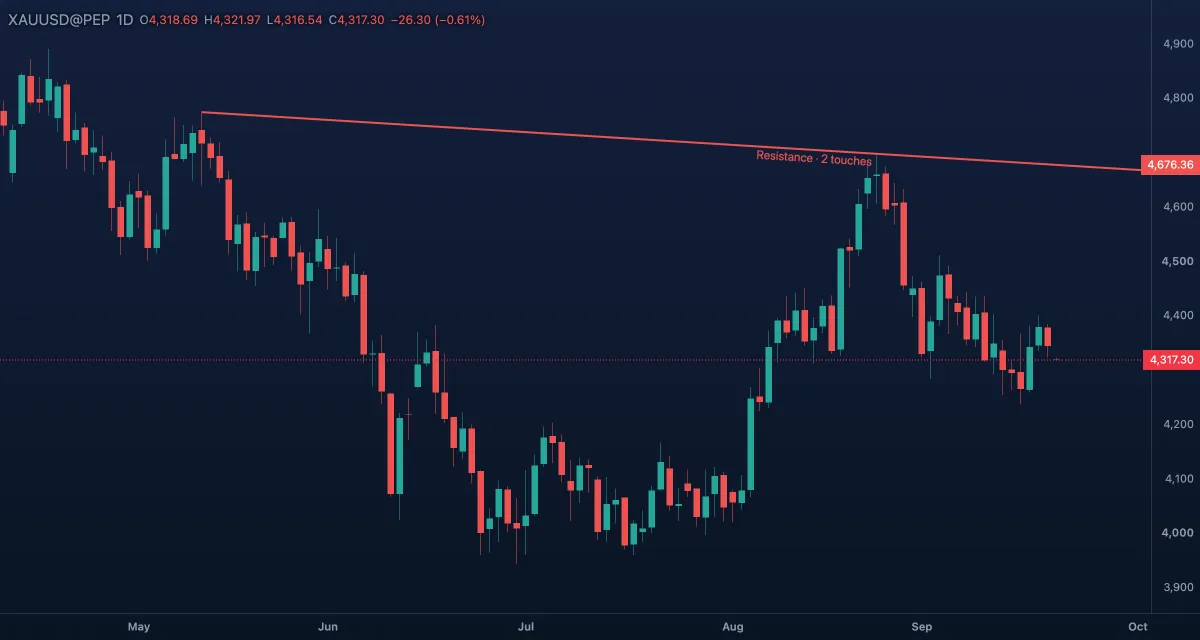
What it draws. A line through two points that runs on past the second one, whichever way you clicked them. As a smart line it takes its role colour, touch count and the price on the axis.
What it is for. A trend line projected into the future: fix it on two turns and watch where the price meets it next. It never ends, so it stays on the chart as the market moves right. The usual mistake is reading a ray as a forecast; it is a line the market may or may not respect, and the touch count says which.
How to draw it. Click two points; the line runs on past the second. Shift snaps a point to horizontal, vertical or 45°; Esc cancels. A double-click opens the Inspector; drag a handle to move a point, drag the body to move all. On the Pro screen Shift+T arms it.
Settings. Colour, Width 2, Line style solid, Price on the scale (off, a tag at each end), Length (off), Angle (off). A ray has no Extend choice.
Example. Click two rising lows on gold and the ray runs on to the right. Each later candle that bounces on it adds a touch to the label; the day the price closes through it, the ray turns red.
Extended line#
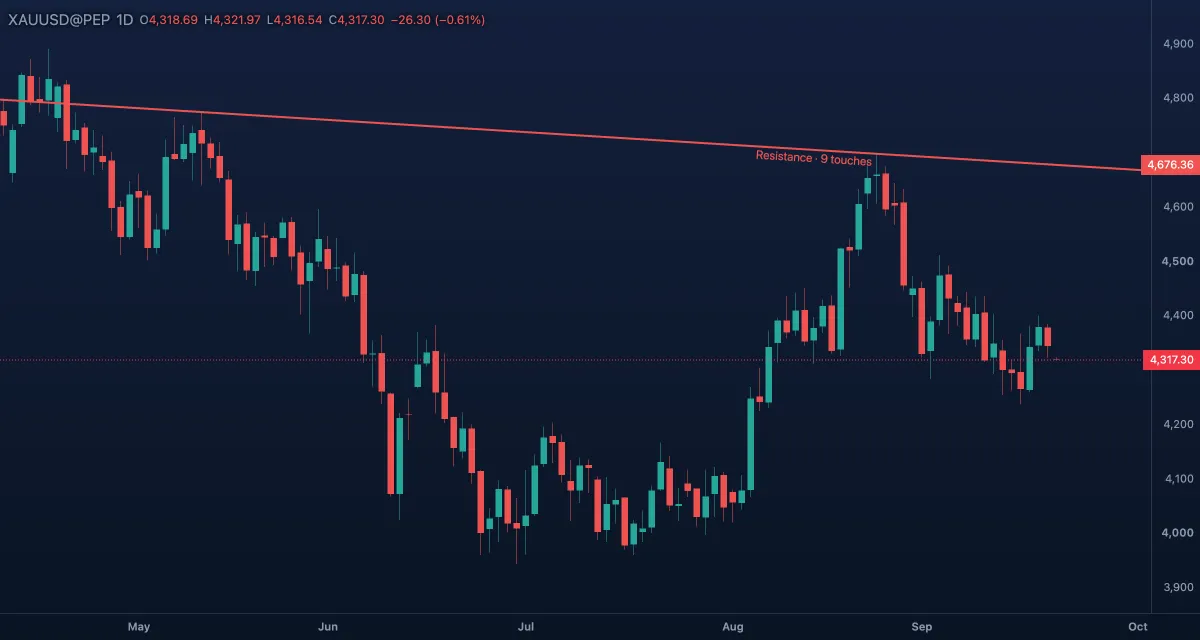
What it draws. An endless line through two points, running both ways to the edges of the chart. A smart line like the trend line.
What it is for. A line whose past matters as much as its future: does last year's trend line explain today's turn? Does a slope reach back to an older swing? The usual mistake is clutter; an extended line crosses everything, so keep few of them.
How to draw it. Click two points; the line runs on both ways. Shift snaps the second point to horizontal, vertical or 45°; Esc cancels. A double-click opens the Inspector; drag a handle to move a point, drag the body to move all. It has no key; star it if you use it often.
Settings. Colour, Width 2, Line style solid, Price on the scale (off), Length (off), Angle (off).
Example. Draw an extended line through two old daily highs on gold. Scroll left: the line shows whether earlier swings respected the same slope, and the touch count includes them. Scroll right: it is already where the price may meet it next.
Parallel channel#
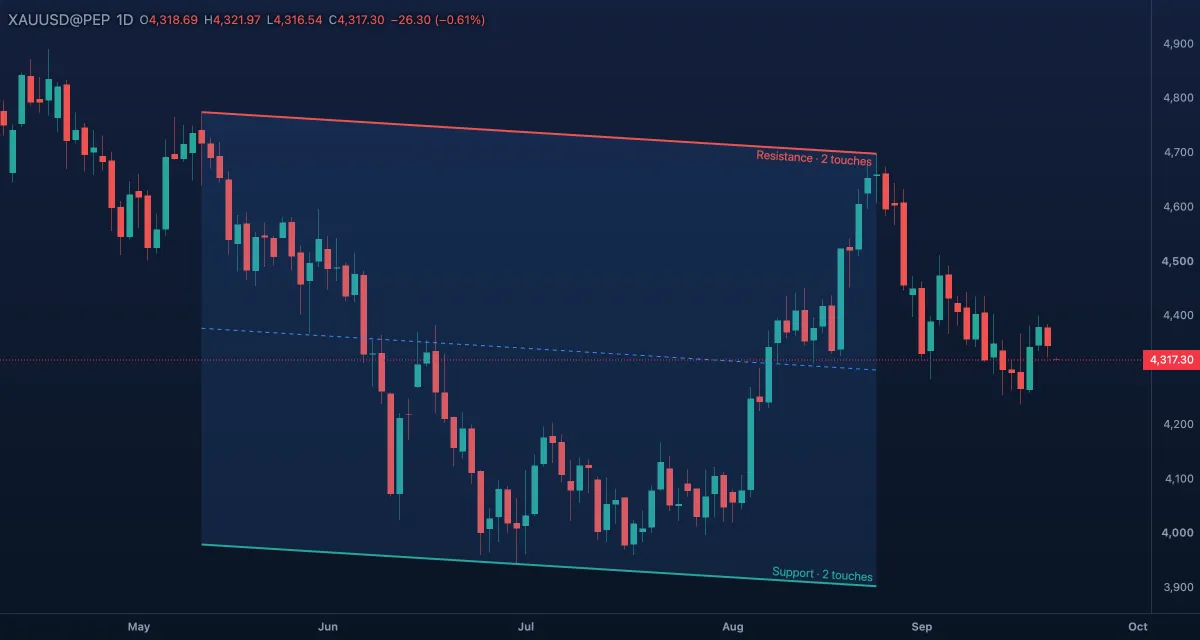
What it draws. Two parallel lines with a tinted band between them and a dashed middle line. The first two clicks make one side, the third sets how far away the other side runs. Each side is read as a smart line of its own: the top side usually red (resistance), the bottom teal (support), each with its touches and label; the band and the middle line keep the channel's colour.
What it is for. Price swinging between two parallel lines: buy near the bottom, sell near the top, the middle line as the first target. A close outside the channel says the swing is over. The usual mistake is forcing a channel on a move that is accelerating; if the third point does not fit the wicks, it is not a channel.
How to draw it. Click two points for one side, then a third for the other side. Shift snaps the first side to horizontal, vertical or 45°; Esc cancels. A double-click opens the Inspector. The third handle moves only the second side; the first two keep the width; the body moves all. On the Pro screen P arms it.
Settings. Colour, Width 2, Line style solid, Extend (None, Left, Right, Both), Middle line (on), Fill (on) with its Opacity (12 %). Right-click it for Alert on break and Alert when near (whichever side goes first) and, with an account, Alert on the channel…: the price enters, leaves, is inside or outside the band.
Example. Gold rises in steps: click two swing lows, then the swing high between them. The band shows the room the price has; on the next visit to the bottom side the label reads Support with its touches, and a close below it ends the channel.
Pitchfork#
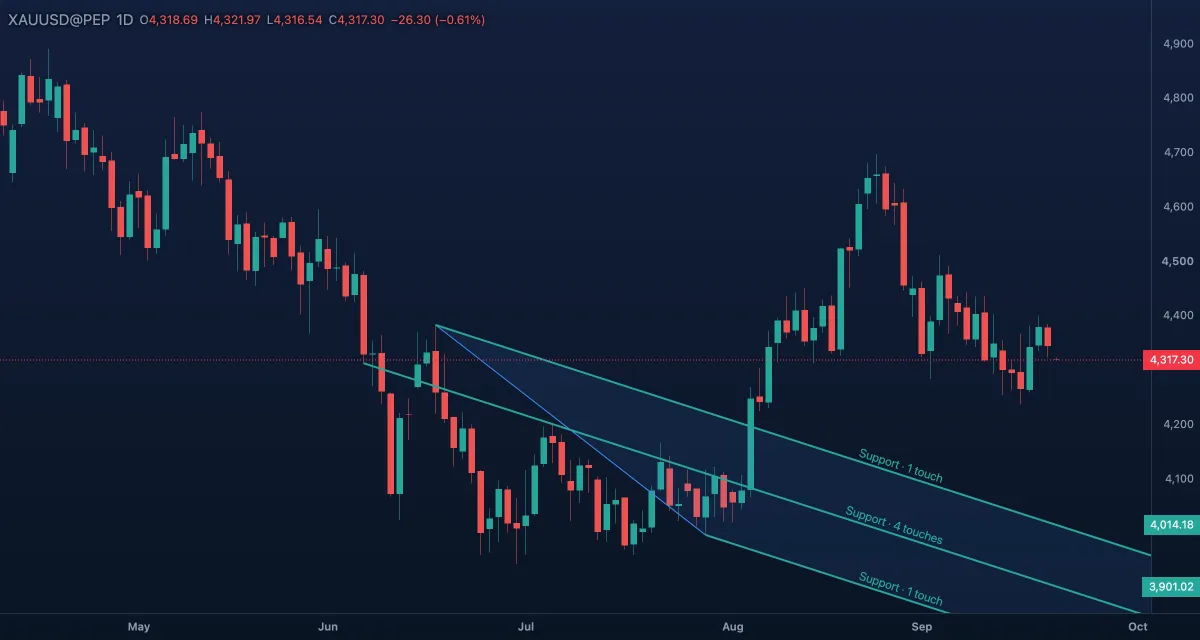
What it draws. Three parallel lines running to the right: the median from the first point through the middle of the other two, and one outer line through each of those two points, with tinted bands between them. Each of the three lines is read as a smart line with its own role, touches and label. The pitchfork is in the Lines list on the Pro screen; on the Guided screen the Lens (Ctrl+K, type pitchfork) arms it.
What it is for. Price tends to come back to the middle line; the outer lines often stop it. Start the fork where a move began, lay its prongs over the first pullback, then watch the next swings against the three lines. The usual mistake is a fork on three points that are not consecutive turns.
How to draw it. Click where the move starts, then the two ends of the pullback. No Shift; Esc cancels. A double-click opens the Inspector; drag a handle to move a point, drag the body to move all.
Settings. Colour, Width 2, Line style solid, Half-way lines (off: dashed lines half-way between the median and each outer line), Fill (on) with its Opacity (10 %). Alert on break and Alert when near ring for whichever of the three lines goes first.
Example. On gold, click the low that started a rally, then the high and the low of its first pullback. The median points where the swing's centre runs; the next pullback that holds the lower line, labelled Support, keeps the rally alive.
Related#
- Drawing on the chart — selecting, handles, the magnet, lock, hide and undo
- Alerts — alerts on break and when near, and price alerts at a level
- Fibonacci
- Trade & measure
- Keyboard — the one-key tools of the Pro screen