Squeeze Momentum (SQZ)
What Squeeze Momentum shows — the Bollinger-inside-Keltner squeeze and a momentum histogram — how to read a release, its settings and an example on gold.
Squeeze Momentum marks the bars on which the Bollinger Bands have contracted inside the Keltner Channel — a "squeeze", the market coiling before a move — and draws a momentum histogram to read which way the move leans when the squeeze releases. It is John Carter's squeeze setup (Mastering the Trade, 2005) in the form of the widely used community script by LazyBear (2014).
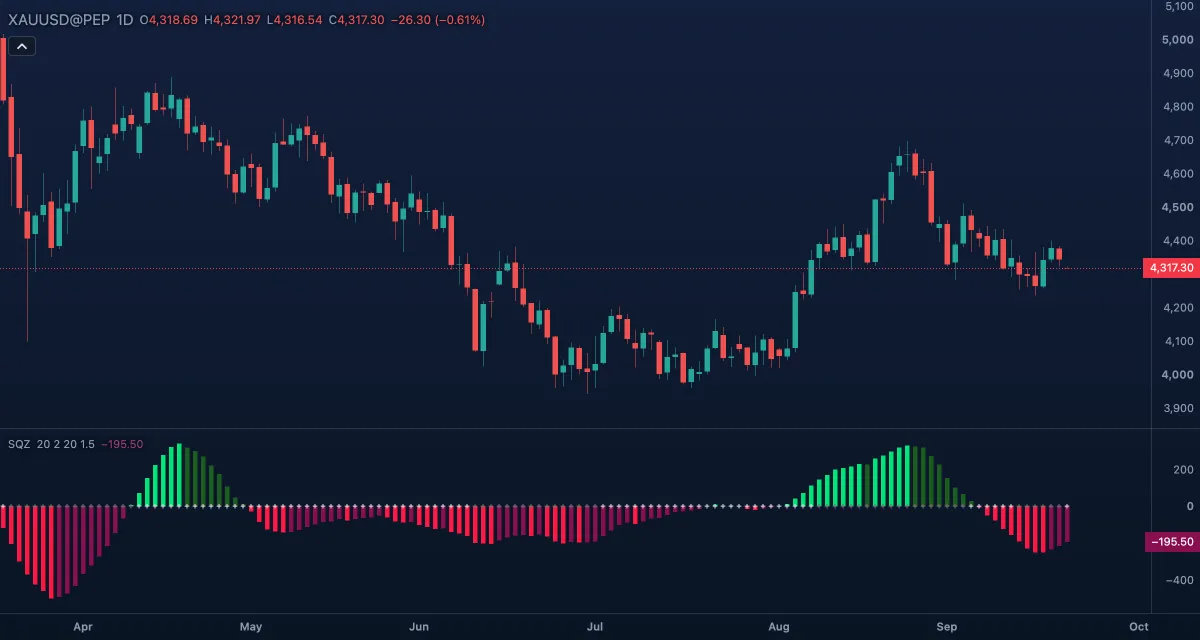
What it shows#
- Momentum — a histogram in its own pane around zero, in price units. Bright green: above zero and rising. Dark green: above zero but no longer rising. Bright red: below zero and falling. Dark magenta: below zero but no longer falling. Bright to dark is the first sign that momentum is fading.
- Squeeze — a cross on the zero line on every bar. Blue: no squeeze. Light: squeeze on, the Bollinger Bands are entirely inside the Keltner Channel. Grey: squeeze off, the bands have opened outside the channel; the first grey cross after a run of light ones is the release. The crosses have no chip in the legend and no value on the scale.
How it is calculated#
The Bollinger Bands are a BB length average of the close with a band on each side; the Keltner Channel is a KC length average with lines KC multiplier average true ranges away (high minus low when Use true range is off). The squeeze is on when both bands are inside the channel and off when both are outside it. With Bands as published on, the bands take their width from the KC multiplier, as the published script does, and BB multiplier has no effect. Momentum is the close minus the midpoint between the KC length average and the middle of the highest high and lowest low of those bars, smoothed by a linear regression over the same bars.
How traders use it#
- Wait for a run of light crosses — the longer the squeeze, the more energy is stored — and trade the first grey cross in the direction of the histogram on that bar: green for a long, red for a short.
- Carter's exit: stay while the histogram keeps its bright colour; take profit or tighten the stop on the first dark bar.
- The histogram alone is a momentum oscillator: a cross of zero marks a change of short-term bias.
- A squeeze by itself has no direction, and a release with momentum near zero is weak. Confirm with the price leaving its range.
- Watch out for: a squeeze sometimes releases against the trend and then reverses (a head fake), and the regression momentum lags the price by a few bars.
Settings#
| Setting | Default | What it changes |
|---|---|---|
| BB length | 20 | Bars of the Bollinger Bands' average and standard deviation. |
| BB multiplier | 2 | Width of the Bollinger Bands in standard deviations; used only when Bands as published is off. |
| KC length | 20 | Bars of the Keltner Channel and of the momentum's highest, lowest and regression. |
| KC multiplier | 1.5 | Width of the Keltner Channel in average ranges; with Bands as published on, also the width of the Bollinger Bands. |
| Use true range | On | On: the channel uses the true range, gaps included. Off: high minus low. |
| Bands as published (BB width from the KC multiplier) | On | Keeps the published script's behaviour. Off: the BB multiplier applies. |
| Colours and style | — | The four histogram colours (Above zero, rising, Above zero, not rising, Below zero, falling, Below zero, not falling) and the three cross colours (No squeeze, Squeeze on, Squeeze off). |
Example on gold#
For example, gold has held between $4,280 and $4,330 for two weeks and the crosses have been light for eight bars. On the ninth bar the cross turns grey and the histogram prints a bright green bar at about +15, with the close at $4,345, above the range. That is the setup: a long at the next open, stop under the range at $4,270.
What would invalidate it: the histogram turning dark green within a bar or two while the close falls back inside the range — a release that fizzled.
Add it to your chart#
- Click Indicators in the top strip (on the Pro screen, press I).
- Type
squeezeand click Squeeze Momentum. - Click its chip in the legend to open the Inspector and change the settings; drag the chip to reorder; the dot hides it; × removes it.
Related#
- Bollinger Bands — the bands that contract into the channel
- Keltner Channels — the channel they contract into
- Bollinger BandWidth — Bollinger's own squeeze, measured against the bands' history
- Alerts — an alert when the value crosses a level
- Adding and tuning indicators