Moving Average Ribbon
Four moving averages drawn together — how their order and spacing read the trend, each line's settings on MillionChart and an example on gold.
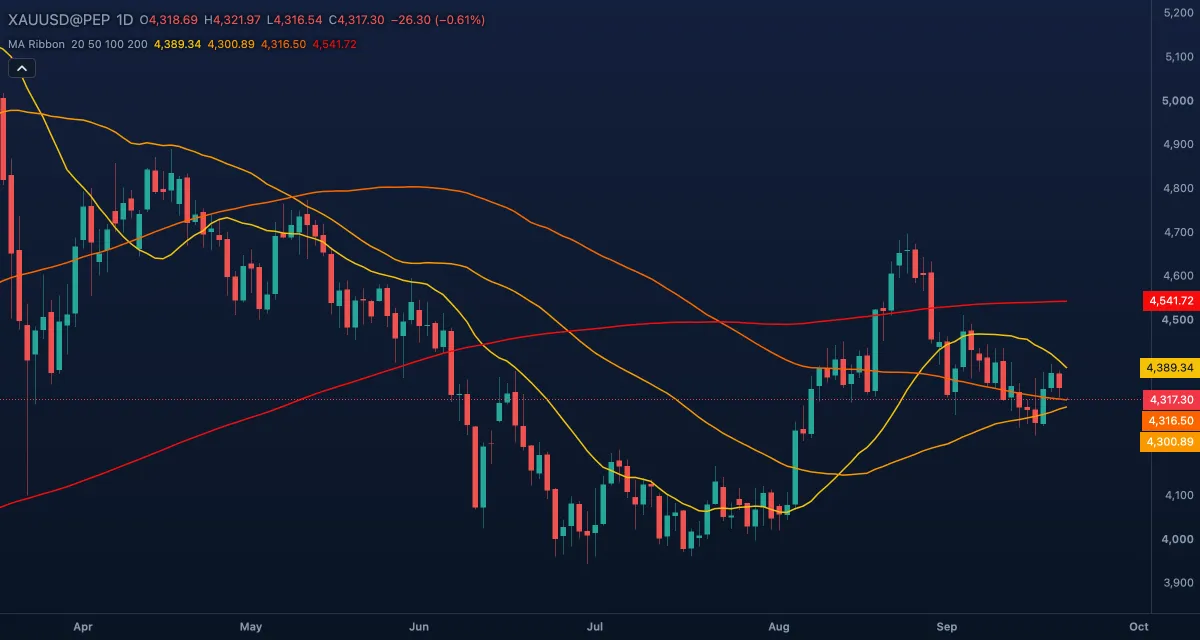
The Moving Average Ribbon draws four moving averages of different lengths on the candles. Read together, their order and spacing show whether a trend is established, starting or ending. The defaults are simple averages of the close over 20, 50, 100 and 200 bars, coloured from yellow for the fastest to red for the slowest.
What it shows#
- MA #1 (yellow, 20 bars), MA #2 (orange, 50), MA #3 (dark orange, 100) and MA #4 (red, 200), over the candles — from the fastest line, closest to the price, to the slowest, the long-term trend.
- Lines fanned out in order — 20 above 50 above 100 above 200, all rising — read as an established up trend; the mirror image as a down trend. Lines tangled or crossing read as a range or a turning point.
- The colours run from yellow to red so you can tell the fastest line from the slowest at a glance.
How it is calculated#
Each line is a moving average of its Source (the close by default) over its Length, of the kind set by its Average: SMA, EMA, SMMA (RMA), WMA or VWMA. Every line has its own three settings, so one ribbon can mix kinds, sources and lengths. A line needs its full length of bars before it starts (the 200-bar line appears 200 bars into the history; an EMA settles later still).
How traders use it#
- Alignment: when the four lines sit in order and point the same way, trade with them; when they are mixed, there is no trend to follow.
- Price above the whole ribbon is an up trend, below it a down trend, inside it a range.
- A ribbon that squeezes together often comes before a move; one that fans open confirms a new trend, and the fan closing again warns that it is tiring.
- In an up trend, pullbacks to the 50-bar line, and deeper ones to the 100, are where trend traders look for entries; the 200 is the trend's last support.
- Watch out: four averages say the same thing with four lags — the ribbon confirms a trend, it does not find the turn. In a range the lines braid and give no reading.
Settings#
| Setting | Default | What it changes |
|---|---|---|
| Average (MA #1) | SMA | The kind of the first line: SMA, EMA, SMMA (RMA), WMA or VWMA. |
| Source (MA #1) | Close | The price it averages: Close, Open, High, Low, Mid (HL2), Typical (HLC3) or Average (OHLC4). |
| Length (MA #1) | 20 | Its bars. |
| Average (MA #2) | SMA | The kind of the second line. |
| Source (MA #2) | Close | Its price. |
| Length (MA #2) | 50 | Its bars. |
| Average (MA #3) | SMA | The kind of the third line. |
| Source (MA #3) | Close | Its price. |
| Length (MA #3) | 100 | Its bars. |
| Average (MA #4) | SMA | The kind of the fourth line. |
| Source (MA #4) | Close | Its price. |
| Length (MA #4) | 200 | Its bars. |
| Colours and style | — | MA #1 to MA #4 set the colour of each line. |
Example on gold#
For example, gold sits at $4,350 after a summer rise, with the lines stacked below it in order: the 20-day at $4,300, the 50-day at $4,230, the 100-day at $4,150 and the 200-day near $4,000. The ribbon is open and every line points up — a trend to follow, not to fade. When gold dips to the 50-day line and closes back above the 20-day a few days later, a trend trader buys that dip with a stop below the 100-day.
What invalidates it: the 20-day crossing under the 50-day and the price closing inside the ribbon. The fan is closing, and the next pullback may not hold.
Add it to your chart#
- Click Indicators in the top strip (on the Pro screen, press I).
- Type
ribbonand click Moving Average Ribbon. - Click its chip in the legend (MA Ribbon 20 50 100 200) to open the Inspector and change the settings; drag the chip to reorder; the dot hides it; × removes it.
Related#
- MA Cross — two averages with a mark at every cross
- Simple Moving Average (SMA) — one average on its own
- Exponential Moving Average (EMA) — the faster kind, if you switch the lines to EMA
- Alligator — Bill Williams's three shifted averages
- Alerts — an alert when the price crosses a line, or one line crosses another
- Adding and tuning indicators