Parabolic SAR
What Parabolic SAR draws, how its dots trail the price and flip, how traders use it as a stop, its settings on MillionChart and an example on gold.
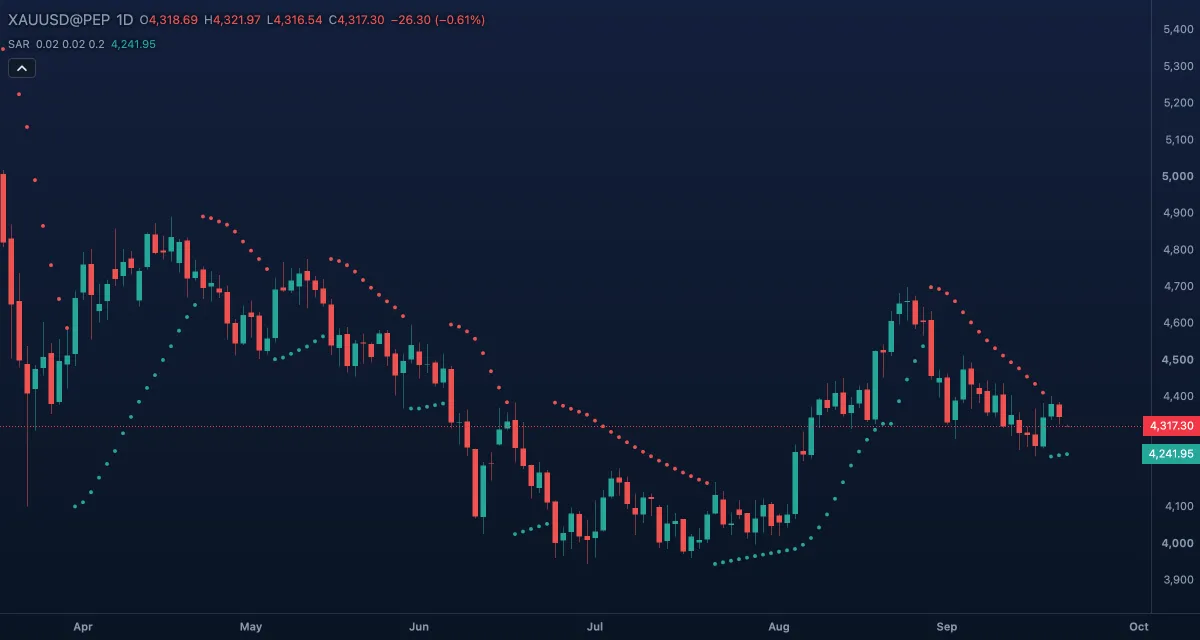
Parabolic SAR ("stop and reverse") draws one dot per candle that works as a trailing stop: the dots run below the price while it rises and above it while it falls, and jump to the other side when the price crosses them. The values are prices, so the indicator sits on the candles. J. Welles Wilder Jr. published it in 1978.
What it shows#
- SAR — a dot on every bar, over the candles: green below the price while the indicator is long (the dot is the stop of a long position), red above the price while it is short.
- After a flip the dots start far from the price and curve toward it faster the longer the move lasts — the parabola of the name.
- A flip (the dots jump to the other side of the candles) is the indicator's reversal: the stop was hit.
How it is calculated#
Each bar the SAR moves toward the extreme point of the current move — the highest high since the dots went long, or the lowest low since they went short — by an acceleration factor: next SAR = SAR + factor × (extreme − SAR). The factor begins at Start (0.02), grows by Increment (0.02) on every bar that sets a new extreme and stops at Maximum (0.2). Two of Wilder's rules apply: the SAR is never moved inside the range of the current or the previous bar, and when the price crosses it the side flips, the SAR jumps to the old extreme point and the factor starts again.
How traders use it#
- Dots below the candles read as an up trend, dots above as a down trend — a direction check at a glance.
- The dot is a ready-made trailing stop: in a long trade, move the stop to the dot each bar and leave when the price closes below it.
- A flip is the usual exit; some traders also take it as an entry the other way, which works in trends and fails in ranges.
- A larger Maximum or Increment tightens the stop and flips sooner; smaller values loosen it.
- Watch out: in a sideways market the dots flip every few bars. Use a trend filter such as ADX; a flip alone is not a reason to trade.
Settings#
| Setting | Default | What it changes |
|---|---|---|
| Start | 0.02 | The acceleration factor right after a flip; higher starts the dots closer to the price. |
| Increment | 0.02 | How much the factor grows on each bar that sets a new extreme. |
| Maximum | 0.2 | The cap on the factor; lower keeps the stop looser in a long trend. |
| Colours and style | — | Long (below price) and Short (above price) set the colour of the dots on each side. |
Example on gold#
For example, gold climbs from about $4,200 to $4,350 over three weeks of daily candles. The dots sit below the candles, starting near $4,150 and rising a little faster each day as new highs come in; a trader who is long keeps the stop at the dot, around $4,300 by the end of the move. Then gold closes at $4,290, below the dot, and the dots flip above the price: that is the exit. A short on the same flip needs a reason beyond the flip itself.
What invalidates the reading: a second flip within a few bars. That is a range, not a reversal, and the dots keep flipping until a trend returns.
Add it to your chart#
- Click Indicators in the top strip (on the Pro screen, press I).
- Type
sarand click Parabolic SAR. - Click its chip in the legend (SAR 0.02 0.02 0.2) to open the Inspector and change the settings; drag the chip to reorder; the dot hides it; × removes it.
Related#
- SuperTrend — a trailing stop measured in ATRs
- ATR Trailing Stop — an ATR stop with Buy and Sell marks
- Average Directional Index (ADX) — the filter that tells a trend from a range
- Alerts — an alert when the price crosses the dots
- Adding and tuning indicators