Commodity Channel Index (CCI)
What CCI measures, its +100 and −100 levels, how it is calculated from the typical price, its settings on MillionChart and an example on gold.
The Commodity Channel Index measures how far the price has moved from its own average, in units of how much it usually moves. A reading of +100 means the price is well above its recent average by the standard of recent swings; −100, well below. It has no fixed range. Donald Lambert published it in Commodities magazine in 1980; it is used on every market.
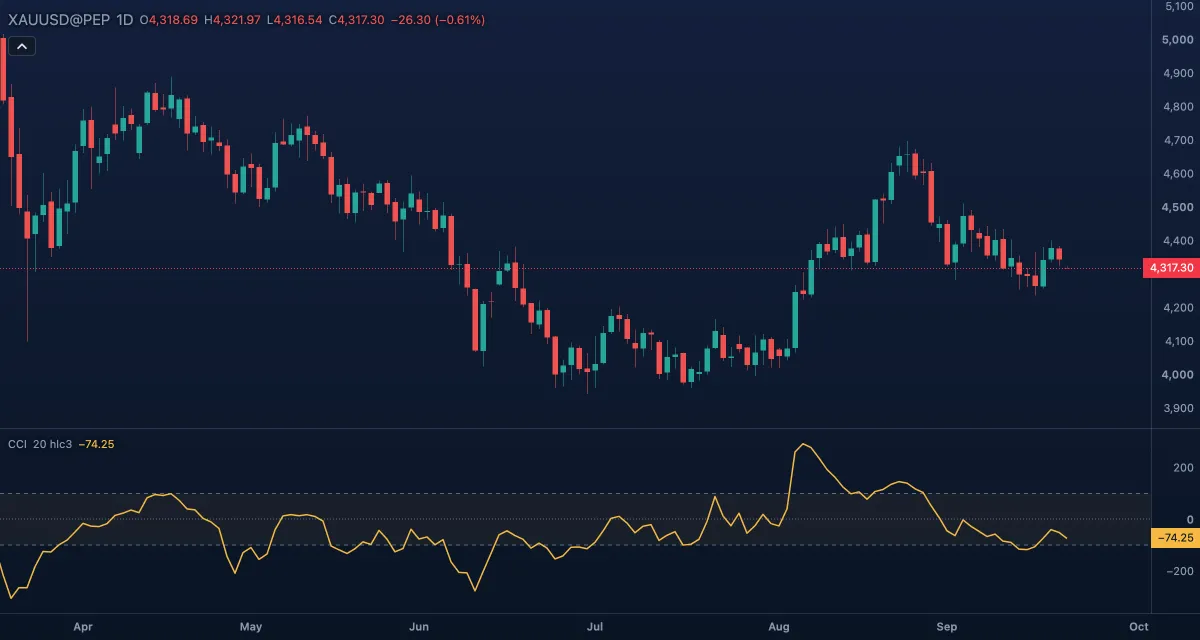
What it shows#
- CCI — one line in its own pane. Rising means the price is pulling away from its average on the upside; falling, on the downside.
- Upper — a dashed level at +100; Lower — a dashed level at −100. Lambert chose his constant so that most values fall between them.
- Zero — a dotted line at zero: the price is exactly at its average.
- Zone fill — a faint tint between the two levels.
How it is calculated#
The chart takes the Source — by default the typical price, (high + low + close) / 3 — and its simple average over Length bars. It also takes the mean absolute deviation: the average distance of the source from that average over the same bars. CCI = (source − average) / (0.015 × mean absolute deviation). The constant 0.015 is Lambert's. A window where the price never left its average has no value.
How traders use it#
- Lambert's own rule: a cross above +100 opens a long position and a fall back under +100 closes it; a cross below −100 opens a short, a rise back over −100 closes it. He designed CCI for trends, not for reversals.
- The opposite use is as common: readings beyond +100 or −100 as overbought or oversold, and the return inside as the entry. Both cannot be right at once; pick one and check it on your market.
- Zero cross as a trend filter: above zero the price is above its average.
- Divergence between the price and CCI warns a move is tiring, as with RSI.
- Watch out: CCI has no ceiling. In a strong trend it runs to +200 or +300 and stays there, so "overbought" without a confirming price pattern is a guess; and a 20-bar window whipsaws on a choppy chart.
Settings#
| Setting | Default | What it changes |
|---|---|---|
| Length | 20 | Bars of the average and of the deviation. Shorter reaches the levels more often; longer is calmer. |
| Source | Typical | Which price is measured: Open, High, Low, Close, Mid (HL2), Typical (HLC3) or Average (OHLC4). Lambert used the typical price. |
| Colours and style | — | The colours of the CCI line, the Upper level, the Lower level, the Zero line and the Zone fill; width and dash under Look in the Inspector. |
Example on gold#
Gold breaks higher, for example, from a base around $4,250 and CCI (20) crosses above +100 at about $4,300 on the daily chart. In Lambert's reading that is a trend entry: the price has left its average by more than its usual swing. A trader takes the long position and keeps it while CCI stays above +100, closing when it falls back under the level — say at $4,360 after a two-week run.
What would invalidate it: CCI dropping straight back under +100 within a day or two, with the price closing back inside the base. That was a false break, and the rule closes the position at a small loss.
Add it to your chart#
- Click Indicators in the top strip (on the Pro screen, press I).
- Type
cciand click the indicator, or press Enter for the first result. - Click its chip in the legend to open the Inspector and change the settings; drag the chip to reorder; the dot hides it; × removes it.
Related#
- Woodies CCI — Ken Wood's reading of CCI, with a turbo line and trend bars
- RSI — a bounded oscillator with fixed levels
- Momentum — the plain price change, in price units
- Alerts — an alert when CCI crosses +100 or −100
- Adding and tuning indicators