VWAP
What the volume-weighted average price and its bands show, what the anchor periods mean, its settings on MillionChart and an example on gold.
VWAP is the volume-weighted average price: the average price of the period so far, with every candle counting in proportion to its volume. It restarts at the start of each anchor period — the session (the day) by default — and is drawn over the candles with up to three pairs of bands. Intraday traders use it as the day's fair price.
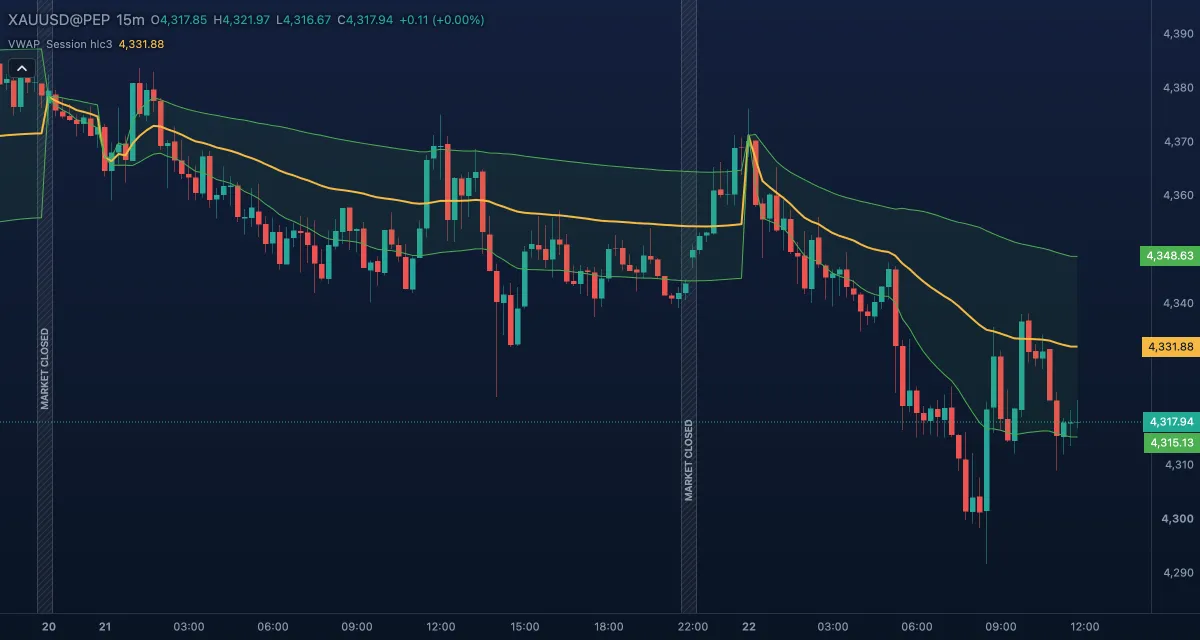
What it shows#
- VWAP — a gold line over the candles. Price above it means the average buyer of the period is in profit; below it, under water. Early in the period it moves a lot; as volume builds it gets harder to move.
- Upper band #1 and Lower band #1 — green lines one volume-weighted standard deviation above and below VWAP, with a faint fill between them.
- Upper band #2 / #3 and Lower band #2 / #3 — two and three deviations away; computed but hidden until you show them under Lines in the Inspector.
- At the first candle of a new period the line and the bands jump: the sums restart.
How it is calculated#
From the first candle of the anchor period, VWAP = Σ(source × volume) / Σ(volume); the source is the typical price (high + low + close) / 3 by default. Each band is VWAP ± multiplier × the volume-weighted standard deviation of the source over the same candles (Standard Deviation mode), or ± multiplier percent of VWAP (Percentage mode). The anchor periods are calendar periods in UTC — Session is the UTC day, Week starts on Monday at 00:00 UTC, Month, Quarter and Year are the calendar ones — whatever time zone the chart shows.
How traders use it#
- Side of the day: many intraday traders look for longs only while price holds above VWAP and for shorts only below it.
- Pullback entry: in a trend, a pullback to VWAP that holds is a common entry; a clean break through it against the trend is a warning.
- Mean reversion: a stretch to band #2 or #3 on a quiet day often comes back toward VWAP; on a trend day it does not, so judge the trend first.
- Watch out for: on daily candles the Session VWAP restarts on every candle and only repeats its typical price — use an intraday timeframe or a longer anchor. The restart at 00:00 UTC need not match the broker's trading day. On gold and forex the volume is tick volume.
Settings#
| Setting | Default | What it changes |
|---|---|---|
| Anchor period | Session | When the sums restart: the UTC day, the week (Monday 00:00 UTC), the calendar month, quarter or year. |
| Source | Typical | The price averaged: Typical is (high + low + close) / 3; or Open, High, Low, Close, Mid (HL2), Average (OHLC4). |
| Bands calculation mode | Standard Deviation | Bands in volume-weighted standard deviations, or (Percentage) in percent of VWAP. |
| Bands multiplier #1 | 1 | Distance of the first band pair. |
| Bands multiplier #2 | 2 | Distance of the second pair (hidden by default). |
| Bands multiplier #3 | 3 | Distance of the third pair (hidden by default). |
| Colours and style | — | VWAP, Upper band / Lower band #1–#3 and Bands fill #1–#3; show the hidden pairs under Lines in the Inspector. |
Example on gold#
On 15-minute candles, suppose the UTC day opens with gold at $4,300, the London morning lifts it to $4,318, and VWAP climbs slowly to $4,308. Around midday price pulls back, touches VWAP, and the next candle closes above it again. For example, a trader who trades with the day's direction takes that hold as a long entry, with a stop just under the lower band #1 (say $4,303) and the morning high as the first target.
What invalidates it: a 15-minute close below VWAP, more so one below band #1 — the day's average buyer is now losing. A position carried past 00:00 UTC is measured against a new, nearly empty VWAP.
Add it to your chart#
- Click Indicators in the top strip (on the Pro screen, press I).
- Type
vwapand click VWAP, or press Enter. VWAP is also under Quick add and in the Scalp setup. - Click its chip in the legend to open the Inspector and change the settings; drag the chip to reorder; the dot hides it; × removes it.
Related#
- Anchored VWAP — the same average started from a candle you pick, as a drawing tool
- Simple Moving Average — a plain average of the last candles, without volume and without a restart
- Volume — the columns that weight the average
- Alerts — an alert when price crosses the line
- Adding and tuning indicators