Williams %R
What Williams %R measures, how to read its -20 and -80 levels, how it relates to the Stochastic, its settings on MillionChart and an example on gold.
Williams %R shows where the latest close sits inside the range of the last 14 bars, read from the top: 0 when the close is at the highest high of the window, −100 when it is at the lowest low. Larry Williams published it in 1973. It runs in its own pane from −100 to 0, with levels at −20 and −80.
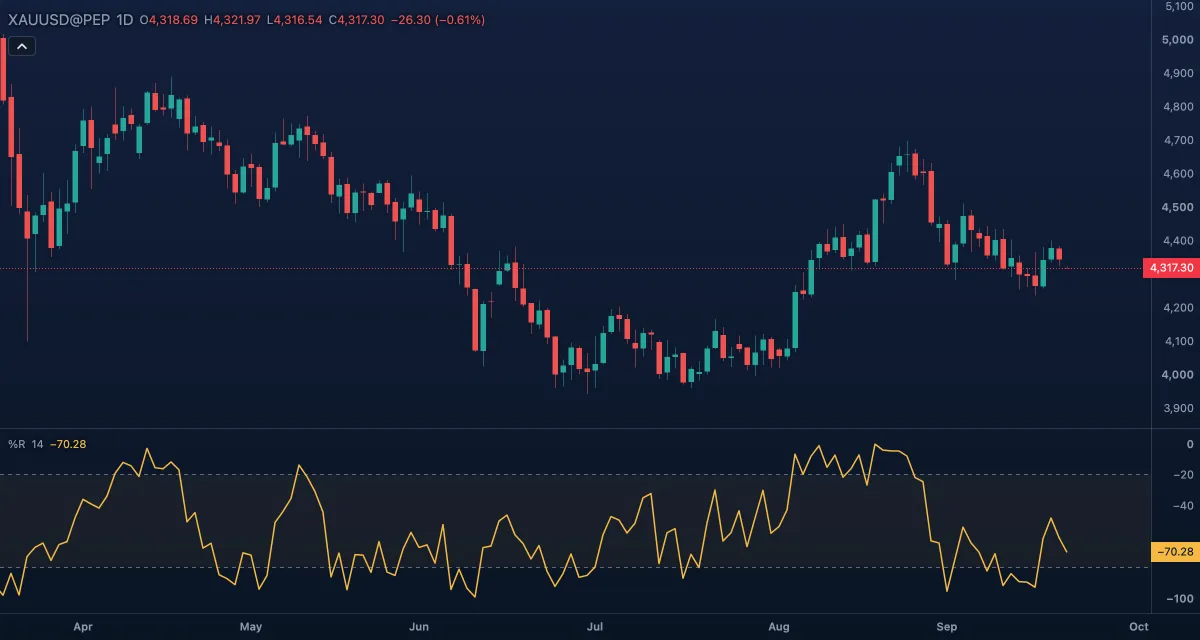
What it shows#
- %R (gold line): the close's place in the window. Near 0 the market is closing at the top of its recent range; near −100 at the bottom.
- Upper (−20) and Lower (−80): dashed levels with a light fill between them. Above −20 is the overbought zone, below −80 the oversold zone.
The pane is fixed to −100 to 0.
How it is calculated#
%R = −100 × (highest high over Length bars − close) / (highest high − lowest low over the same bars). It always uses the high, low and close; there is no source option and no smoothing. When the window's high and low are equal there is no value. It is the Stochastic's raw %K shifted down by 100: the same line on a different scale.
How traders use it#
- Overbought and oversold: readings above −20 mean the close is in the top fifth of the range; below −80 in the bottom fifth. In a trend the line can sit above −20 for many bars, so an overbought reading shows strength, not an imminent reversal.
- Leaving the zone: a common trigger is %R falling back under −20 after a stay above it, or rising back over −80, rather than the first touch.
- The middle: above −50 the close is in the upper half of the range, a simple read of who is in control.
- Divergence: price makes a new high while %R peaks lower, so closes are landing further from the highs.
- Watch out for: with no smoothing the line jumps from bar to bar and whipsaws in a range. The window defines "high" and "low": 14 daily bars is less than three weeks, so the levels say nothing about the longer trend.
Settings#
| Setting | Default | What it changes |
|---|---|---|
| Length | 14 | Bars of the high-low window the close is placed in. Shorter reaches the extremes more often. |
| Colours and style | — | The colour of the %R line, the two levels and the zone fill. |
The Upper and Lower levels are rows under Lines in the settings card; each has a Level box, so you can move them, to −10 and −90 for example.
Example on gold#
Suppose gold has climbed from about $4,200 to $4,320 over two weeks on the daily chart, closing near the highs, for example. %R has been above −20 for most of those sessions: strength, not a sell. Then a session closes mid-range and %R drops to −35, leaving the zone. A trader who is long might take that as the cue to trail a stop under the last swing low rather than to sell, because the trend is intact. If %R later falls through −80 while price breaks that swing low, the pullback has become a change of character; if it returns above −20 within a few bars, the trend has simply resumed.
Add it to your chart#
- Click Indicators in the top strip (on the Pro screen, press I).
- Type
%rand click Williams %R. - Click its chip in the legend to open the Inspector and change the settings; drag the chip to reorder; the dot hides it; × removes it.
Related#
- Stochastic — the same place-in-range line on a 0 to 100 scale, with smoothing
- Stochastic RSI — the formula applied to the RSI
- Ultimate Oscillator — the same author's three-window oscillator
- Alerts — an alert when %R crosses −20 or −80
- Adding and tuning indicators