Anchors
Anchored VWAP and the fixed range volume profile: drawings that run an indicator from the candle you click.
An anchor is a drawing that runs an indicator from the candle you click. The chart adds the indicator the moment you place the drawing, keeps its inputs in step with the drawing when you move it, and removes it with the drawing; removing the indicator from the legend with its × removes the drawing too. Neither indicator is in the Indicators list: the drawing is its only door. A saved layout keeps the drawing, which brings the indicator back when the layout opens. On the Pro screen the two anchors are the last rows of the Trade & measure list on the rail (the left tool bar); on the Guided screen and on a phone they are not on the rail, so open the Lens (Ctrl+K) and type avwap or vprofile. The star next to a tool puts it on the favourites bar over the chart (the first five starred tools also sit at the top of the rail; ten at most). Every drawing also has a Note field in the Inspector; the note shows when you point at it.
Anchored VWAP#
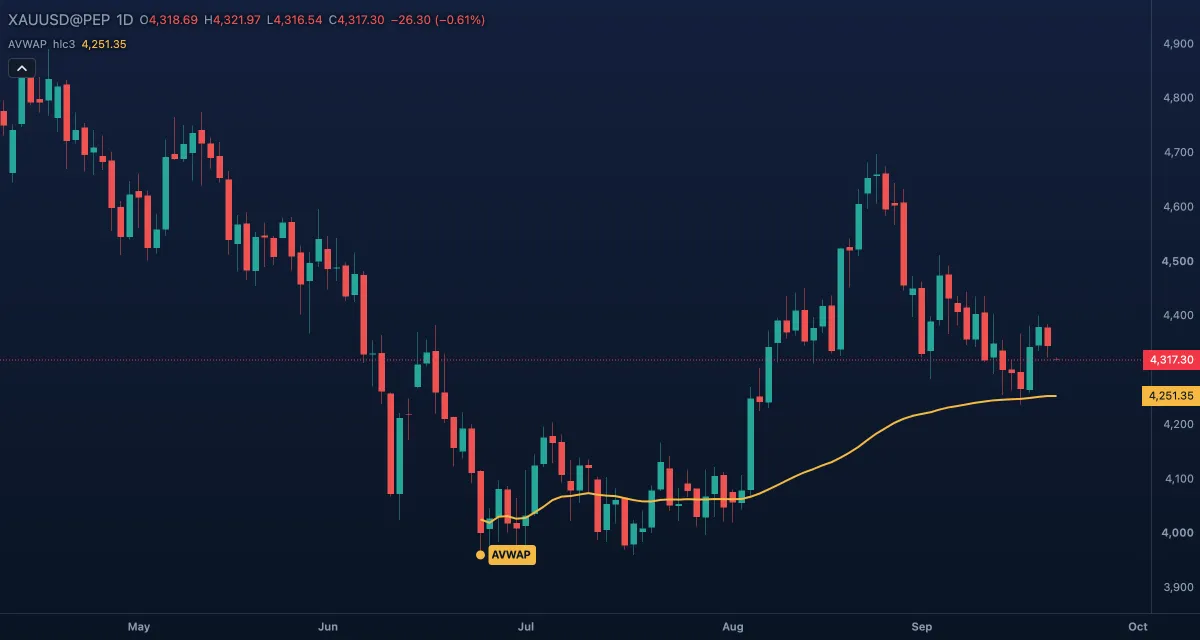
What it draws. A small marker tagged AVWAP on the candle you click, on that candle's typical price (the average of its high, low and close), and from there the indicator Anchored VWAP: the volume-weighted average price of every candle since the anchor (the sum of price times volume over the sum of volume), a gold line that moves with each new candle. It can add bands one and two standard deviations above and below.
What it is for. The average price everyone paid since a turning point: a swing low, a news candle, a month's open. While the price is above the line, the buyers since the anchor are ahead; a pullback to it often finds them again, so it acts as support in a rally and as resistance in a decline. The plain VWAP restarts every day; this one starts where you say. The usual mistake is anchoring at a candle nobody cares about.
How to draw it. Click the candle where the move starts. The marker snaps to that candle whatever price you clicked; drag it to another candle and the line is computed again from there. No Shift; Esc cancels. A double-click opens the drawing's Inspector; the indicator's own settings open from its chip in the legend, like any indicator.
Settings. The drawing: Marker colour (amber), Label text colour, Font size (11). The indicator: Source (Typical), Bands (σ) off, 1 or 2, and a colour for the line and each band.
Example. Gold made a sharp low and rallied. Click that low candle: the gold line is the average price of the rally so far. On the next pullback a bounce from it says the rally's buyers are still in charge; a close well below it says they are under water.
Fixed range volume profile#
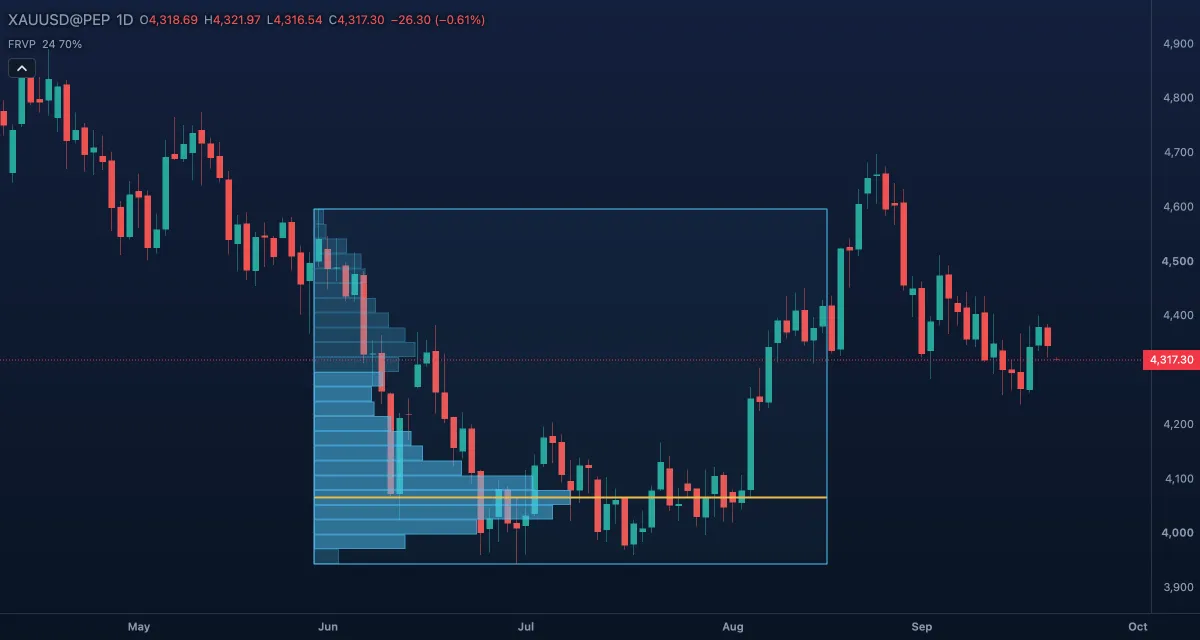
What it draws. A thin frame over the candles between your two clicks, as tall as the range's high and low, and inside it the indicator Fixed Range Volume Profile: the range's prices split into rows (24 by default), each a horizontal bar whose length is the volume traded at those prices. The row with the most volume is the point of control, with a gold line across the range; the rows around it that hold 70 % of the volume are the value area, drawn brighter.
What it is for. Where the most business was done inside a range. The point of control often acts as a magnet when the price comes back; the edges of the value area act as support and resistance; a thin row, where little traded, is usually passed quickly. Profile a consolidation and its levels are the ones to watch after the breakout.
How to draw it. Click the first candle of the range, then the last. Drag either handle to resize it; the profile recomputes. Only the thin frame catches a click, not the faint background. No Shift; Esc cancels. A double-click on the frame opens the drawing's Inspector; the indicator's settings open from its legend chip.
Settings. The drawing: Frame colour (sky blue), Fill (the faint background), Rows (24, from 2 to 500; the indicator follows it). The indicator: Rows, Value area % (70), Width (% of the range) (50: how wide the longest row is drawn), and colours for the Rows, the Value area and the POC.
Example. Gold spent three weeks in a range. Click the range's first and last candles. The gold line marks the price where the most volume traded; after the breakout, a pullback to it or to the top of the value area is where to look for the retest.
Related#
- Drawing on the chart — selecting, handles, lock, hide and undo
- VWAP — the daily VWAP indicator
- Session Volume Profile — a profile per session, as an indicator
- Indicators — adding and tuning an indicator from its legend chip
- Lines — the levels you draw at a point of control