Stochastic RSI (Stoch RSI)
What Stochastic RSI measures, why it moves faster than RSI, how to read %K and %D against the 80 and 20 levels, its settings and an example on gold.
Stochastic RSI applies the stochastic formula to the RSI instead of to the price: it shows where the RSI sits inside its own recent range, from 0 at the lowest RSI of the window to 100 at the highest. It reaches the extremes far more often than RSI itself. Tushar Chande and Stanley Kroll published it in 1994. It runs in its own pane from 0 to 100.
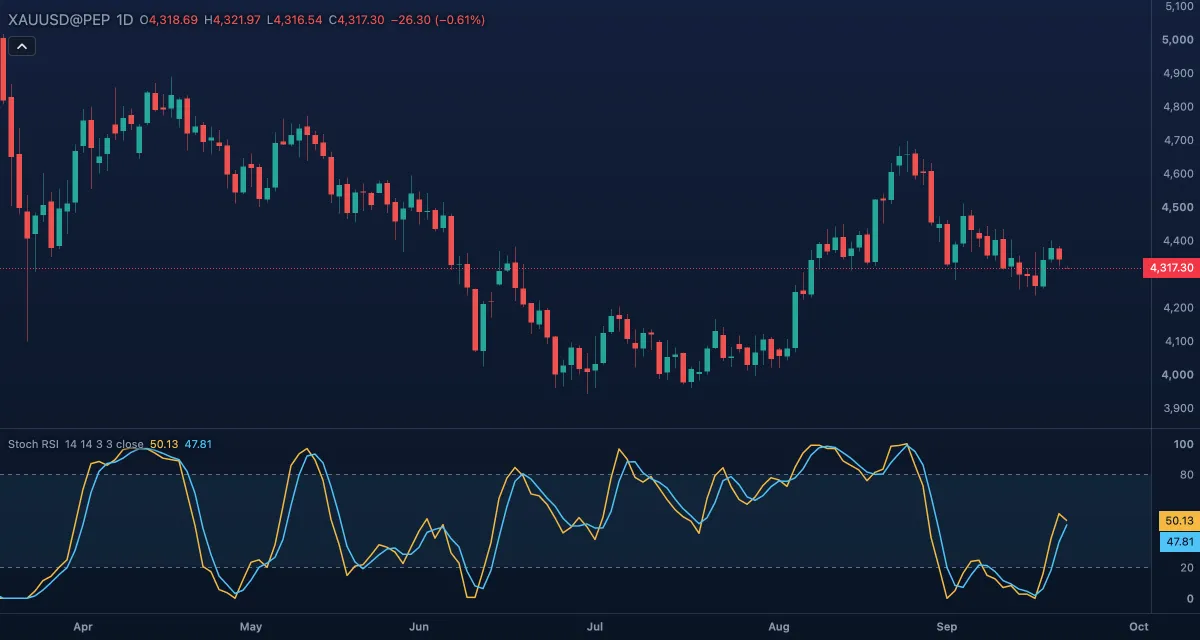
What it shows#
- %K (gold line): the stochastic of the RSI, smoothed over 3 bars by default. Near 100 the RSI is at the top of its last 14 readings; near 0 at the bottom.
- %D (blue line): a 3-bar average of %K, the slower line that %K is compared with.
- Upper (80) and Lower (20): dashed levels with a light fill between them. Above 80 is the overbought zone, below 20 the oversold zone.
The pane is fixed to 0 to 100.
How it is calculated#
First an RSI of the source over RSI length bars (Wilder's smoothing, as on the RSI page). Then, over the last Stochastic length bars: 100 × (RSI − lowest RSI) / (highest RSI − lowest RSI). %K is a simple moving average of that over %K smoothing bars, and %D a simple moving average of %K over %D length bars. A bar where the RSI has not moved at all within the window has no value.
How traders use it#
- Overbought and oversold: above 80 or below 20 the RSI is stretched within its own range. The usual trigger is the return from the zone, %K dropping back under 80 or rising back over 20, not the entry into it.
- %K and %D crossings: %K crossing above %D from below 20 marks a turn up; crossing below %D from above 80, a turn down.
- Trend filter: in a strong uptrend the lines sit above 80 for long stretches. It gives more signals, and more false ones, than RSI, so most traders use it to time entries in the direction of a trend set by a slower tool.
- Watch out for: a reading of 100 only says the RSI is at the top of its last 14 values, which can be a tiny range. Check the RSI itself before calling the market overbought.
Settings#
| Setting | Default | What it changes |
|---|---|---|
| RSI length | 14 | Bars of the RSI the stochastic is taken from. |
| Stochastic length | 14 | The window of RSI values the current RSI is placed in. |
| %K smoothing | 3 | Bars of the simple average applied to the raw line; 1 means none. |
| %D length | 3 | Bars of the simple average of %K. |
| Source | Close | The price the RSI uses: Open, High, Low, Close, Mid (HL2), Typical (HLC3) or Average (OHLC4). |
| Colours and style | — | The colours of %K and %D, the two levels and the zone fill. |
The Upper and Lower levels are rows under Lines in the settings card; each has a Level box, so you can move them to 90 and 10 if you prefer.
Example on gold#
Suppose gold is in an uptrend on the daily chart, above $4,200 and rising, and pulls back for four sessions to about $4,240, for example. Stoch RSI drops under 20 while RSI itself only dips to the mid-40s: the pullback is deep relative to recent momentum, not a change of trend. When %K crosses back above %D and rises over 20, a trader looking to join the trend has a timed entry, with a stop under the pullback low. If %K stays pinned under 20 while price keeps falling, the pullback is not finished; a close below the last swing low would put the trend itself in question.
Add it to your chart#
- Click Indicators in the top strip (on the Pro screen, press I).
- Type
stoch rsiand click Stochastic RSI. - Click its chip in the legend to open the Inspector and change the settings; drag the chip to reorder; the dot hides it; × removes it.
Related#
- Relative Strength Index (RSI) — the line this one is built on
- Stochastic — the same formula applied to the price
- Williams %R — the price's place in its range, read from the top
- Alerts — an alert when %K crosses a level or %D
- Adding and tuning indicators