Alligator
What Bill Williams' Alligator draws, how its three shifted lines are read, its settings on MillionChart and a worked example on gold.
The Alligator is three smoothed moving averages of the middle of each candle, each pushed a few candles into the future, drawn over the candles in price units. Bill Williams published it in Trading Chaos (1995) and named the lines after an alligator's jaw, teeth and lips: tangled lines mean it sleeps and there is no trend; lines that fan apart mean it is feeding and a trend is on.
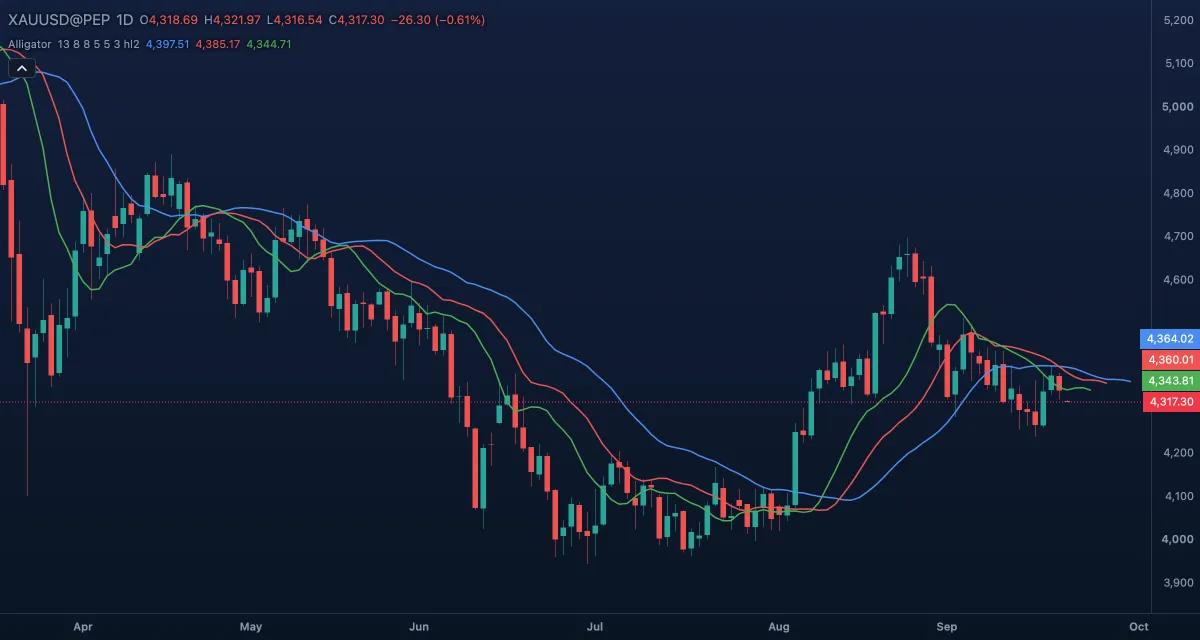
What it shows#
- Jaw — blue, the slowest average (13 candles), drawn 8 candles to the right.
- Teeth — red, 8 candles, drawn 5 to the right.
- Lips — green, the fastest (5 candles), drawn 3 to the right.
- The shifts push the lines past the last candle into the space at the right. Their order is what matters: lips above teeth above jaw, all rising, is an up trend; the mirror image a down trend; lines weaving through each other, no trend.
How it is calculated#
Each line is a smoothed moving average (Wilder's smoothing: every candle moves the average by 1 / length of the distance to the new price) of the Source, by default the middle of the candle, (high + low) / 2, shown as Mid in the settings. The jaw uses 13 candles, the teeth 8, the lips 5, and each value is drawn 8, 5 or 3 candles after the candle it was computed on.
How traders use it#
- Sleeping: the lines are close together and crossing. Williams' rule is to stay out.
- Waking: the lines separate in order (lips, then teeth, then jaw) and point the same way; in his reading, the longer the sleep, the stronger the move.
- Eating: price stays on the far side of the lips and the lines stay apart; hold while the lips do not cross the teeth.
- Satiated: the lines flatten and converge. The trend is over.
- Williams paired it with the Awesome Oscillator, the Accelerator Oscillator and Williams Fractals for the entries.
- Watch out for: the shift into the future makes the lines look prescient on old data. On the live candle they are moving averages and lag like any other.
Settings#
| Setting | Default | What it changes |
|---|---|---|
| Jaw length | 13 | The candles smoothed for the jaw (blue). |
| Jaw offset | 8 | Candles to the right the jaw is drawn. |
| Teeth length | 8 | The candles smoothed for the teeth (red). |
| Teeth offset | 5 | Candles to the right the teeth are drawn. |
| Lips length | 5 | The candles smoothed for the lips (green). |
| Lips offset | 3 | Candles to the right the lips are drawn. |
| Source | Mid (HL2) | The price smoothed: Open, High, Low, Close, Mid (HL2), Typical (HLC3) or Average (OHLC4). |
| Colours and style | — | The Jaw, Teeth and Lips colours, line widths and dashes. |
Example on gold#
Suppose gold has spent three weeks between $4,260 and $4,300 on the daily chart and the three lines have braided together near $4,280: the alligator is asleep. For example, a daily close at $4,330, with the green lips rising above the red teeth and the blue jaw and all three turning up, is the waking signal; a trader following Williams would buy a fractal breakout above the recent highs and hold while the close stays above the lips. A close back inside the lines, with the lips crossing down through the teeth, would say the move was false. Nothing in the lines says how far the trend will run.
Add it to your chart#
- Click Indicators in the top strip.
- Type
alligatorand click the indicator, or press Enter for the first result. - Click its chip in the legend to open the Inspector and change the settings; drag the chip to reorder; the dot hides it; × removes it.
Related#
- Awesome Oscillator — Williams' momentum tool, used with the Alligator
- Accelerator Oscillator — the change of the Awesome Oscillator
- Williams Fractals — the swing points his entries are taken from
- Adding and tuning indicators