Woodies CCI
What Woodies CCI draws (CCI 14, CCI turbo, the trend-coloured histogram), how Ken Wood's patterns are read, its settings on MillionChart and an example on gold.
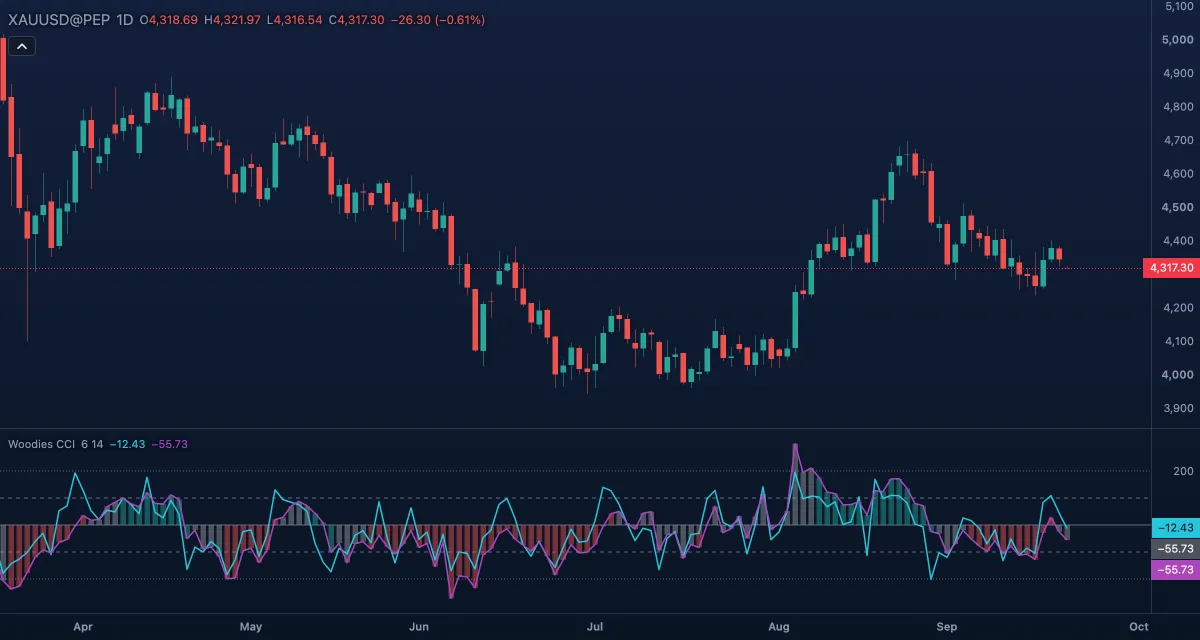
Woodies CCI is Ken Wood's way of reading the Commodity Channel Index (CCI): a 14-bar CCI drawn as a line and as a histogram, a faster 6-bar "turbo" CCI, and a histogram colour that calls the trend only after the CCI has held one side of zero for five bars. It is drawn in its own pane with levels at 0, ±100 and ±200. The CCI itself is Donald Lambert's indicator of 1980.
What it shows#
- CCI histogram — the 14-bar CCI as columns from zero, coloured by the five bars before each column: green (up trend) when all five were above zero, red (down trend) when all five were below, grey (neutral) when they were mixed.
- CCI 14 — the same 14-bar CCI as a line over the histogram.
- CCI turbo — a 6-bar CCI, the fast line; it leads the 14-bar line and crosses zero first.
- Levels — a solid Zero line, dashed lines at +100 and −100, dotted lines at +200 and −200.
How it is calculated#
Both lines are a standard CCI on the close: the close minus its simple moving average over the length, divided by 0.015 times the mean absolute deviation of the close around that average. The CCI 14 length (14) gives the main line and the histogram, the CCI turbo length (6) the fast line. The histogram colour reads the five previous values of the 14-bar CCI. Note that the CCI here is computed on the close, not on the typical price of Lambert's original.
How traders use it#
- The histogram colour is the trend call: Wood trades only in the direction of the colour and treats grey bars as "no trade".
- Zero-line reject: in an up trend (green) the CCI 14 dips toward zero and turns back up; the turn is a continuation entry. The mirror applies in a down trend.
- The turbo line crossing zero ahead of the CCI 14 gives an early hint of the same move.
- Trend lines across the CCI's own peaks and troughs, and their breaks, are part of the method; draw them in the indicator's pane with the trend line tool.
- Watch out for: five bars is a slow filter, so the colour changes after a good part of the move. The full Woodies panel also has a chop zone and a sidewinder; here the chop zone is a separate indicator (Chop Zone, in the Trend group) and there is no sidewinder.
Settings#
| Setting | Default | What it changes |
|---|---|---|
| CCI turbo length | 6 | Bars of the fast CCI line (3 to 14) |
| CCI 14 length | 14 | Bars of the main CCI line and the histogram (7 to 20); the histogram colour follows this line |
| Colours and style | — | The three histogram colours (up trend, down trend, neutral), the CCI turbo and CCI 14 lines, the Zero line and the +100, −100, +200 and −200 levels |
Example on gold#
Imagine gold rising from $4,200 to $4,300 with the histogram green for two weeks. Price pauses near $4,280 and the CCI 14 slips from +150 to about +20 while the histogram stays green, since the five bars before each column were all above zero. The CCI then turns up, and the turbo line, which had dipped below zero, crosses back above it. For example, a trader following Wood's method would read that as a zero-line reject in an up trend and buy the continuation with a stop under the pause's low. Had the CCI 14 pushed below zero, the next columns would turn grey and the setup would be off until the colour returned.
Add it to your chart#
- Click Indicators in the top strip (on the Pro screen you can press I).
- Type
woodiesand click the indicator. - Click its chip in the legend to open the Inspector and change the settings; drag the chip to reorder; the dot hides it; × removes it.
Related#
- Commodity Channel Index — the plain CCI with one line
- Relative Strength Index — another oscillator read against fixed levels
- Alerts — an alert when the value crosses a level
- Adding and tuning indicators