MillionAlgo Motion Matrix
What the Motion Matrix middle line, cloud and trend circles show, how it is built, its presets and settings on MillionChart, and an example on gold.
Motion Matrix is MillionAlgo's trend-and-volatility study. It draws an adaptive middle line over the candles, a layered volatility cloud around it, circles that grade the strength of the trend, and marks where a reversal setup has completed. It comes with MillionChart Pro, a MillionAlgo indicator plan, the founders' year or the free Pro month; see Plans.
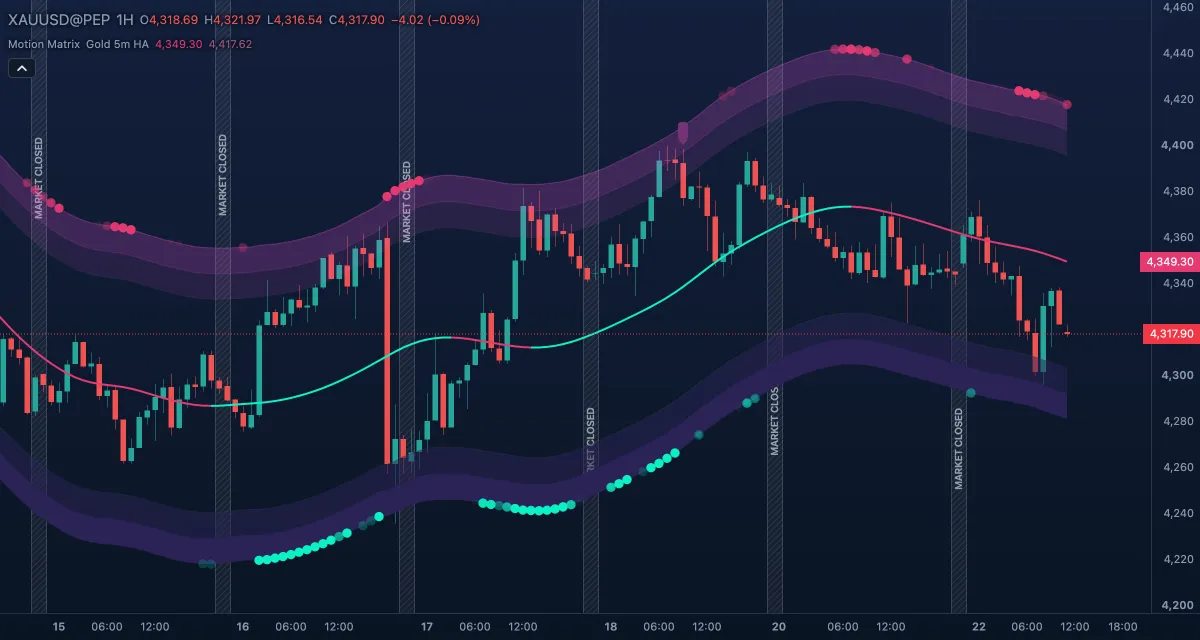
What it shows#
- Middle Line — a smooth line over the price, green while it is rising and red while it is falling or flat. Its direction is the trend the study follows.
- Cloud top and Cloud bottom, with Upper layer 1 / 2 and Lower layer 1 / 2 — a band around the middle line whose width follows the recent range of the bars (the ATR), in three layers above and three below: wider when the market moves more, tighter when it calms.
- Medium Bullish / Bearish Trend — circles on the outer layer of the cloud while directional movement is building, drawn fainter when the trend is weak and more solid as it strengthens: bullish circles under the price, bearish circles above it.
- Strong Bullish / Bearish Trend — larger circles for an established, strong trend, with the same fading.
- V Up and V Dn — label marks under or over a bar where a reversal setup has completed. A V Up follows a bar that closes below the lows of the 33 bars before it; it is placed on the first bar within the next 7 that closes above that bar's high, unless a close below that bar's low came first. A V Dn is the mirror: a bar that closes above the highs of the previous 33, then the first close under its low.
- Squeeze State — small circles on the middle line while the cloud is compressed. With the current formula this state is practically never reached, so do not wait for the circles or for the two squeeze alerts; judge the cloud's width by eye.
The V marks are placed only once their bar has closed.
How it is calculated#
The source is the Heikin Ashi median of each bar (or the close, if you choose it). The middle line is a smoothed average whose length adapts to the price: it shortens when the market gets erratic and lengthens when it calms, so the line hugs trends and ignores small noise. The cloud is the middle line plus and minus multiples of the ATR; the preset sets the lengths and multiples. The trend circles come from directional movement (the +DI, −DI and ADX of the DMI) at two speeds — a slower one for the medium circles and a faster, stricter one for the strong circles. With HTF Trend Filter on, strong circles need the 1-hour or 4-hour trend to agree.
How traders use it#
- The colour of the middle line is the simplest reading: trade long while it is green and short while it is red, or at least do not trade against it.
- The circles grade the move: medium circles say a trend is forming; strong circles say it is established. A price that pulls back to the middle line while strong circles keep printing is the classic continuation entry.
- The band is a volatility ruler: a close outside the outer layer is stretched and often pauses; a narrowing band means the next move has less in its way.
- Set an alert on Strong bull momentum starts or Strong bear momentum starts to be told when the first strong circle of a run prints. See Alerts.
- Watch out for lag and ranges. The line turns after the price does, and a sideways market colours it green and red in turn with no circles; in that case wait for circles or use the HTF filter.
Settings#
| Setting | Default | What it changes |
|---|---|---|
| Preset | Gold / Indices 5m (default) | Every length and multiple of the study at once: Gold / Indices 5m (default), Forex 15m or Scalp 1m. There are no separate length inputs. |
| Price Source | HA Median | HA Median (the Heikin Ashi midpoint, smoother) or Close. |
| HTF Trend Filter | Off | 60 or 240: strong circles only when the 1-hour or 4-hour trend agrees. If the chart cannot load those bars, a small note says the filter is off. |
| Show Volatility Cloud | on | Draws or hides the band and its layers. |
| Show Middle Line | on | Draws or hides the line. |
| Medium Trend circles | on | Draws or hides the medium circles. |
| Strong Trend circles | on | Draws or hides the strong circles. |
| Show Reversal Marks | on | Draws or hides the V Up / V Dn marks. |
| Show Squeeze State | on | Draws or hides the squeeze circles. |
| Colours and style | — | Each line, cloud layer, circle and mark has its own row under Lines in the Inspector. |
Example on gold#
For example, on the 1-hour chart gold has climbed from $4,250 to $4,320 over two days; the middle line is green and large strong-bull circles sit under the price. On the third day price slips back to $4,300, touching the green line, while the circles keep printing. The continuation reading is to buy near the line with a stop under the lower cloud layer, around $4,284, and to hold while the line stays green. The line turning red, or the circles stopping and reappearing above the price as bearish ones, would say the trend has gone, and the trade should be closed rather than argued with.
Add it to your chart#
- Click Indicators in the top strip (on the Pro screen, press I), or click Signals and turn Motion Matrix on.
- Type
motionand click the indicator. - Click its chip in the legend to open the Inspector and change the settings; drag the chip to reorder; the dot hides it; × removes it.
Related#
- Lightning Strike, Smart Money, VIP V6 — the other MillionAlgo studies
- DMI and ADX — the trend-strength readings behind the circles
- Keltner Channels — the same idea of an ATR band around an average
- Alerts — the four Motion Matrix alert conditions
- Adding and tuning indicators