SSL Channel
Two averages of the highs and the lows that swap colours when the close breaks out: reading the channel, its settings on MillionChart and an example on gold.
The SSL Channel draws two moving averages — one of the highs, one of the lows — and swaps their colours when the close breaks out of them. Green on top reads as an up trend, red on top as a down trend, and the cross where they swap is the signal. It comes from Erwin Beckers's community script (2017); SSL stands for "semaphore signal level".
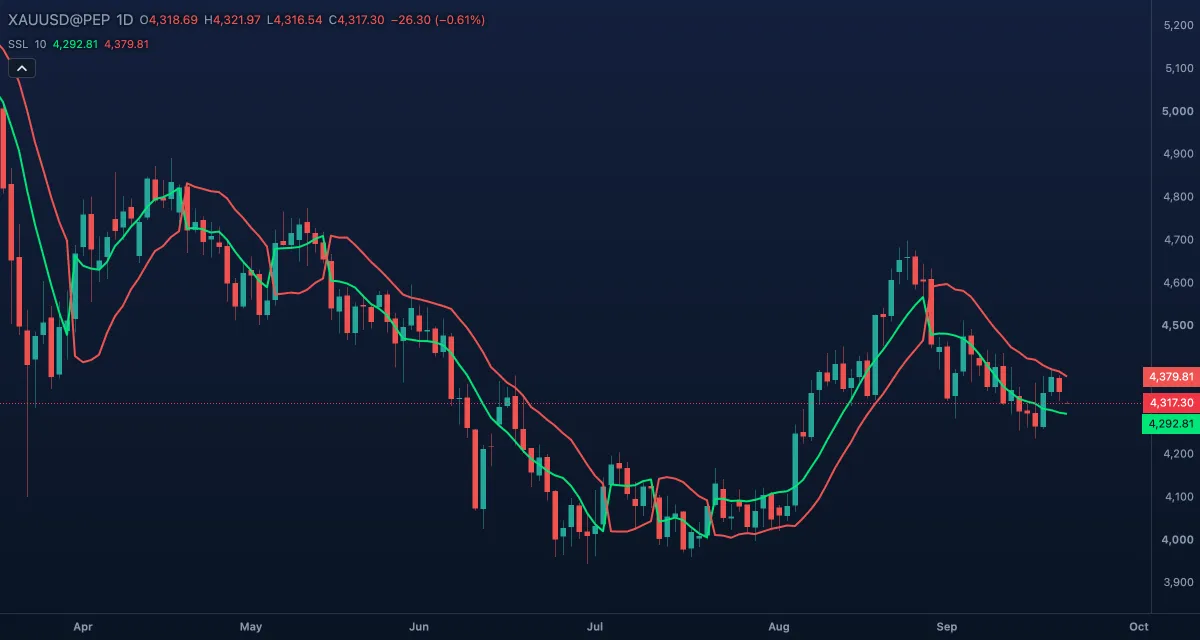
What it shows#
- SSL up (green) and SSL down (red), over the candles: the 10-bar simple averages of the highs and of the lows, a channel about as wide as an average candle.
- After a close above the average of the highs the green line is the upper one and the channel reads up; after a close below the average of the lows the red line is on top and it reads down. The lines cross where the side changes.
- A close inside the channel changes nothing: the last side holds.
How it is calculated#
Two simple averages are taken over Period bars: one of the highs, one of the lows. The side is set by the close: above the high average it turns up, below the low average it turns down, between them it stays what it was. While the side is up, SSL up is the high average and SSL down the low average; while it is down, the two swap, so the green line is drawn on the lower average and the red one on the upper.
How traders use it#
- Green above red is the long side, red above green the short side; the cross is the entry of a simple trend-following system, taken on the close that caused it.
- The lower line is a natural stop for a long (the upper one for a short); the channel's width is a quick read of volatility.
- Pullbacks into the channel that hold without a close through the far line are continuation entries.
- Many traders take SSL crosses only in the direction of a slower tool, such as a 200-bar EMA, or of the next timeframe up.
- Watch out: ten bars is fast. In a sideways market the colours swap every few bars; a cross is not a reason to trade by itself.
Settings#
| Setting | Default | What it changes |
|---|---|---|
| Period | 10 | Bars in both averages. Longer means a wider channel and fewer, later swaps. |
| Colours and style | — | Up line and Down line set the colour of each side. |
Example on gold#
For example, gold has been falling and the red line sits above the green, at about $4,260 and $4,230. Then a wide up day closes at $4,290, above the average of the highs: the lines swap, green is on top, and a trader buys the next open with a stop under the lower line. Over two weeks gold climbs to $4,380 and the channel rises with it, the lower line stepping up behind the price.
What invalidates it: a close below the lower line, which swaps the colours back. Within two or three bars of the cross that means a range, and the next cross needs a reason beyond itself.
Add it to your chart#
- Click Indicators in the top strip (on the Pro screen, press I).
- Type
ssland click SSL Channel. - Click its chip in the legend (SSL 10) to open the Inspector and change the settings; drag the chip to reorder; the dot hides it; × removes it.
Related#
- Donchian Channels — a channel of the highest high and lowest low instead of their averages
- MA Cross — two averages of the close whose cross gives the same kind of signal
- SuperTrend — one line that flips side, measured in ATRs
- Alerts — an alert when the two lines cross, or the price crosses one of them
- Adding and tuning indicators