Choppiness Index (CHOP)
What the Choppiness Index measures, how to read its 61.8 and 38.2 levels, its setting on MillionChart and an example on gold.
The Choppiness Index tells you whether the market is trending or chopping sideways, on a scale from 0 to 100: high means the bars overlap and the price goes nowhere, low means each bar extends the move. It says nothing about direction. The Australian commodity trader E. W. Dreiss devised it.
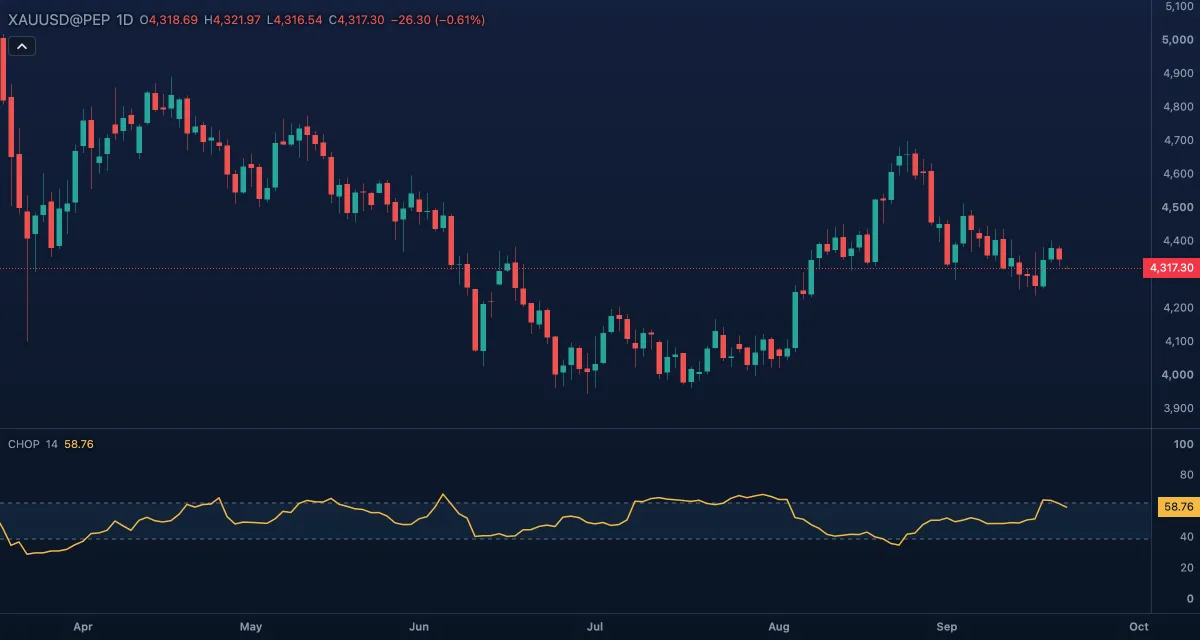
What it shows#
- CHOP — one line in its own pane, on a fixed 0 to 100 scale. Rising means the market is settling into a range; falling means it is starting to trend.
- Upper — a dashed level at 61.8; above it the market is choppy.
- Lower — a dashed level at 38.2; below it the market is trending.
- Zone fill — the tint between the levels, the undecided zone. The levels are the Fibonacci ratios the index is read against.
How it is calculated#
The index adds up the true ranges of the last Length bars and divides the sum by the distance the price actually covered over those bars, the highest high minus the lowest low. When the bars overlap a lot the sum is far bigger than the net distance and the index is high; when every bar pushes the move further the two are close and the index is low. The logarithm of the ratio is scaled by the logarithm of the length to fit 0 to 100. There is no value while the highest high equals the lowest low.
How traders use it#
- A filter, not a signal. Above 61.8 use range tactics: fade the edges, read Bollinger Bands or an oscillator. Below 38.2 use trend tactics: moving averages, breakouts, trailing stops.
- A turn down from above 61.8 says the consolidation is ending and a break may be near, in either direction; Donchian Channels show the break itself.
- A turn up from below 38.2 says the trend is losing steam and a range is forming.
- Pair it with ADX: the index says whether there is a trend, ADX how strong it is, and neither says which way.
- Watch out: it needs the whole window, so it confirms a trend after it is well under way, and a very low value after a long move says the move is mature, not that it will continue. The levels are conventions.
Settings#
| Setting | Default | What it changes |
|---|---|---|
| Length | 14 | How many bars the index looks back over (at least 2). A shorter length reacts faster and swings more; a longer one is smoother and later. |
| Colours and style | — | The Choppiness, Upper level, Lower level and Zone fill colours; the line's width, dash and visibility under Lines in the Inspector. |
Example on gold#
For example, gold has chopped between $4,250 and $4,350 for three weeks and the index sits at 65. You keep to range tactics: buy near $4,250, sell near $4,350, chase nothing in between. Then a wide daily candle closes at $4,380 and the index drops to 50 the next day and 35 the day after. The chop has ended and the market is trending, so the breakout trader's tools take over: a stop under the old top of the range, targets measured in ATR.
If the index had climbed back above 61.8 while the price slipped back inside the range, the break was false and range tactics would apply again. This is an illustration, not a signal.
Add it to your chart#
- Click Indicators in the top strip (on the Pro screen, press I).
- Type
chopand click Choppiness Index (the search also lists Chop Zone, a different indicator). - Click its chip in the legend to open the Inspector and change the settings; drag the chip to reorder; the dot hides it; × removes it.
Related#
- Average Directional Index — the strength of a trend once there is one
- Donchian Channels — the breakout that ends a choppy stretch
- Bollinger BandWidth — another view of compression, from the width of the Bollinger Bands
- Alerts — an alert when the index crosses 61.8 or 38.2
- Adding and tuning indicators