Signals and the four MillionAlgo studies
The Signals button, what each MillionAlgo study shows, who can switch it on, the free Pro month and the 7-day tries, and the studies in replay and alerts.
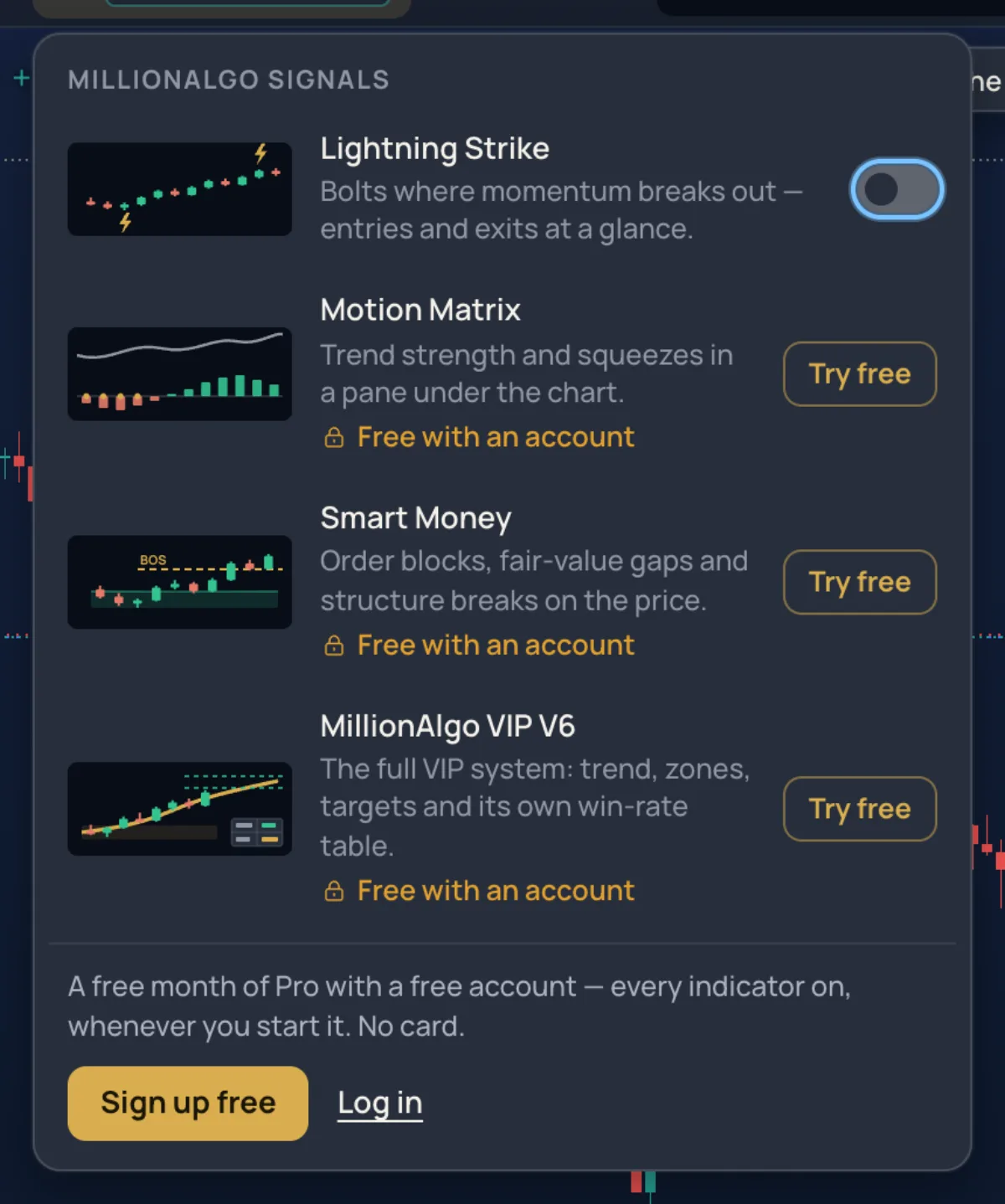
Signals gathers the four studies only MillionChart has: Lightning Strike, Motion Matrix, Smart Money and MillionAlgo VIP V6. The panel is one place to switch each of them on or off and to see what your account includes.
What it is#
| Study | What it draws | Included in |
|---|---|---|
| Lightning Strike | Bolts where momentum breaks out — entries and exits at a glance | Free, for everyone — guests too |
| Motion Matrix | A trend line, a volatility cloud and trend-strength circles on the price | Basic Plan and above |
| Smart Money | Structure breaks drawn on the price: BOS, CHoCH and CHoCH+ lines | Lite Plan and above |
| MillionAlgo VIP V6 | The full VIP system: trend, zones, targets and its own win-rate table | Pro Plan and above |
MillionChart Pro, the free Pro month and the founders' year open all four as well, and every MillionAlgo indicator plan includes MillionChart Pro. See Plans.
Where it is#
- Signals in the strip. A short line under it names your plan and how many of the four are on —
FREE CHART · 1/4as a guest,PRO PLAN · 4/4, orFREE PLAN · try Pro freewhile your free month waits. - On the Pro screen, G then X.
- On a phone, Signals in the action bar opens the same panel as a sheet.
- The same four rows are in the Indicators popover under MillionAlgo, and the Lens finds them by name (
+vip).
How to use it#
- Click Signals.
- Every row has a small preview, the study's name and one line on what it shows. If your account includes it, there is a switch at the right: turn it on and the study draws (Drawing… or Computing… while it works). Smart Money then counts its structure breaks; VIP V6 shows its preset and the number of its signals.
- Turn the switch off to take the study away again.
- A locked row shows a lock and the plan that includes it, with Try free (as a guest, or while your free month waits) or See plans. Both open the Unlock sheet — a locked row is never a dead end.
Settings, colours and lines of a study are in the Inspector, like any indicator: click its chip in the legend. See Indicators panel and the Inspector.
Access states#
The foot of the panel says where you stand and offers one way forward:
| You are | The foot says | Button |
|---|---|---|
| A guest | A free month of Pro comes with a free account; no card. | Sign up free, Log in |
| A free member, month not started | A free month of Pro is waiting — every indicator on for 30 days from the moment you press Start. | Try Pro free |
| In your free Pro month | How much of the month is left; choose a plan to keep them after it. | Keep the indicators |
| Month over, no plan | Your free Pro month has ended — the plans switch them back on. | See plans |
| On an indicator plan | Your plan and how many of the four it includes. | Upgrade for the rest |
| MillionChart Pro, a founder, or every indicator | Every indicator is unlocked on your account. | — |
The Unlock sheet#
Every locked door — a locked row, a locked study added from the Lens or the Indicators popover, or one in a layout you open — leads to the Unlock sheet. It lists the four studies with their state for you (Included, In your Pro month, or the plan and above) and one button:
- Start my free Pro month — it starts when you press, ends by itself after 30 days, once per account, no card. The month gives you everything MillionChart Pro has: every signal, alerts on whole watchlists and webhooks.
- Try 7 days free on a locked study — once per study per account, for a member whose free month is not waiting.
- Sign up free as a guest, See plans otherwise.
The sheet also points to Post about MillionChart and get MillionChart Pro free — see Your account.
In replay and in alerts#
- Bar replay: the studies draw candle by candle as they would have on that day — the same bolts, structure breaks and setups. See Bar replay.
- Alerts: right-click a study (or press the bell in its Inspector) and choose Add alert…. A bolt, a break of structure or a V6 setup can ring on Telegram, your phone and the desktop. This needs an account. See Alerts.
- VIP V6 is computed on the server, so it needs a connection, and it is not served on seconds and tick charts yet.
Examples#
- A guest on gold. Click Signals and turn Lightning Strike on: bolts appear at the turns of momentum. Click its chip in the legend to change its size or colours.
- A free member. Click Signals, then Try Pro free and Start my free Pro month: all four switches come alive for 30 days. Afterwards the sheet offers Try 7 days free on each study, once.
Limits and plans#
Lightning Strike is free for everyone. The other three come with the MillionAlgo indicator plans, MillionChart Pro, the free Pro month or a founder's year. The free month is one per account and starts only when you press Start. See Plans.