Ichimoku Kinko Hyo
What the five Ichimoku lines and the cloud show, how they are calculated and displaced, the settings on MillionChart and a worked example on gold.
Ichimoku Kinko Hyo ("one-glance equilibrium chart") is a complete trend system drawn over the candles: two moving midlines, a cloud projected into the future, and a copy of the close shifted into the past. It shows direction, support and resistance, and momentum at one glance, which is the point of the name. Goichi Hosoda published it in Japan in 1969.
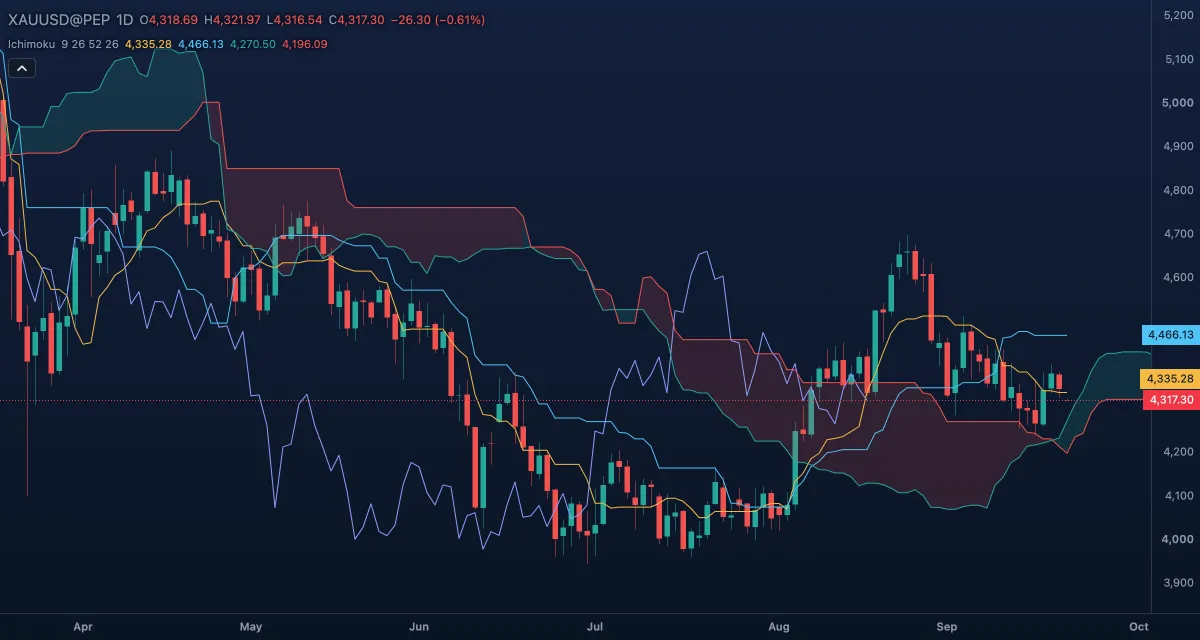
What it shows#
- Conversion line (tenkan-sen, gold) — the midpoint of the last 9 bars' range: the fast line.
- Base line (kijun-sen, light blue) — the midpoint of the last 26 bars' range: the slow line, and the first support or resistance.
- Leading span A (green) — the average of those two lines, drawn 26 bars ahead.
- Leading span B (red) — the midpoint of the last 52 bars' range, also drawn 26 bars ahead.
- The cloud (kumo) — the area between the leading spans: green while span A is above span B, red while it is below. Price above the cloud is an uptrend, below it a downtrend, inside it no trend.
- Lagging span (chikou span, blue-violet) — today's close drawn 26 bars back, to compare it with the price of that time.
How it is calculated#
A midpoint over N bars is (highest high + lowest low) / 2 of those bars, from the high and the low only. The conversion line, the base line and leading span B use Conversion line length, Base line length and Leading span B length bars; leading span A is (conversion + base) / 2. The Displacement shifts the leading spans forward and the lagging span back, counting the current bar as the first of the 26, so a value computed on a bar is drawn 25 bars beyond it. The cloud's colour follows which span is on top.
How traders use it#
- Trend: trade long above the cloud and short below it; stay out while price is inside, where the cloud is support and resistance at once.
- Crossing: the conversion line crossing above the base line is a buy signal, strong above the cloud and weak below it; the mirror for sells.
- The cloud ahead: a green cloud in front of the last candle says the spans expect the trend to go on; a thin cloud is easy to cross, a thick one is a wall.
- Base line: a pullback that holds the base line in a trend is the classic entry; a close through it warns. The lagging span above the candles of 26 bars ago confirms an uptrend.
- Watch out: in a range every line crosses every other and the cloud flips colour; the system was built for daily charts and gets noisy on short timeframes. Five lines and a cloud are a lot: start with the cloud alone, then add the rest.
Settings#
| Setting | Default | What it changes |
|---|---|---|
| Conversion line length | 9 | Bars in the conversion line's midpoint (1 to 1,000). |
| Base line length | 26 | Bars in the base line's midpoint (1 to 1,000). |
| Leading span B length | 52 | Bars in leading span B's midpoint (1 to 1,000). |
| Displacement | 26 | How far ahead the leading spans and how far back the lagging span are drawn, counting the current bar (1 to 100). |
| Colours and style | — | The five line colours and the two cloud colours (Cloud: span A above, Cloud: span A below). |
Example on gold#
Gold trades at about $4,300, above a green daily cloud whose top sits near $4,230, and the conversion line has just crossed above the base line at around $4,260. For example, a trader takes that as trend continuation: long on a pullback that holds the base line, stop below the bottom of the cloud near $4,200, and the cloud ahead, still green and widening, as the reason to expect more.
What would invalidate it: a daily close inside the cloud with the conversion line back under the base line. Inside the cloud there is no trend to follow; a close below it would flip the bias to short.
Add it to your chart#
- Click Indicators in the top strip (on the Pro screen, I does the same).
- Type
ichimokuand click the indicator. - Click its chip in the legend to open the Inspector and change the settings; drag the chip to reorder; the dot hides it; × removes it.
Related#
- Donchian Channels — the same highest-high and lowest-low window as a channel; its middle line is the Ichimoku midpoint
- Average Directional Index — a strength reading to go with the cloud's direction
- Parabolic SAR — a trailing stop for a position taken above or below the cloud
- Alerts — an alert when the price crosses a line
- Adding and tuning indicators