Fisher Transform
What the Fisher Transform does to price, why its turns are sharp, how to read the Fisher and trigger lines, its settings and an example on gold.
The Fisher Transform takes where the price sits inside its range of the last 9 bars and reshapes it so that extremes become sharp, clear peaks rather than the flat tops of a stochastic. John Ehlers published it in 2002. It runs around zero in its own pane with no fixed limits; readings beyond about 2 either way are rare and mark a stretched market.
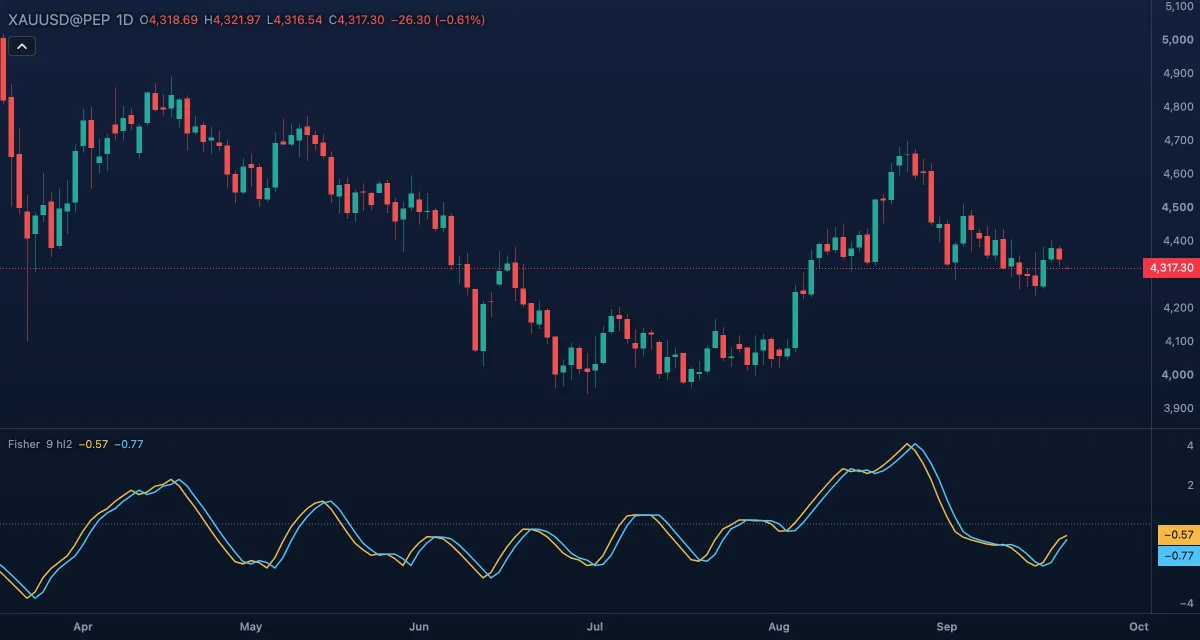
What it shows#
- Fisher (gold line): the transformed position of the price in its recent range. Rising means the price is climbing within that range; a sharp peak marks an extreme.
- Trigger (blue line): the Fisher line one bar earlier. The two cross exactly when the Fisher line changes direction, so the crossing is the turn made visible.
- Zero: a dotted line. On it the price is at the middle of its recent range.
How it is calculated#
The position of the source inside the highest and lowest of the last Length bars, scaled to −1 … +1, is smoothed (one third of the new position plus two thirds of the previous value) and kept just inside ±1. The transform is then 0.5 × ln((1 + value) / (1 − value)), averaged half and half with the previous Fisher value. The logarithm is what turns small moves near the edges of the range into large moves of the line. The Trigger is the previous bar's Fisher. The default Source is Mid (HL2), the middle of each bar. A bar whose window has no range at all has no value, and the line starts again from zero on the next.
How traders use it#
- Turns: the Fisher line crossing its trigger after reaching an extreme is the signal. Because the peaks are sharp, the crossing tends to come close to the turn in price rather than long after it.
- Extremes: readings beyond about +2 or −2 mark a market stretched against its recent range. Wait for the turn; the extreme itself is not the signal.
- Zero line: above zero the price is in the upper half of its recent range, a simple trend read; below zero the lower half.
- Length: 9 bars is short. A longer length makes the line slower and its extremes rarer.
- Watch out for: in a trend the line can sit at an extreme and cross its trigger on every small wiggle, giving many false turns. The window moves with each bar, so the reading can change because an old bar dropped out, not because price did anything. It does not know the trend.
Settings#
| Setting | Default | What it changes |
|---|---|---|
| Length | 9 | Bars of the high-low window the price is placed in. |
| Source | Mid | The price placed in the window: Open, High, Low, Close, Mid (HL2), Typical (HLC3) or Average (OHLC4). Mid is the middle of each bar. |
| Colours and style | — | The colours of the Fisher and Trigger lines and of the zero line. |
Example on gold#
Suppose gold has run up for two weeks to about $4,330 on the daily chart, for example, and the Fisher line spikes to 2.4, its highest reading in months, then turns down through its trigger line on the next bar. Price is stretched against its recent range and has stopped rising within it. A trader might use the crossing to take profit on a long position, or, with a reason from the larger picture, to try a short with a stop above $4,330. A Fisher line that turns back up through its trigger within a couple of bars, with price making a new high, would cancel the turn.
Add it to your chart#
- Click Indicators in the top strip (on the Pro screen, press I).
- Type
fisherand click Fisher Transform. - Click its chip in the legend to open the Inspector and change the settings; drag the chip to reorder; the dot hides it; × removes it.
Related#
- Stochastic — the same place-in-range idea without the transform
- Williams %R — the place in the range read from the top
- Relative Strength Index (RSI) — momentum on a fixed scale
- Alerts — an alert when Fisher crosses its trigger or zero
- Adding and tuning indicators