Average Day Range (ADR)
What the Average Day Range measures, how day traders read today against it, its settings on MillionChart and an example on gold.
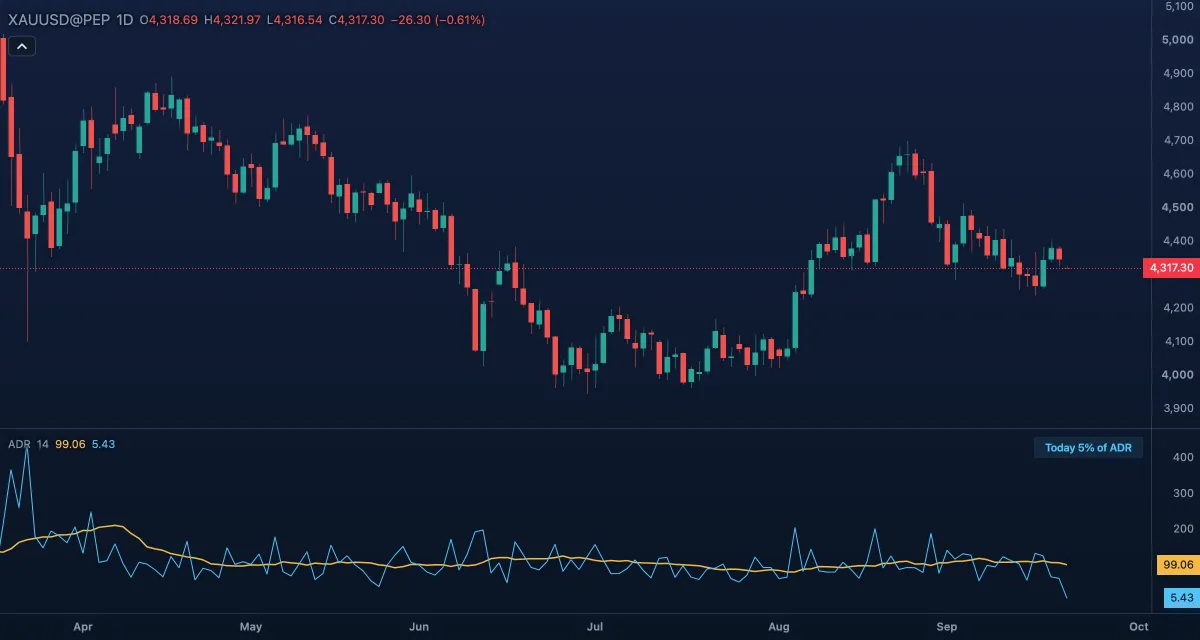
The Average Day Range is the average distance between a day's high and its low over the last N days, in the symbol's price units, with the range today has covered so far drawn next to it. It answers the day trader's question: has today already done an ordinary day's work? It is a long-standing traders' measure with no single author.
What it shows#
- ADR — the average of the last 14 completed days' ranges, in its own pane, printed with the symbol's digits. It holds still through the day and steps when a day closes. It is the same number on every timeframe: a 5-minute bar and the daily bar of its day show the same ADR.
- Today — the range the current day has covered up to this bar: the day's highest high minus its lowest low so far. On the daily chart it is each bar's own range. Where it meets the ADR line the day has covered an average day.
- A small table at the top right of the pane, at the last bar, reads for example "Today 71% of ADR". The Today vs average table switch hides it.
On an intraday chart the average comes from the broker's daily bars. If the chart has none, both lines stay empty and a note in the pane says "Average Day Range: no daily bars".
How it is calculated#
For each bar, the ADR is the mean of the high minus the low of the Days days that closed before the bar's own day; the current day is never part of its own average. Today's range is the running highest high minus lowest low of the day's bars up to the current one. A day is the broker's trading day, so a day after a clock change is not split in two.
How traders use it#
- Room left: when today has covered 80 to 100 percent of the ADR, the odds of a further push the same way fall. Take profit rather than chase; a new entry needs a better reason than usual.
- Targets: a target that needs the day to run well past one ADR is optimistic on a normal day; one inside the remaining range is realistic.
- Early in the day, a Today line at 20 or 30 percent of the ADR says there is room for a move either way.
- Stops in ADR terms: a quarter of the ADR is inside a normal day's noise; the full ADR is outside it.
- Watch out: it is an average, so news days run to two or three times it. It is in price units, so it grows with the price level, and it says nothing about direction.
Settings#
| Setting | Default | What it changes |
|---|---|---|
| Days | 14 | How many completed days go into the average. Fewer days follow the latest mood; more days give a steadier figure. |
| Today vs average table | On | Shows or hides the "Today … % of ADR" table in the pane. |
| Colours and style | — | The Average day range and Today's range colours; each line's width, dash and visibility under Lines in the Inspector. |
Example on gold#
For example, gold's 14-day ADR reads $60. By the London and New York overlap gold has climbed from an open at $4,280 to $4,336: the Today line is at $56 and the table reads "Today 93% of ADR". A day trader who is long takes that as the sign to bank most of the position rather than hope for $4,380, because the day has already done an ordinary day's work. If the table read 30 percent at the same hour, the same trader would hold for more.
The indicator says how far, never which way, and a central-bank day can run to twice the average. This is an illustration, not a signal.
Add it to your chart#
- Click Indicators in the top strip (on the Pro screen, press I).
- Type
adrand click Average Day Range, or press Enter for the first result. - Click its chip in the legend to open the Inspector and change the settings; drag the chip to reorder; the dot hides it; × removes it.
Related#
- Average True Range — the average range per bar on any timeframe, gaps included
- Historical Volatility — volatility in percent per year rather than price units
- Timeframes — the intraday charts the ADR is read on
- Alerts — an alert when today's range reaches a level
- Adding and tuning indicators