Timeframes
The timeframe chips and menu, favourites, custom intervals such as 7m or 3D, seconds and tick charts, what changes when you switch, and the keys.
A timeframe is how much time one candle holds: on a 15m chart every candle is 15 minutes of trading. MillionChart builds any timeframe from the feed's own candles, from one second to twelve months, and keeps the ones you use as chips on the strip.
What it is#
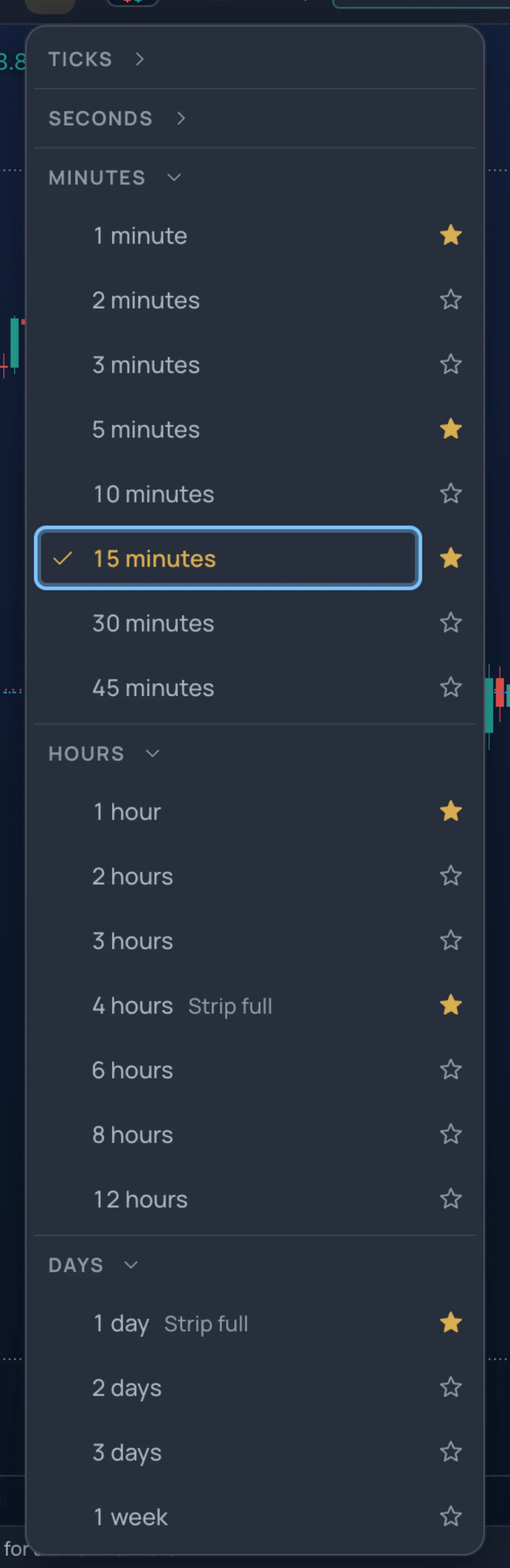
Every candle is built on the server from the feed's base candles — minute, hour and day bars — and streamed live, so a 7-minute or a 50-minute chart exists the moment you ask for it. The menu lists:
| Section | Timeframes |
|---|---|
| Ticks | 1, 10, 100 and 1000 ticks |
| Seconds | 1s, 5s, 10s, 15s, 30s, 45s |
| Minutes | 1, 2, 3, 5, 10, 15, 30, 45 |
| Hours | 1, 2, 3, 4, 6, 8, 12 |
| Days | 1D, 2D, 3D, 1W, 1M, 3M, 6M, 12M |
Any other interval can be added as a custom one. The chips print short labels: 1m 5m 15m 1h 4h D for the six classic ones, and 30m, 2H, 1W, 1M, 15s or 100T for the rest.
Where it is#
The chips sit on the strip right after the symbol button, with a More timeframes chevron that opens the Timeframe menu. The chips are your favourites: up to five on the Guided screen, eight on the Pro screen, fewer in a narrow window. The timeframe on the chart always has a chip, even when it is not a favourite. New members start with the six classic ones (on the Guided screen 4h waits in the menu until there is room).
How to use it#
- Click a chip to switch. A thin progress bar runs in the symbol button while the candles load.
- Open the menu for everything else. Each section folds under its head; the timeframe on the chart is checked. Click a row to switch.
- Star a row (★) to make it a chip: Show in the Strip / Remove from the Strip. When the strip is full, the row says Strip full and waits in the menu until you unstar another chip.
- Add custom interval… at the bottom takes a number and a unit — minutes, hours, days, weeks, months, plus ticks and seconds where tick charts are on — then Add. The interval goes on the chart and into its section with an × to remove it.
120minutes is kept as2H; a count past the unit's range is refused with the range printed. You can keep up to 10, within ticks 1–5000, seconds 1–59, minutes 1–1439, hours 1–24, days 1–30, weeks 1–52, months 1–12. - Or type it in the Lens:
15,1h,4h,d,7m,50m,3d, or:30with the:prefix;eurusd 1hchanges symbol and timeframe at once.m15,h1,240,d1,1wand1moare read too. Seconds and ticks are typed the same way —15s,45s,100t,1000t— for the ones the menu offers. A bare number counts as minutes only when it is a common step, soalert 4290stays a price; typed this way the Lens reads up to 7 days or 4 weeks.
Seconds and tick charts#
A seconds chart holds one candle per second, per 5 seconds and so on; a tick chart closes a candle every N price changes (10 ticks = one candle per 10 ticks), so it moves at the market's own pace. Both are built from ticks the server records for the symbols people watch, kept for 14 days. The first seconds or tick chart of a symbol nobody opened before starts empty and says No ticks recorded for XAUUSD yet — the chart fills as they arrive (the last 14 days are kept). On a build where tick recording is off, the two sections are greyed: Not available yet — tick and seconds charts come with the tick recorder. Both start folded.
What changes when you switch#
- The chart loads the new candles, keeps the symbol, and computes every indicator again. Drawings stay: they are anchored to time and price, not to a timeframe.
- If the new timeframe cannot load, the chart goes back and says so: XAUUSD 7m could not be loaded — back on 15m. 0 returns to the previous timeframe at any time.
- Candle times follow the feed's day. On a broker feed a trading day starts at 17:00 New York (21:00 or 22:00 UTC), so 4h, 8h and 12h candles count from there, like the broker's own; weeks start on Sunday at 17:00 New York, months on their first trading day, and 3M, 6M and 12M from January. Binance pairs use UTC midnight. Steps that divide an hour (1s to 30m, and 1h) sit on the plain clock grid everywhere.
- In a chart grid, linked charts can share a timeframe, and the Lens offers Top-down (the symbol on three timeframes, each a step up) and Show inside this candle (the candle under the crosshair on a smaller timeframe). See Layouts and the chart grid.
Keys#
| Key | Does |
|---|---|
| 1 … 9 | The timeframe chips, left to right, while the pointer is on the chart. The Pro screen prints the digit on each chip's tip and in the menu. |
| 0 | Back to the previous timeframe |
Ctrl+K, then :15 | The Lens, timeframes only |
| 1 … 9 with Keys of other chart sites | A box to type a timeframe: 5, 15, 60, 4h, D |
Examples#
- You trade gold on 1m and 5m and check 1H and 4H. Star those four and unstar 15m and D: the chips read
1m 5m 1h 4h, and 1 to 4 switch between them. - You want a 7-minute chart: open the menu, Add custom interval…, type
7, keep minutes, press Add. Next time, type7min the Lens.
Limits and plans#
Every timeframe is free, for guests too. Favourites, folded sections and custom intervals are kept in this browser, not in your account, so set them again on another device. How far back a chart goes depends on the symbol: gold has daily candles since 2008, hourly since 2023 and every minute since mid-2025; most other symbols have less, and seconds and tick charts hold the last 14 days. See Plans.
Related#
- Symbols and markets
- Chart types
- Bar replay
- Layouts and the chart grid
- The chart, part by part
- Keys — numbers pick a timeframe on the Pro screen