Chande Momentum Oscillator (CMO)
What the Chande Momentum Oscillator measures, its +50 and −50 levels, its settings on MillionChart and an example on gold.
The Chande Momentum Oscillator weighs the up moves of the last bars against the down moves and scales the balance from −100 to +100: +100 when every bar in the window closed higher than the one before, −100 when every bar closed lower, 0 when the two sides are equal. Tushar Chande and Stanley Kroll published it in The New Technical Trader (1994).
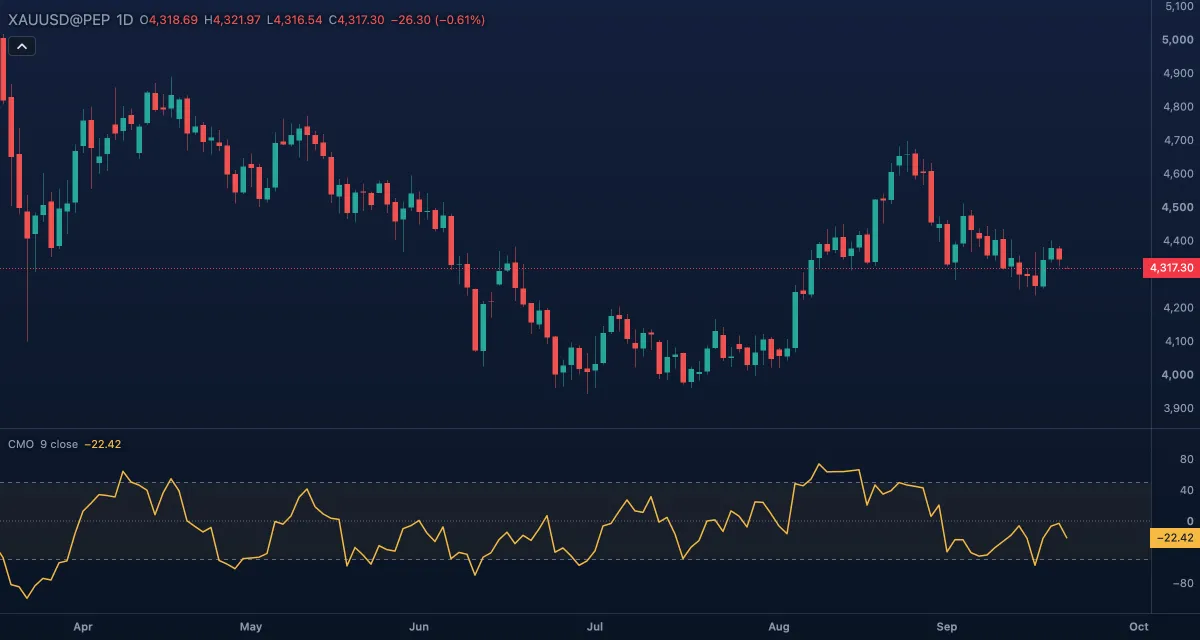
What it shows#
- CMO — one line in its own pane on a fixed scale from −100 to +100. Rising means the up moves are winning more of the window; falling, the down moves.
- Upper — a dashed level at +50; Lower — a dashed level at −50: Chande's overbought and oversold levels.
- Zero — a dotted line at zero.
- Zone fill — a faint tint between the two levels.
How it is calculated#
For each bar the chart takes the change of the Source from the bar before. Over the last Length bars it adds up the up moves and, separately, the down moves. CMO = 100 × (up moves − down moves) / (up moves + down moves). Unlike RSI nothing is smoothed: the sums are plain, so the line reacts at once and swings wide. A window with no movement at all has no value.
How traders use it#
- Above +50 the symbol is called overbought, below −50 oversold — with the same caution as RSI: in a strong trend the line can hold beyond the level while the price keeps going.
- The sign as a trend reading: CMO above zero means the up moves have outweighed the down moves over the window; a cross of zero is a change of balance.
- The distance from zero, whatever the sign, is also read as trend strength: near +100 or −100 a one-way market, near zero a choppy one.
- Divergence between the price and CMO, as with RSI, warns that a move is losing strength.
- Watch out: with no smoothing and a 9-bar window the line is jumpy, and one large bar leaving the window moves it. Lengthen it, or read it beside a calmer oscillator, before acting on a single touch of a level.
Settings#
| Setting | Default | What it changes |
|---|---|---|
| Length | 9 | Bars in the window. Shorter is faster and reaches the levels often; longer is smoother and stays nearer zero. |
| Source | Close | Which price is measured: Open, High, Low, Close, Mid (HL2), Typical (HLC3) or Average (OHLC4). |
| Colours and style | — | The colours of the CMO line, the Upper level, the Lower level, the Zero line and the Zone fill; width and dash under Look in the Inspector. |
Example on gold#
Gold rallies, for example, from $4,250 to $4,380 in two weeks on the daily chart, and CMO (9, close) climbs past +50 to about +70: nearly every day closed higher than the one before. The rally is strong, not finished — the reading alone is no reason to sell. A trader who missed the move waits for CMO to fall back under +50 while the price holds above $4,320, the first pullback inside the trend. One holding a long position watches for a bearish divergence: a new high near $4,400 with CMO topping out below its earlier +70.
What would invalidate the pullback idea: CMO falling through zero with a daily close under $4,320 — the balance of the window has turned.
Add it to your chart#
- Click Indicators in the top strip (on the Pro screen, press I).
- Type
cmoand click the indicator, or press Enter for the first result. - Click its chip in the legend to open the Inspector and change the settings; drag the chip to reorder; the dot hides it; × removes it.
Related#
- RSI — the smoothed cousin, with 70 and 30 levels on a 0 to 100 scale
- Momentum — the plain price change over n bars, in price units
- Rate of Change — the same change in percent
- Alerts — an alert when CMO crosses +50, −50 or zero
- Adding and tuning indicators