Pivot Points
What the pivot, support and resistance levels are, the six formulas and the period rule, their settings on MillionChart and an example on gold.
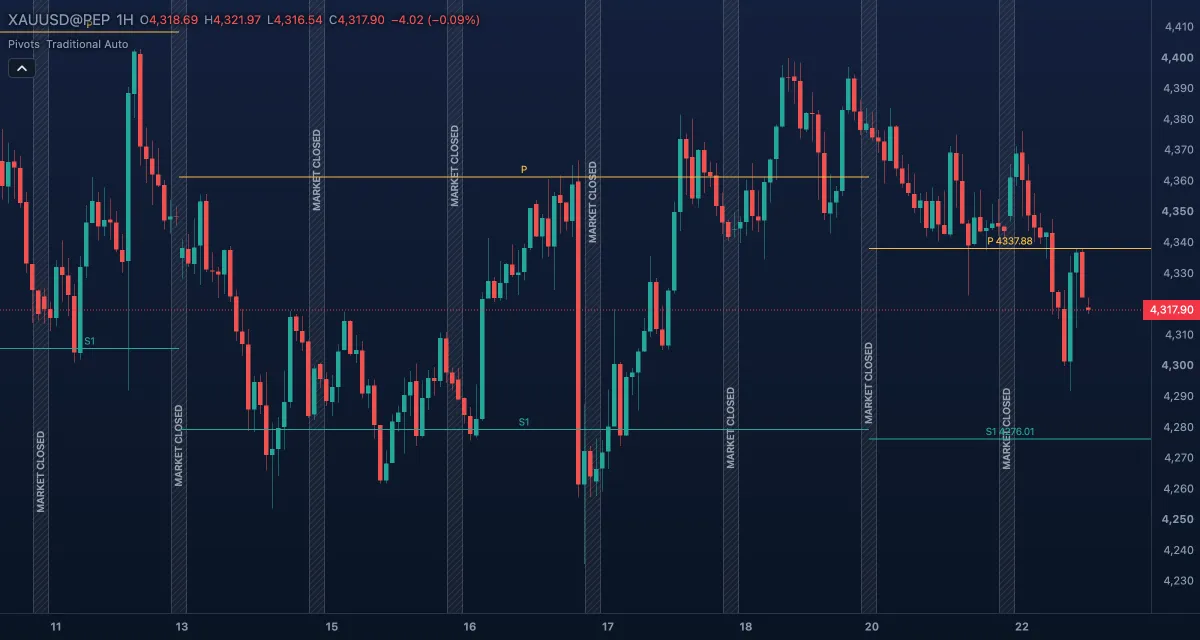
Pivot Points draws a set of horizontal levels for each period — a central pivot (P) with resistance levels above it (R1, R2 …) and support levels below (S1, S2 …) — calculated from the previous period's high, low and close. Floor traders used them before screens existed; they still mark the prices where intraday traders expect the market to pause or turn.
What it shows#
- Pivot — the central level of the period, gold, labelled P.
- Resistance — R1 to R5 above it, red; Support — S1 to S5 below it, green. How many of each depends on the Type.
- Each level is a line across its own period; the current period's levels run on to the right edge, with the level's name above the line and, by default, its price on the current period only.
- A period's levels are fixed from its first bar, so they never move while the period trades; new levels appear when the period rolls over.
How it is calculated#
With H, L and C the previous period's high, low and close, the Traditional pivot is P = (H + L + C) / 3, R1 = 2P − L, S1 = 2P − H, R2 = P + (H − L), S2 = P − (H − L), and so on up to R5 / S5. Fibonacci places R1–R3 and S1–S3 at 38.2 %, 61.8 % and 100 % of the range from P; Woodie weights the new period's own open; Classic steps R2–R4 and S2–S4 by whole ranges; DeMark draws one level each way, chosen by whether the previous period closed up or down; Camarilla (Nick Scott, 1989) sets tight levels around the previous close at fractions of the range, with R5 / S5 outside. The Period is the previous day, week, month or year; Auto uses daily levels on charts up to 15 minutes, weekly on longer intraday charts, monthly on daily charts and yearly from the weekly chart on.
How traders use it#
- P is the day's balance point: trading above it is read as a bullish day, below it as bearish. Many intraday traders take longs only above P and shorts only below it.
- R1 and S1 are the first targets and the first places to expect a reaction; a strong trend day runs through R1 to R2 or R3.
- A level that has been tested and held gains weight; a level broken on a close often becomes the stop for a trade in the breakout's direction.
- Camarilla's R3 / S3 are classic fade levels (sell at R3, buy at S3, stop beyond R4 / S4); its R4 / S4 are breakout levels.
- Watch out for the period: on a 5-minute chart the daily levels matter; on a daily chart the monthly ones do. Levels from a tiny previous range sit too close together to mean much, and a gap over several levels at the open leaves them irrelevant for that day.
Settings#
| Setting | Default | What it changes |
|---|---|---|
| Type | Traditional | Traditional, Fibonacci, Woodie, Classic, DeMark or Camarilla: the formula and the number of levels. |
| Period | Auto | Auto, Daily, Weekly, Monthly or Yearly: which previous period the levels come from. |
| Periods to draw | 15 | How many past periods keep their levels on the chart. 1 to 200. |
| Show labels | on | The level names (and prices) on the lines. |
| Prices in labels | Current period | Prices on the current period's labels only, on All periods, or Off (names only). |
| Colours and style | — | Pivot (gold), Resistance (red) and Support (green). |
If the chart cannot load the daily or weekly bars the levels need, a small note says so and nothing is drawn.
Example on gold#
For example, yesterday gold traded between $4,276 and $4,312 and closed at $4,300: today's Traditional pivot is P = $4,296, R1 = $4,316, S1 = $4,280. Gold opens at $4,304, above P, and dips to $4,298 in the first hour without closing a 5-minute candle below P. An intraday trader buys near $4,299 with a stop at $4,290, under P, and takes profit at R1 ($4,316); if R1 breaks on a close, R2 ($4,332) is the next target. A 5-minute close under P, followed by a failed bounce, turns the day bearish and the plan to the short side, towards S1.
Add it to your chart#
- Click Indicators in the top strip (on the Pro screen, press I).
- Type
pivotand click Pivot Points. - Click its chip in the legend to open the Inspector and change the settings; drag the chip to reorder; the dot hides it; × removes it.
Related#
- Pivot Highs and Lows — swing points of the price itself, not calculated levels
- 52-Week High and Low — the year's extremes as two lines
- VWAP — the other level intraday traders measure the day against
- Alerts — an alert when the price crosses a level
- Adding and tuning indicators