Volume Oscillator (VO)
What the Volume Oscillator measures, how to read it around zero, its settings on MillionChart and a worked example on gold.
The Volume Oscillator (VO) measures whether volume is rising or falling: it is the percent gap between a fast and a slow moving average of volume. Above zero, recent bars carry more volume than the longer average; below zero, less. It is in percent with no fixed bounds, and it says nothing about the direction of price — only about the amount of activity behind it. It is a generic construction with no single author.
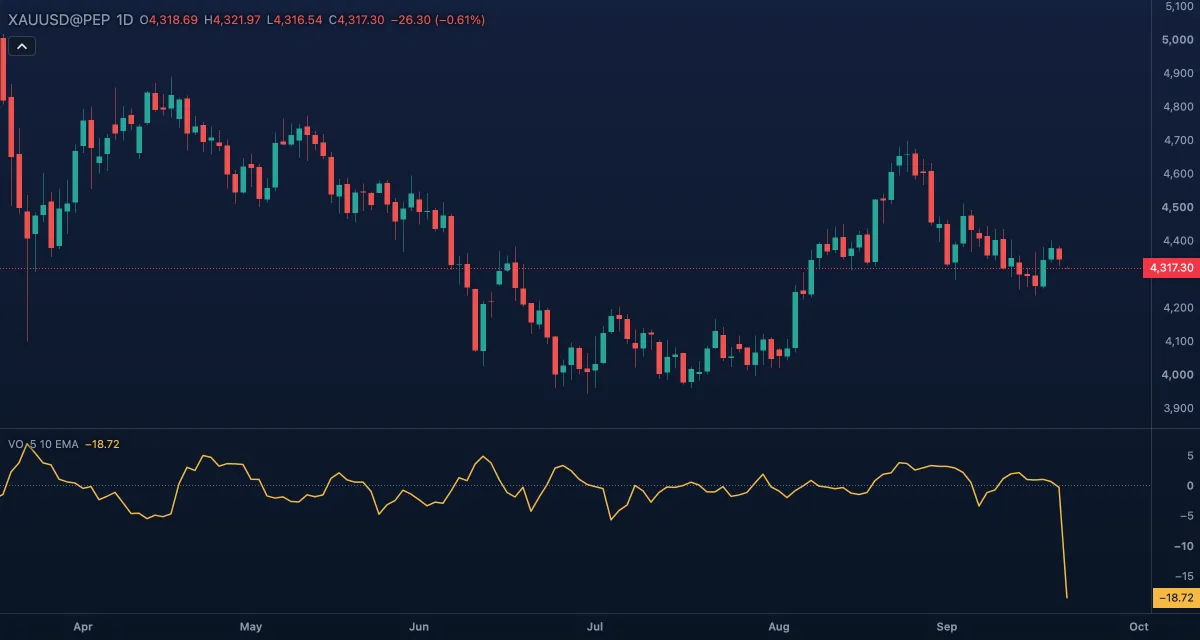
What it shows#
- VO — one line in its own pane under the chart. It rises while volume expands against its slower average and falls while it dries up. A reading of +20 means the fast average of volume is 20% above the slow one.
- Zero — a dotted line at 0, where the two averages are equal.
How it is calculated#
The chart takes an exponential moving average (EMA) of volume over Fast length (5 bars) and another over Slow length (10 bars), then plots 100 × (fast − slow) / slow. Average switches both to simple moving averages (SMA). A value appears once both averages exist; a missing volume restarts them. On gold and other CFD or forex symbols the volume is the broker's tick volume (the number of price changes in the bar), not contracts traded.
How traders use it#
- A breakout with VO rising through zero has expanding volume behind it; a breakout with VO falling or below zero has not, and is more often a false one.
- In a trend, VO sinking below zero while price keeps going says the move is running on less and less volume — a reason to tighten stops, not by itself a reason to reverse.
- In a range, VO climbing above zero before price leaves the range is an early sign that the quiet period is ending.
- Watch out for its blindness to direction: VO rises on a sell-off exactly as it does on a rally. Read it together with price, or with Net Volume, which carries the sign. With 5 and 10 bars it is also fast and noisy; longer lengths smooth it.
Settings#
| Setting | Default | What it changes |
|---|---|---|
| Fast length | 5 | The bars of the fast volume average. |
| Slow length | 10 | The bars of the slow volume average. The gap between the two lengths sets how sensitive the oscillator is. |
| Average | EMA | EMA or SMA for both averages. The SMA is steadier and changes with each bar that leaves its window. |
| Colours and style | — | The colour of the Oscillator line and of the Zero line. |
Example on gold#
For example, gold on daily candles has spent three weeks between $4,250 and $4,300 and VO has drifted under zero: volume dried up inside the range. One day price closes at $4,312 and VO jumps to +25, the fast average now well above the slow one. A trader who wants to buy the breakout takes the expansion as support for the trade and places the stop back inside the range, near $4,285. VO dropping back under zero over the next few days while price hovers just above $4,300 would say the breakout drew no follow-through, and the trade is reconsidered.
Add it to your chart#
- Click Indicators in the top strip (on the Pro screen the key is I).
- Type
volume oscillatorand click the indicator. - Click its chip in the legend to open the Inspector and change the settings; drag the chip to reorder; the dot hides it; × removes it.
Related#
- Volume — the columns and their moving average
- Relative Volume at Time — volume against the usual for the time of day
- On-Balance Volume — the running total that carries the direction of the close
- Alerts — an alert when the oscillator crosses zero
- Adding and tuning indicators