Bollinger Bands (BB)
What Bollinger Bands measure, how to read the squeeze and a band walk, their settings on MillionChart and an example on gold.
Bollinger Bands draw a moving average with a band on each side, a set number of standard deviations away. A standard deviation is the usual distance of the price from its average over the window, so the bands widen when the market moves a lot and narrow when it calms. The lines are in price units and sit over the candles. John Bollinger devised them in the 1980s.
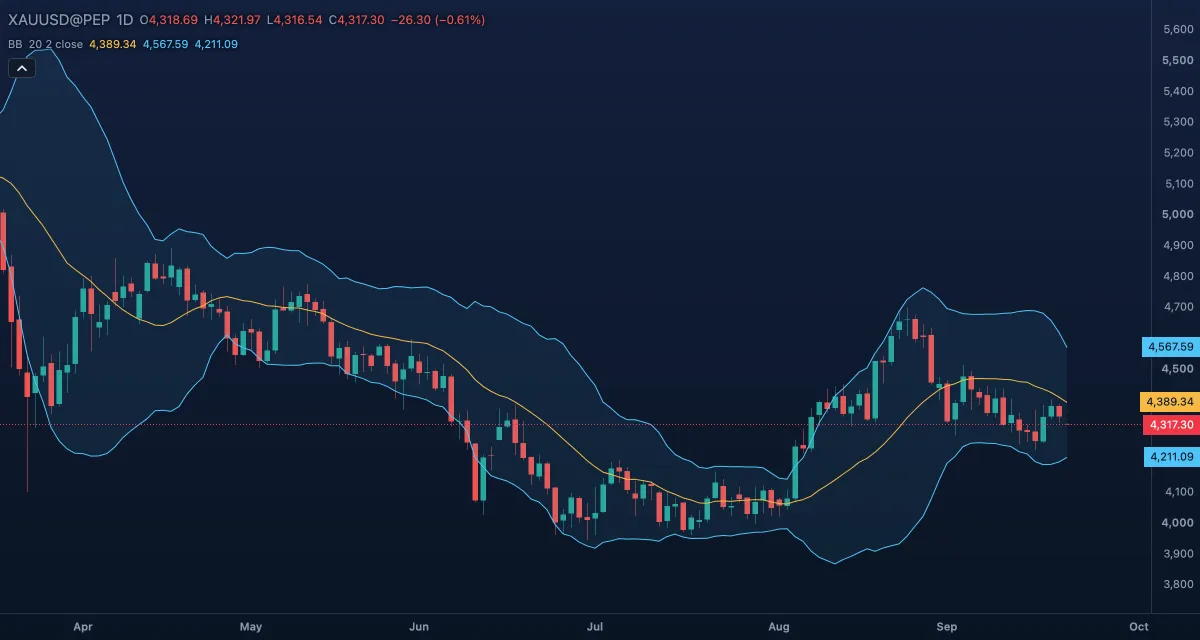
What it shows#
- Basis — the 20-bar simple moving average of the source. The price above it is above its average; the slope is the trend.
- Upper — the basis plus two standard deviations. A touch means the price is high compared with its recent average, not necessarily too high.
- Lower — the basis minus two standard deviations.
- Band fill — the tint between the bands. Its width is the volatility: wide after large moves, narrow in a quiet market.
How it is calculated#
The basis is the simple average of the Source over Length bars. The standard deviation of the same window is taken in the population form (divided by the number of bars). The upper band is the basis plus StdDev multiplier times that deviation; the lower band is the basis minus the same amount. The first value appears after Length bars.
How traders use it#
- A touch of the upper band is not a sell signal by itself: in a strong trend the price "walks the band" for weeks.
- The squeeze: the bands narrow to their tightest in months. A bigger move tends to follow, but the squeeze says nothing about its direction; wait for the break.
- In a sideways market the common trade is from a band back to the basis: buy near the lower band, sell near the upper.
- The basis is a trend filter: longs while the price holds above it, shorts while it holds below.
- Pair the bands with a momentum oscillator such as RSI, or read them as a number with Bollinger %B.
- Watch out for the lag: the bands widen after the move has begun. They describe the recent past; they are not limits the price has to respect.
Settings#
| Setting | Default | What it changes |
|---|---|---|
| Length | 20 | How many bars go into the average and the deviation. Shorter bands hug the price and cross it often; longer ones are smoother and slower. |
| StdDev multiplier | 2 | How far the bands sit from the basis, in standard deviations (0.1 to 10). A larger multiplier gives wider bands and fewer touches. |
| Source | Close | The price each bar contributes: Open, High, Low, Close, Mid, Typical or Average. |
| Colours and style | — | The Basis, Upper band, Lower band and Band fill colours; each line's width, dash and visibility under Lines in the Inspector. |
Example on gold#
For example, gold has drifted sideways around $4,300 for three weeks and the bands have narrowed to about $4,260 and $4,340, the tightest in two months. Then a daily candle closes at $4,360, outside the upper band, on a wide range. A squeeze followed by a close outside the band is the classic breakout reading: a trader who sees the next day hold above $4,340 treats the quiet spell as over and buys, with the stop under the basis near $4,300.
The reading fails if the price closes back inside the band within a few days: that was a false break, and the range continues. This is an illustration, not a signal.
Add it to your chart#
- Click Indicators in the top strip (on the Pro screen, press I).
- Type
bband click Bollinger Bands, or press Enter for the first result. - Click its chip in the legend to open the Inspector and change the settings; drag the chip to reorder; the dot hides it; × removes it.
Related#
- Bollinger %B — where the price sits inside these bands, from 0 to 1
- Bollinger BandWidth — the width of the bands as a line, for the squeeze
- Keltner Channels — the same idea with ATR bands; the two together make the squeeze setup
- Squeeze Momentum — marks the bars where these bands sit inside the Keltner Channels
- Alerts — an alert when the price crosses a band
- Adding and tuning indicators