Bar replay
Replay any past moment candle by candle, hide what comes next, trade it with a practice account and read your results.
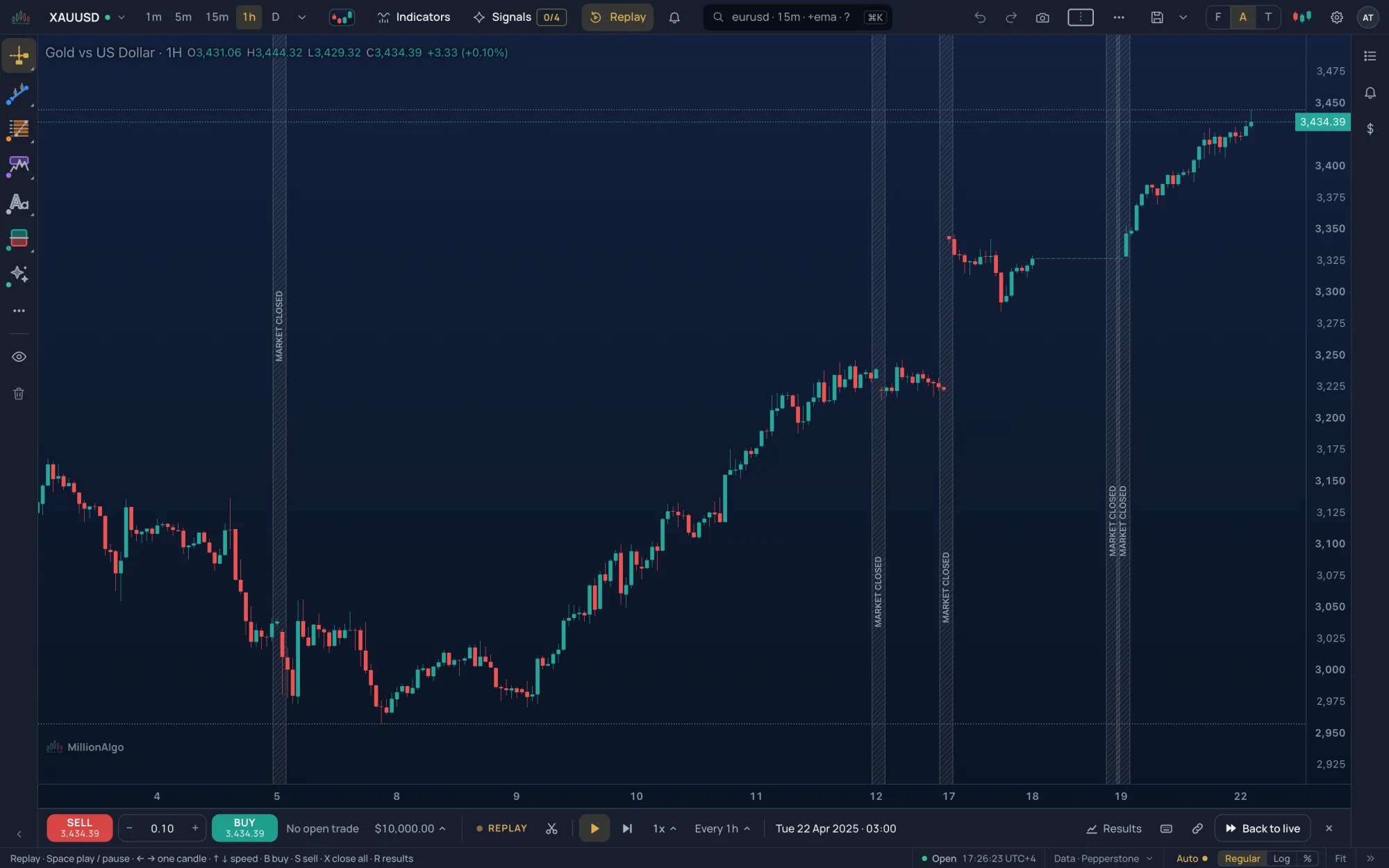
Bar replay takes the chart back to a moment you choose and hides everything after it. You reveal the candles one at a time, at your own pace, and can trade them with a practice account that is kept apart from your paper trading.
What it is#
The replay runs inside the chart: the indicators see only the candles revealed so far, so what you read on screen is what you could have known at that moment. It is free for everyone, with or without an account. The practice account, its trades and your results stay in this browser.
Where it is#
- Replay in the strip, right after Signals; More › Bar replay; on a phone, the Replay tile of the More sheet.
- On the Pro screen, G then E. In the Lens, type
>and thenreplay,replay randomorreplay 2025-08-12.
How to use it#
- Click Replay. A gold band follows the pointer over the chart with the words Start after …. Click a candle and the replay starts right after it. The last candle is refused: pick one before it.
- Instead of clicking, use Date (a date and an hour, then Start here; the menu says how far back this timeframe goes), Random (a moment you do not know) or Practice (below). Cancel or Esc leaves the pick.
- The replay bar docks under the chart; on a phone it floats at the foot of the chart. Press Play, or step with Next candle.
- To trade, press SELL or BUY at the replay's price with the lots you set (0.01 to 100). Drag the trade's TP and SL buttons on the chart to set a target and a stop, as in paper trading.
- Back to live (or the ×) ends the replay and brings the live chart back.
The replay bar#
| Control | What it does |
|---|---|
| Pick again | Start from another candle. |
| Play / Pause | Reveal candles one after another. |
| Next candle | One step forward. ← steps back, but not while a trade or an order is open. |
| Speed | 0.5x, 1x, 2x, 3x, 5x or 10x: candles a second. |
| Every … | What one step reveals: the chart's own candles, or a finer step (1m, 5m, 15m, 1h or 4h, whatever lies below the chart's timeframe). A finer step grows each candle bit by bit, the way it formed. |
| The clock | The newest candle shown; Caught up with the present when the replay reaches live data. |
| Results | Your replay results, with a count of closed trades. |
| Keys · link | The replay's keys, and a link that opens this chart at this moment of the replay. |
| Back to live · × | Leave the replay. |
The trade row above it shows SELL, the lots, BUY, the open P&L, Close all and the balance. The balance opens the account menu: balance, open P&L, net since start, trades and win rate, best and worst, the last five trades, See all results and Start over with $10,000.
Keys#
| Key | Does |
|---|---|
| Space | Play or pause |
| → ← | One candle forward, one back |
| ↑ ↓ | Faster, slower |
| B S | Buy, sell at the replay price |
| X | Close every open replay trade |
| R | Your replay results |
| Esc | Cancels a pick or closes a bar menu; it never ends the replay |
The letters go by the key's position, so they work on any keyboard layout.
Trading inside a replay#
Orders fill at the replay's price. A candle that reaches both your stop and your target counts as the stop. Close or reverse a trade from its line on the chart, or Close all from the bar. Switching to another symbol while the replay runs closes that symbol's trades at their last price. The account starts with $10,000, keeps its newest 1,000 closed trades and is separate from your paper account; Start over resets it after one confirmation.
Results#
Results on the bar, See all results in the account menu, More › Replay results or R open the Results panel. When a replay with new closed trades ends, a toast offers See results.
- Overview: tiles for net P&L, win rate, profit factor, max drawdown and expectancy; the cumulative P&L after each trade with its deepest drawdown marked; each trade as a bar; long against short; how the trades ended (take profit, stop loss, closed by you, replay ended).
- Trades: every closed trade with symbol, side, lots, entry, exit, how it ended and how long it was held. Chips at the top filter by symbol.
Practice: what comes next?#
Practice on the pick bar starts a round at a random moment with the date hidden. The question is Where will the price close 10 candles from now? Answer ▲ Higher (↑ or H) or ▼ Lower (↓ or L); the next ten candles play and the bar says whether you were right, then Next round (Enter). The bar keeps the round's score, your streak, your best and your lifetime score.
Links to a moment#
The bar's link button copies an address such as /chart?symbol=XAUUSD&interval=15&replay=1723464000, where the last number is the moment in Unix seconds. Whoever opens it lands inside the replay at that moment; ?replay=random opens a random one. A moment that falls in a weekend or a market break starts right after the last candle before it.
History and limits#
Gold has the deepest archive: daily candles from 2008, hourly from late 2023 and every minute from mid-2025; forex, crypto and indices follow the same pattern. The Date menu says how far back the chart's timeframe goes, and a replay keeps at least 50 candles of history before its start. If Random says there is not enough history on this timeframe, try a lower one. Where a finer step's candles do not exist yet, the replay steps by the chart's own candles.
Bar replay is free for everyone, guests included. The replay account, its results and your practice score stay in this browser: another device or browser starts fresh. In a chart grid the replay runs on the gold chart, shown large.
Related#
- Paper trading: the live practice account
- Layouts and the chart grid
- Timeframes · Symbols and markets
- Keyboard