Accelerator Oscillator (AC)
What Bill Williams' Accelerator Oscillator shows, how it is calculated from the Awesome Oscillator, its settings and an example on gold.
The Accelerator Oscillator measures whether momentum is speeding up or slowing down. It is the Awesome Oscillator minus its own short average, so it turns before the Awesome Oscillator does, and the Awesome Oscillator turns before the price. It is measured in the symbol's price units and has no fixed range. Bill Williams published it in New Trading Dimensions (1998).
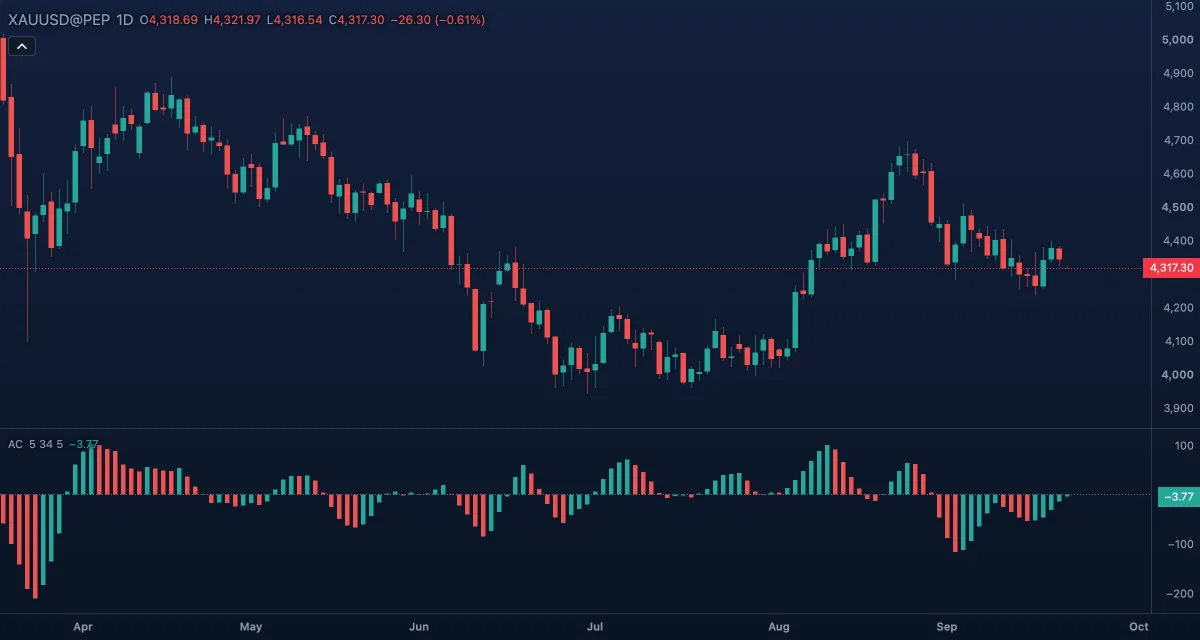
What it shows#
- AC — a histogram in its own pane. Each bar is green when it is higher than the bar before (Rising bar) and red when it is lower or equal (Falling bar); the first bar after a gap in the data counts as green. The colour, not the side of zero, is what Williams read.
- Zero — a dotted line at zero. Above it momentum is accelerating upward; below it, downward.
How it is calculated#
The chart first computes the Awesome Oscillator: the simple average of the bar's median price, (high + low) / 2, over Fast length bars minus the same average over Slow length bars. AC is that value minus its own simple average over Average length bars. The indicator reads the high and low of each bar, so it has no Source setting.
How traders use it#
- Colour first: Williams' rule is not to buy on a red bar and not to sell on a green bar, whatever else the chart says.
- Above zero, two green bars in a row are his buy condition; below zero he asked for three green bars, because the oscillator still had the zero line against it. The sell side mirrors this with red bars.
- Bars of one colour growing away from zero show the move accelerating; shrinking bars show it running out of push, before the Awesome Oscillator and the price do.
- As a filter: a colour that agrees with the trade's direction is a small confirmation, a disagreeing one a reason to wait a bar.
- Watch out: AC is noisy — on a quiet chart the bars flip colour constantly around zero — and a 34-bar average lags a sharp reversal. In price units, its height means nothing across symbols; read the shape.
Settings#
| Setting | Default | What it changes |
|---|---|---|
| Fast length | 5 | Bars of the fast average of the median price. |
| Slow length | 34 | Bars of the slow average. Williams used 5 and 34; both are inputs here. |
| Average length | 5 | Bars of the average of the Awesome Oscillator that is subtracted. |
| Colours and style | — | The colours of the Rising bar, the Falling bar and the Zero line; the bar width under Look in the Inspector. |
Example on gold#
Gold, for example, has risen from $4,200 to $4,320 on the daily chart and AC (5, 34, 5) has been above zero with green bars. Then the price grinds a little higher to $4,330 while the AC bars turn red and shrink towards zero: the advance is still on, but it is no longer accelerating. A trader holding a long position tightens the stop rather than adding; one waiting to buy a pullback waits for the bars to turn green again with the price still above the last swing low near $4,260.
What would invalidate the caution: a fresh run of green bars growing away from zero on new highs — the acceleration has come back.
Add it to your chart#
- Click Indicators in the top strip (on the Pro screen, press I).
- Type
acand click the indicator, or press Enter for the first result. - Click its chip in the legend to open the Inspector and change the settings; drag the chip to reorder; the dot hides it; × removes it.
Related#
- Awesome Oscillator — the oscillator AC is derived from
- Alligator — the trend filter of Williams' method
- Williams Fractals — the entry points of the same method
- Alerts — an alert when AC crosses zero
- Adding and tuning indicators