MA Cross
Two moving averages with a mark where they cross — what a golden or death cross means, its settings on MillionChart and an example on gold.
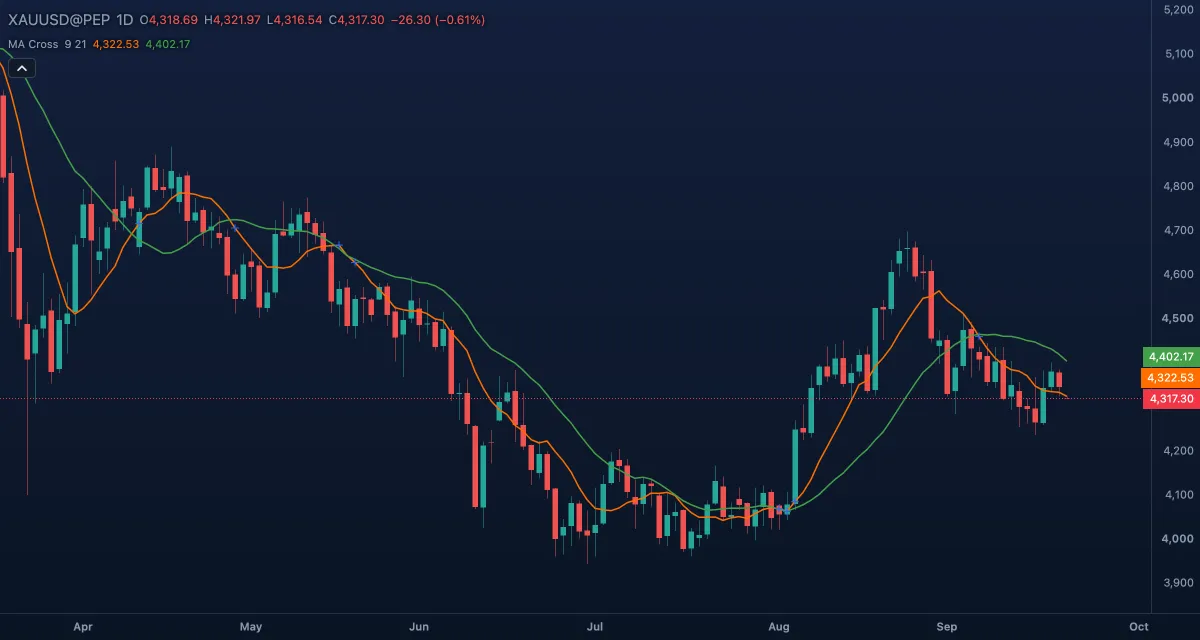
MA Cross draws a short and a long moving average of the close and marks every bar where the two cross. It is the simplest trend-following tool: the short average above the long one reads as an up trend, below it as a down trend, and the cross is the moment the reading changes. The defaults are 9 and 21 bars, simple averages.
What it shows#
- Short MA — the orange line over the candles, the 9-bar average; it hugs the price.
- Long MA — the green line, the 21-bar average; smoother, and later to turn.
- Cross — a blue cross mark on the short line at every bar where the two averages cross, either way.
- Short above long is an up trend, below it a down trend; the gap between them is the trend's momentum.
How it is calculated#
Each line is a moving average of the close over its length — Short MA length (9) and Long MA length (21). Average picks the kind for both: SMA (every bar weighs the same), EMA (recent bars weigh more), SMMA (RMA) (Wilder's smoothing), WMA (linear weights) or VWMA (weighted by volume). A cross mark is drawn where the short average is above the long one on this bar and was at or below it on the bar before, or the reverse.
How traders use it#
- The short average crossing above the long one is the classic buy of trend-following systems; crossing below is the sell. Wait for the close: a cross inside the bar can undo itself.
- With the lengths at 50 and 200 on daily candles, the up cross is the "golden cross" and the down cross the "death cross" of the financial press.
- In an up trend, a pullback that touches the long average and holds is a common entry area.
- A widening gap confirms the trend; the lines converging warns that it is slowing, before any cross.
- Watch out: averages lag, so the cross comes after the turn, and in a range the lines cross back and forth — each cross costs a little. Add a filter such as ADX or the trend of a higher timeframe.
Settings#
| Setting | Default | What it changes |
|---|---|---|
| Short MA length | 9 | Bars in the fast average. Shorter crosses sooner and more often. |
| Long MA length | 21 | Bars in the slow average. Longer means fewer, later crosses. |
| Average | SMA | The kind of both averages: SMA, EMA, SMMA (RMA), WMA or VWMA. |
| Colours and style | — | Short MA, Long MA and Cross set the colours of the two lines and the marks. |
Example on gold#
For example, gold has fallen from $4,400 to $4,200 and the 9-day average has been under the 21-day for a month. Then a week of higher closes lifts the 9-day line, and at about $4,250 it crosses above the 21-day — a blue mark on the chart. A trader takes that as the first sign of a new up trend and buys the next dip toward the 9-day line, with a stop under the low near $4,200.
What invalidates it: the 9-day crossing back under the 21-day within days. Two quick crosses mean a range, and the next signal needs more confirmation.
Add it to your chart#
- Click Indicators in the top strip (on the Pro screen, press I).
- Type
ma crossand click MA Cross. - Click its chip in the legend (MA Cross 9 21) to open the Inspector and change the settings; drag the chip to reorder; the dot hides it; × removes it.
Related#
- Exponential Moving Average (EMA) — one average on its own, the faster kind
- Moving Average Ribbon — four averages at once
- MACD — the difference of two EMAs, so a cross becomes a zero crossing in its own pane
- Alerts — an alert when the short average crosses the long one
- Adding and tuning indicators