Net Volume
What Net Volume shows, how each bar's volume gets its sign, its settings on MillionChart and a worked example on gold.
Net Volume is each bar's volume with a sign: positive when the bar closed above the previous close, negative when it closed below it. It is drawn as columns in its own pane around a zero line, in volume units. It is the one-bar view of what On-Balance Volume adds up over time.
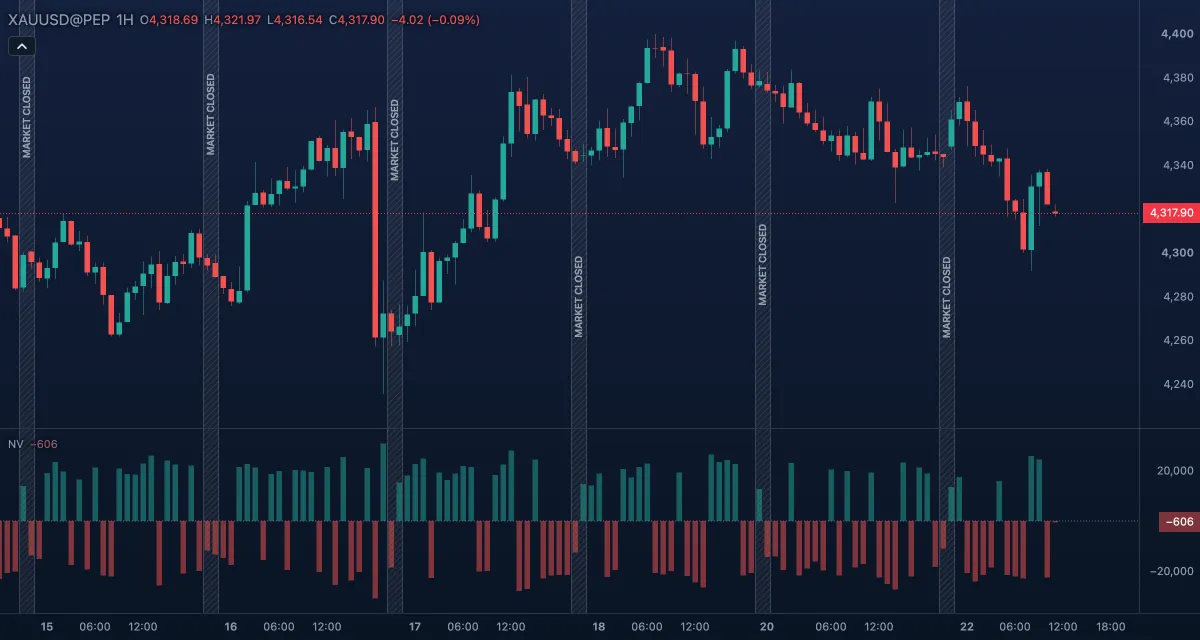
What it shows#
- Net volume — one column per bar in its own pane under the chart. A column above zero (green by default, Net volume: buying) is a bar that closed higher than the bar before it; a column below zero (red, Net volume: selling) closed lower. The column is as tall as the bar's whole volume.
- Zero — a dotted level at 0. A bar that closed exactly where the previous one closed sits on it.
How it is calculated#
For each bar the chart compares the close with the previous close: higher gives +volume, lower gives −volume, equal gives 0. The first bar of the loaded history has no previous close and reads 0. The chart does not split a bar's volume into buys and sells — that would need every trade of the bar — so a column is the whole bar's volume on one side. On gold and other CFD or forex symbols the volume is the broker's tick volume (the number of price changes in the bar), not contracts traded.
How traders use it#
- A run of tall buying columns while price breaks a level says the move had participation; a breakout on short columns is treated with more doubt.
- A tall selling column inside a rise (or a tall buying column inside a fall) is a warning that the other side showed up; wait to see whether the next bars confirm it.
- Compare the heights, not the count: five small buying columns can weigh less than one large selling column.
- Watch out for the sign: it comes from the close against the previous close, not against the open. A bar that gapped up and closed below its open can still be a buying column, and a bar with a tiny net price change but huge volume is drawn at full height on one side.
Settings#
Net Volume has no calculation settings.
| Setting | Default | What it changes |
|---|---|---|
| Colours and style | — | The colours of the buying and selling columns (Net volume: buying, Net volume: selling) and of the Zero line. |
Example on gold#
For example, on 1-hour candles gold has been stepping up all morning from about $4,280 and reaches $4,300 as the New York session opens. The bar that clears $4,300 prints the tallest buying column of the day, and the next two bars add smaller buying columns. A trader who wants to buy the breakout takes the columns as support for the trade and places the stop under the breakout bar's low. A tall selling column on the next bar, with a close back below $4,300, would invalidate the reading: the first sellers after the break were larger than the buyers who made it.
Add it to your chart#
- Click Indicators in the top strip (on the Pro screen the key is I).
- Type
net volumeand click the indicator. - Click its chip in the legend to open the Inspector and change the settings; drag the chip to reorder; the dot hides it; × removes it.
Related#
- On-Balance Volume — the running total of these columns
- Volume — the unsigned columns
- Relative Volume at Time — whether a bar's volume is unusual for the time of day
- Alerts — an alert when net volume crosses zero or a level
- Adding and tuning indicators