Snapshots and ideas
Save or share a picture of your chart, make a public link to a read-only live copy, and publish an idea that other traders can replay, follow, like and reward.
A snapshot is a picture of your chart exactly as you see it; a snapshot link is a public page with that picture and a read-only live copy of the chart. An idea goes one step further: your chart, your text, your direction and your levels, published on the Ideas pages where other traders replay what happened next.
What it is#
- Snapshot — a picture of the chart with its candles, drawings and indicators (the crosshair is left out). A head line names you and MillionChart with the date; the foot carries the logo, the symbol, the timeframe, the data feed and not investment advice.
- Snapshot link — a page at millionchart.com/x/ followed by a short id. Anyone can open it, with or without an account.
- Idea — a snapshot plus a title, your analysis, Long / Short / Neutral, optional levels and tags. Ideas live at millionchart.com/ideas.
Where it is#
The camera button in the strip opens the snapshot menu (its tip reads Snapshot — image or link). When the strip is too narrow for it, the same menu is under More › Snapshot; on a phone it is the Snapshot or Share tile of the More sheet. Ctrl+Shift+S (⌘+Shift+S on a Mac) copies a screenshot without opening the menu.
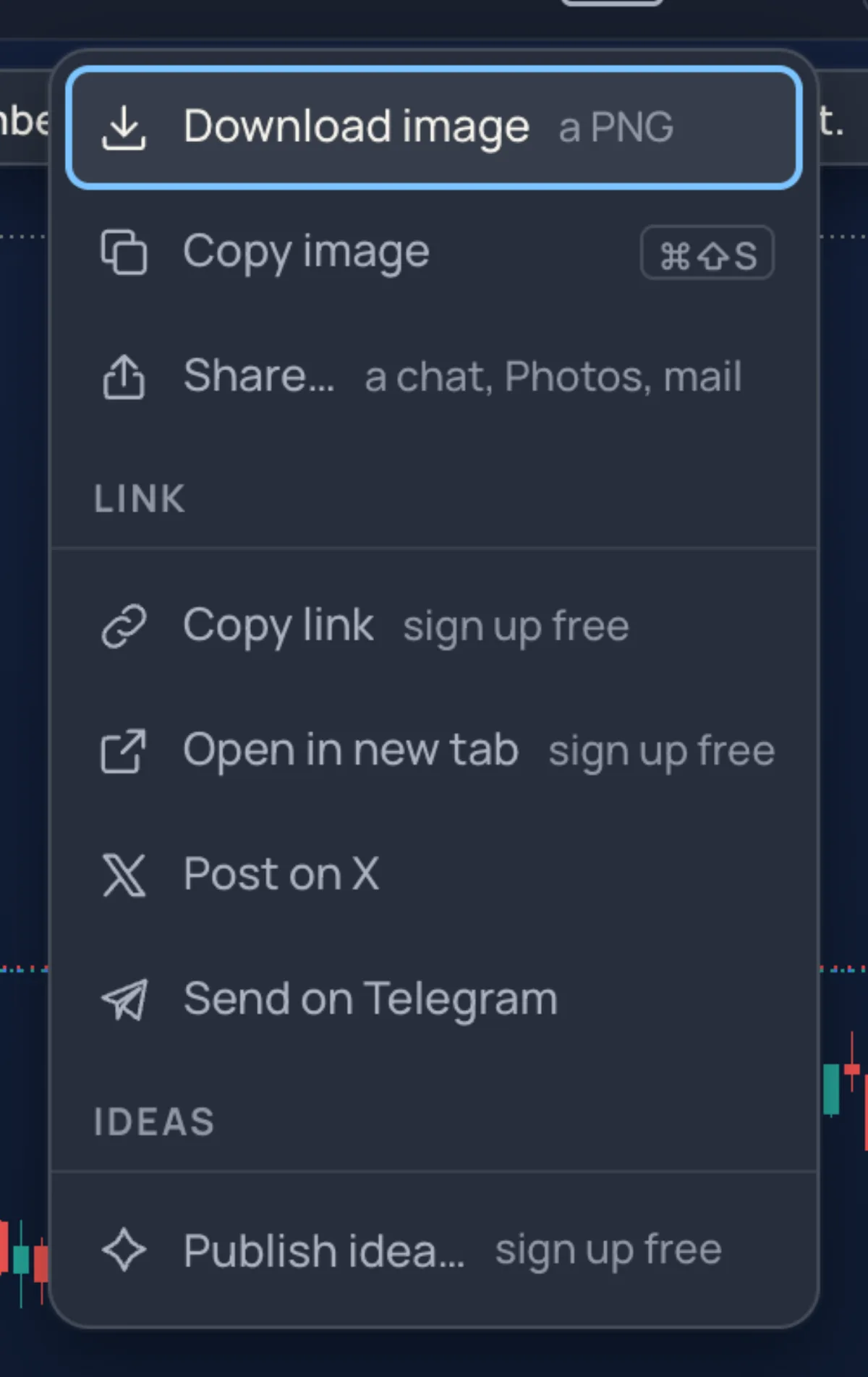
| Row | What it does |
|---|---|
| Download image | Saves a PNG. In a chart grid it is the whole grid. |
| Copy image | Puts the picture on the clipboard — paste it into a chat or a document. |
| Share… | On phones: the system share sheet (a chat, Photos, mail). |
| Copy link | Makes the public page and copies its address. |
| Open in new tab | Makes the page and opens it. |
| Post on X, Send on Telegram | Make the page and open a post with its address. |
| Publish idea… | Opens the idea composer with this picture. |
Without an account you can download and copy the picture; the link rows and Publish idea… need a free account (their hint reads sign up free).
How to make a link#
- Set the chart up as you want it seen.
- Click the camera, then Copy link. After Making your link… a card shows the address with Copy, Open and Post on X, and the link is on your clipboard.
- Paste it anywhere; on X and Telegram the preview shows the picture.
The same look of the chart reuses its page for ten minutes; change something and the next link is a new page.
The snapshot page#
The page shows the title, by your public name, the date and the views, with two tabs: Picture and Live chart. The live chart is read-only and moves with the market; an indicator outside the viewer's plan stays off, and the page says so. Under it: Launch XAUUSD chart opens the symbol on your own chart; Copy the 3 drawings to my chart copies the drawings for a member (Undo takes them back; a guest sees Sign up free to copy these drawings); Download picture saves the PNG; and the author has Delete this snapshot, which asks once.
Publishing an idea#
- Draw your analysis on the chart. A Long position or Short position drawn first fills the entry, stop and target for you and shows the setup on the picture.
- Click the camera, then Publish idea… — or More › Ideas › Publish idea, or Publish an idea on the My ideas account page.
- The first time, Choose your public name: ideas carry your username, never your member ID.
- Fill the composer: Analysis or Education; a Title; Your analysis (10 to 10,000 characters; short paragraphs,
**bold**,-lists and###headings work); optional Levels — Entry, Stop, Target, Target 2; Tags (up to 5). - Click Publish idea. The idea opens on its own page.
The title and text can be changed for 15 minutes after publishing; after that, Add update (up to 20 updates). Close idea ends it with an optional note; Delete removes it for everyone.
How an idea is graded#
An idea with levels is checked against the market by the site, never by its author. Price touching the entry and then the target makes it Target reached; the stop coming first makes it Stop hit; when one candle touches both, the stop counts. An idea that reaches neither in 90 days is Expired. A Target reached idea gets Create card: a result picture for X, Telegram or TikTok, with Download PNG, Share… and Copy caption.
The Ideas pages#
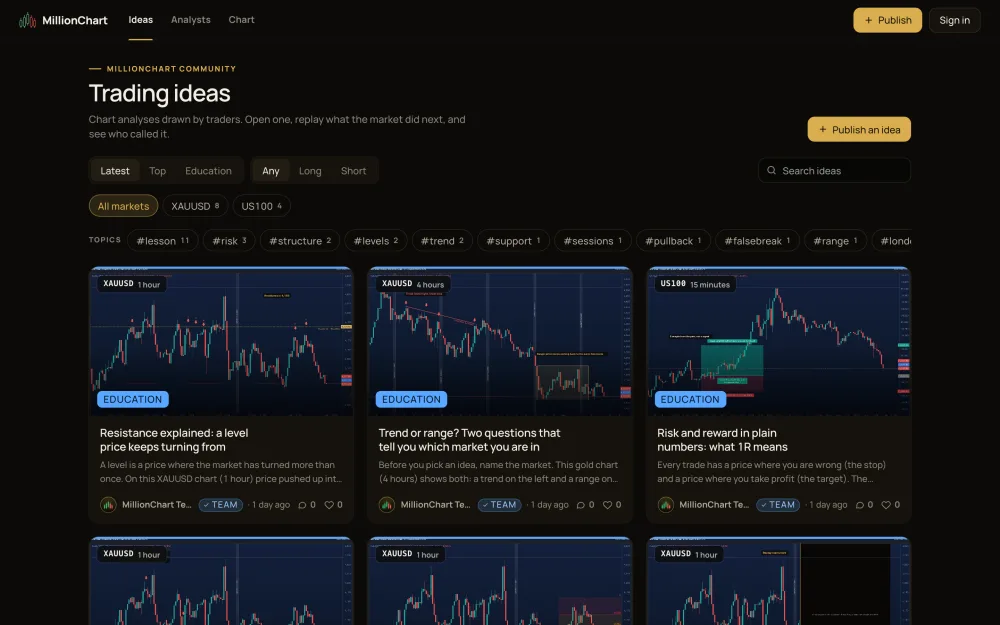
- millionchart.com/ideas — the feed: Latest, Top (the most liked of the last 7 days) and Following, a search box, an instrument filter and Topics. millionchart.com/ideas/XAUUSD lists one symbol.
- An idea's page — Picture or Chart and replay. Play what happened next replays the chart from the moment of publishing (Play, Next candle, Speed, Back to publish, Jump to now). Below: Like, Comments (mention with
@username), Gift, Share and Report; Take it to the live chart offers Copy drawings and Open XAUUSD chart. - Top analysts (millionchart.com/ideas/analysts) — ranked by the share of rated ideas that reached their target over 30 days, 90 days or all time, from 5 rated ideas; Net R adds the reward-to-risk of every target reached and takes 1 for every stop hit.
- Profiles (millionchart.com/u/username) — the member's ideas, followers, track record and a Follow button. Yours is set up on the Public profile page.
Gifts#
A reader can send you money for an idea: Gift offers a coffee ($2), a clap ($5), a rocket ($10), a trophy ($25) or any amount from $1 to $500, with a message and a Send anonymously box. The money moves from the sender's MillionAlgo wallet to yours; no fee is taken at present. A sender whose wallet is short sees Add funds to my wallet.
Related#
- Bar replay — the same player, on your own chart
- Trade and measure tools — the Long and Short position tools
- Your account pages — My ideas, your public page, gifts received
- Keyboard shortcuts