Bollinger %B
What Bollinger %B measures, how to read it above 1 and below 0, its settings on MillionChart and an example on gold.
Bollinger %B tells you where the price sits inside the Bollinger Bands, as one number: 1 on the upper band, 0.5 on the basis, 0 on the lower band, and above 1 or below 0 when the price is outside the bands. It puts the bands' message in its own pane, so you can read "how far into the bands" at a glance and set an alert on it. John Bollinger described it in Bollinger on Bollinger Bands (2001).
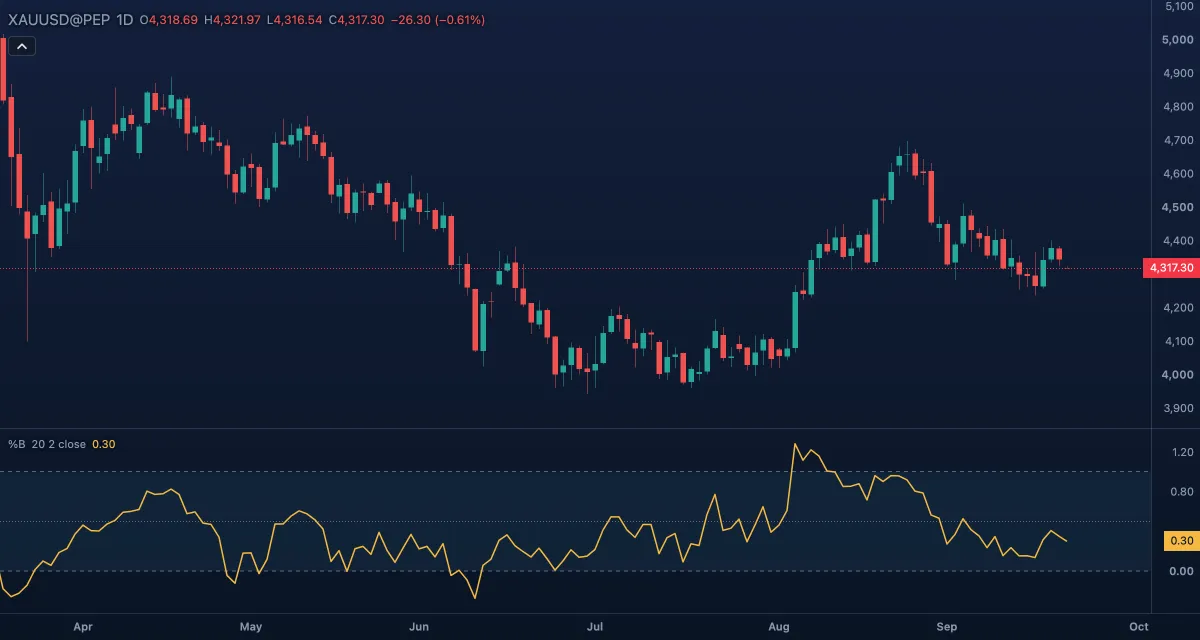
What it shows#
- %B — one line in its own pane. Rising means the price is climbing through its bands; falling means it is sinking through them.
- Upper band — a dashed level at 1; above it the price is above the upper band.
- Basis — a dotted level at 0.5, the moving average itself.
- Lower band — a dashed level at 0; below it the price is under the lower band.
- Band fill — the tint between 1 and 0, standing for the band itself.
How it is calculated#
The bands are those of Bollinger Bands: the simple average of the Source over Length bars, plus and minus StdDev multiplier times the population standard deviation of the same window. %B is the source minus the lower band, divided by the upper band minus the lower band. The chart computes it as 0.5 plus the distance from the basis divided by the full band width, which is the same number. There is no value where the window is flat, because the bands then have no width.
How traders use it#
- Above 1 means the price is above the upper band. In a trend that is strength, not a sell: %B stays near 1 for weeks while the price walks the band. Below 0 is the mirror image.
- Divergence: the price makes a higher high but %B a lower high, so the second high is less far into the bands; the push is losing force.
- Bollinger's W bottom: the price makes a lower low but %B a higher low, the second low inside the band while the first was below it; a cross back above 0.5 confirms it. The M top is the reverse.
- In a sideways market, readings near 0 and 1 are the edges to trade back from, with 0.5 as the first target, but only when a filter such as the Choppiness Index says the market is in a range.
- Watch out: %B inherits the bands' lag, 1 and 0 are not overbought and oversold in a trend, and it adds no information the bands do not already hold.
Settings#
| Setting | Default | What it changes |
|---|---|---|
| Length | 20 | How many bars go into the average and the deviation (at least 2). |
| StdDev multiplier | 2 | How far the bands sit from the basis, in standard deviations (0.1 to 10). A larger multiplier keeps %B between 0 and 1 more of the time. |
| Source | Close | The price each bar contributes: Open, High, Low, Close, Mid, Typical or Average. |
| Colours and style | — | The %B, Upper band level, Basis level, Lower band level and Band fill colours; the line's width, dash and visibility under Lines in the Inspector. |
Example on gold#
For example, gold sells off to $4,210 and %B prints −0.08, below the lower band. Two weeks later gold dips to $4,195, a lower low, but %B only reaches 0.12: the second low stays inside the band. That is Bollinger's W bottom. The selling has lost force compared with the bands, and a trader waits for %B to cross back above 0.5 before buying, with the stop under $4,195.
A %B that falls back below 0 on a further new low cancels the pattern. This is an illustration, not a signal.
Add it to your chart#
- Click Indicators in the top strip (on the Pro screen, press I).
- Type
%band click Bollinger %B, or press Enter for the first result. - Click its chip in the legend to open the Inspector and change the settings; drag the chip to reorder; the dot hides it; × removes it.
Related#
- Bollinger Bands — the bands %B is read from
- Bollinger BandWidth — the width of the same bands, for the squeeze
- Relative Strength Index — a momentum oscillator read for the same divergences
- Stochastic — the price's place in its recent range instead of its bands
- Alerts — an alert when %B crosses 1, 0.5 or 0
- Adding and tuning indicators