Rate of Change (ROC)
What the Rate of Change measures, how to read it against the zero line and its own history, its settings on MillionChart and an example on gold.
The Rate of Change measures how much the price has moved over a set number of bars, in percent. With the default length of 9, a reading of 2 means the close is 2% above the close nine bars ago. It swings around zero in its own pane and has no fixed top or bottom.
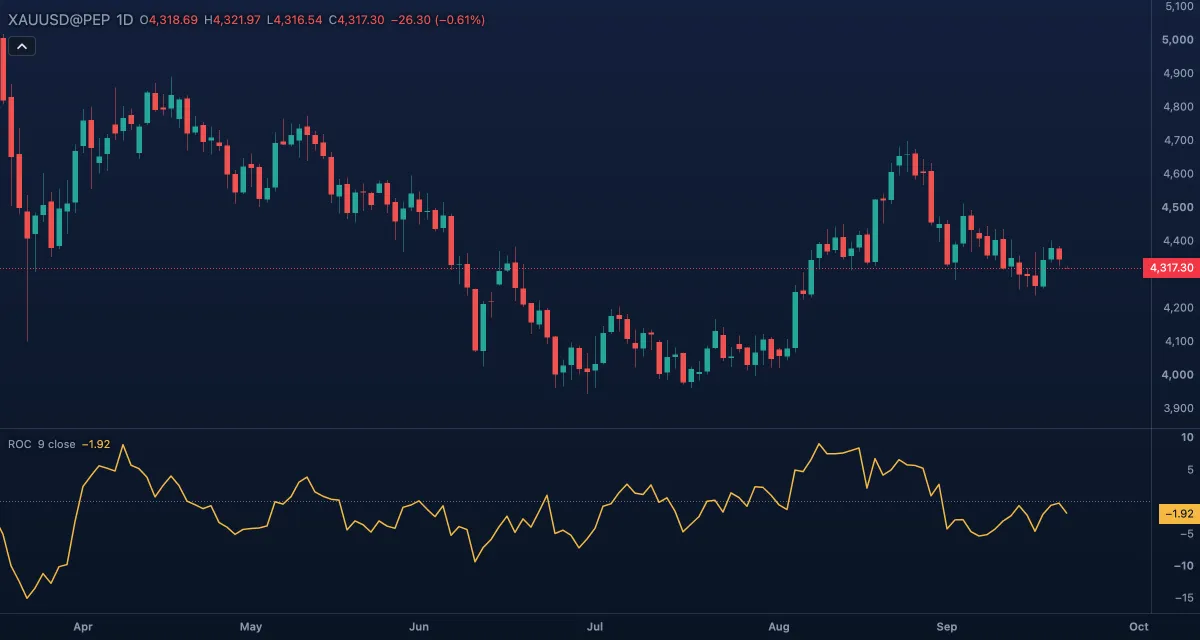
What it shows#
- ROC (gold line): the percent change over Length bars. Above zero the price is higher than it was nine bars ago; below zero, lower. The further from zero, the faster the move.
- Zero: a dotted line at 0.
No overbought or oversold levels are drawn, because the indicator has no natural limits: a 5% reading is extreme on a daily gold chart and ordinary on a small cryptocurrency.
How it is calculated#
ROC = 100 × (source − source n bars ago) / source n bars ago, where n is Length and the source is the price chosen in Source (the close by default). The first value appears after n bars of history. Nothing is smoothed, so the line is as rough as the price itself.
How traders use it#
- Zero crossings: ROC rising above zero says the price is now above where it was n bars ago, a simple read of direction; falling below zero the reverse.
- Extremes: with no fixed bands, compare the reading with the indicator's own recent peaks on the same symbol and timeframe. A reading far above the usual range often marks a move that is due to pause.
- Confirmation: a breakout with ROC rising carries more weight than one with ROC already falling.
- Divergence: price makes a new high while ROC makes a lower high, so each leg up gains less than the last. A warning, not a signal on its own.
- Watch out for: a big bar changes the reading twice, once when it enters the window and again when it drops out n bars later, without anything new happening in the market. Short lengths are noisy; long ones lag.
Settings#
| Setting | Default | What it changes |
|---|---|---|
| Length | 9 | How many bars back the comparison goes. Shorter reacts faster and swings more. |
| Source | Close | The price compared: Open, High, Low, Close, Mid (HL2), Typical (HLC3) or Average (OHLC4). |
| Colours and style | — | The colour of the ROC line and of the zero line. |
Example on gold#
Suppose gold on the daily chart has risen from about $4,150 to $4,300 in nine sessions, for example: ROC reads about 3.6, well above its recent peaks of 1 to 2. The price is moving faster than it has for weeks. A trader who is long might see that as a reason not to add at this price, and a trader waiting to buy might wait for ROC to come back toward zero, which happens either through a pullback or through a few sideways sessions while the older, lower closes drop out of the window. A ROC that keeps climbing past 3.6 while price breaks higher would show the move is still accelerating.
Add it to your chart#
- Click Indicators in the top strip (on the Pro screen, press I).
- Type
rocand click Rate of Change. - Click its chip in the legend to open the Inspector and change the settings; drag the chip to reorder; the dot hides it; × removes it.
Related#
- Momentum — the same comparison in price units instead of percent
- Know Sure Thing — four rates of change, smoothed and combined
- Relative Strength Index (RSI) — momentum on a fixed 0 to 100 scale
- Alerts — an alert when ROC crosses zero
- Adding and tuning indicators