Range Filter
A line that moves only when price travels beyond its average range, with target bands and Buy and Sell marks: settings on MillionChart and an example on gold.
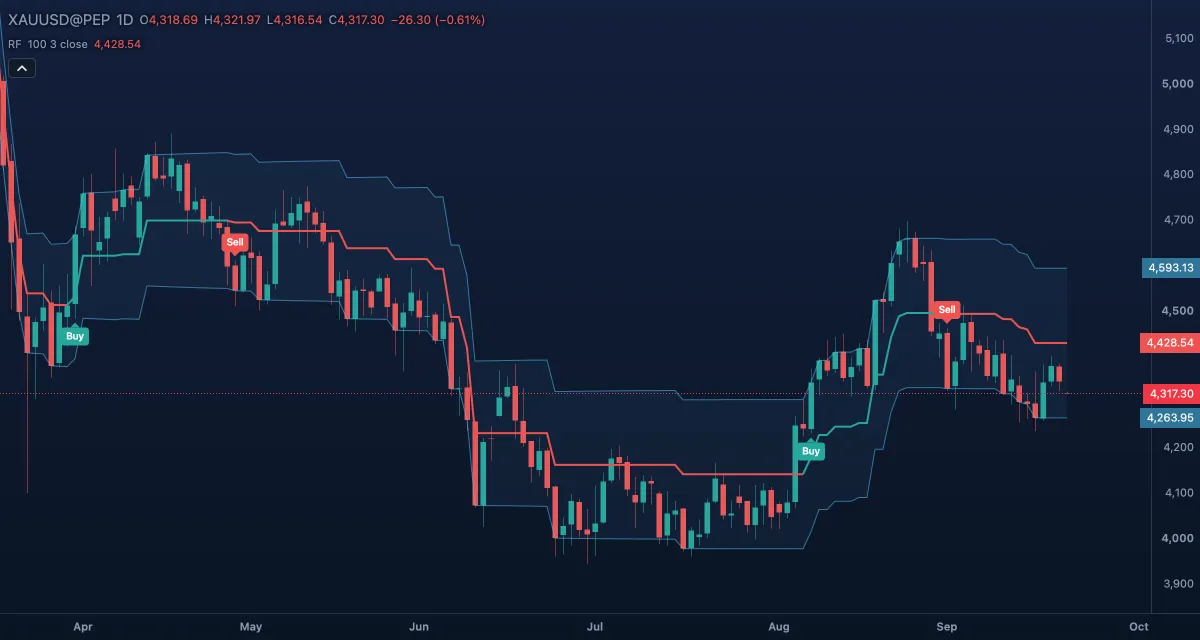
The Range Filter is a line that follows the price only when the price moves further than its usual range; otherwise it holds still. The result is a line that steps in trends and stays flat in noise, with a band of "target" lines around it and Buy and Sell marks where the price changes side. MillionChart draws the "buy and sell" form of Donovan Wall's community script (2019).
What it shows#
- Filter — a thick line over the candles: green while its last move was up, red while its last move was down, amber only before it has moved at all.
- High target and Low target — thin light-blue lines one range above and below the filter, with a faint fill between them; the price has to get beyond this band for the filter to move.
- Buy — a green label under the bar where the price sits above a rising filter after a Sell; Sell — a red label above the bar where it sits below a falling filter after a Buy.
How it is calculated#
The range is an average of how much the Source moves from one bar to the next: the bar-to-bar change is smoothed by an EMA over Sampling period bars and again by an EMA over twice that period minus one (100, then 199), and multiplied by Range multiplier (3). On each bar, if the source is more than one range away from the filter's last value, the filter moves to the source minus the range (when above) or plus the range (when below); otherwise it keeps its value. The targets are the filter plus and minus the range.
How traders use it#
- Read the colour: green for an up trend, red for a down trend. A flat line is a range; trend traders wait.
- The Buy and Sell labels are the entries of a simple system — one label per side, so a Buy is not repeated until a Sell has printed. Wait for the close.
- The filter is a trailing stop: leave a long on a close below the green line.
- A smaller Sampling period or Range multiplier follows the price sooner and signals more often; larger is calmer.
- Watch out: with the default period the filter needs about 300 bars of history before it has a value (3 × 100 − 2 = 298), so on a symbol with little history the line may not appear at all. In a range the labels alternate.
Settings#
| Setting | Default | What it changes |
|---|---|---|
| Sampling period | 100 | Bars in the smoothing of the range. Longer is smoother and needs more history. |
| Range multiplier | 3 | How many smoothed ranges the price must move before the filter follows. |
| Source | Close | The price the filter follows: Close, Open, High, Low, Mid (HL2), Typical (HLC3) or Average (OHLC4). |
| Mark buy and sell signals | On | Draws the Buy and Sell labels. |
| Colours and style | — | Filter: rising, Filter: falling and Filter: flat colour the line by its state; High target, Low target and Target fill style the band; Buy mark and Sell mark colour the labels. |
Example on gold#
For example, gold's smoothed daily move is about $25, so with the multiplier at 3 the band is about $75 either side of the filter. Gold has drifted between $4,220 and $4,280 for three weeks and the filter has sat flat at $4,250, red from the last fall. Then gold closes at $4,340, more than one band above the filter: the filter steps up to $4,265 and turns green, and since the price sits above a rising filter after a Sell, a Buy label prints. A trader buys and uses the green line as the stop.
What invalidates it: gold closing back under the filter within days and the filter stepping down — a Sell label, and a sign that the range is not over.
Add it to your chart#
- Click Indicators in the top strip (on the Pro screen, press I).
- Type
range filterand click Range Filter. - Click its chip in the legend (RF 100 3 close) to open the Inspector and change the settings; drag the chip to reorder; the dot hides it; × removes it.
Related#
- ATR Trailing Stop — a stop line with the same Buy and Sell labels
- SuperTrend — a trend line that flips side when the price crosses it
- Chop Zone — a colour read of whether the market is trending or flat
- Alerts — an alert when the price crosses the filter, or on a Buy or Sell signal
- Adding and tuning indicators