Chande Kroll Stop
Two ATR-based stop lines, one for longs and one for shorts: how they are built, how traders use them, their settings on MillionChart and an example on gold.
The Chande Kroll Stop draws two stop lines on the candles — one for long positions, one for short — at a distance set by the ATR (the average true range, a measure of how much the bars move). Tushar Chande and Stanley Kroll published it in The New Technical Trader in 1994.
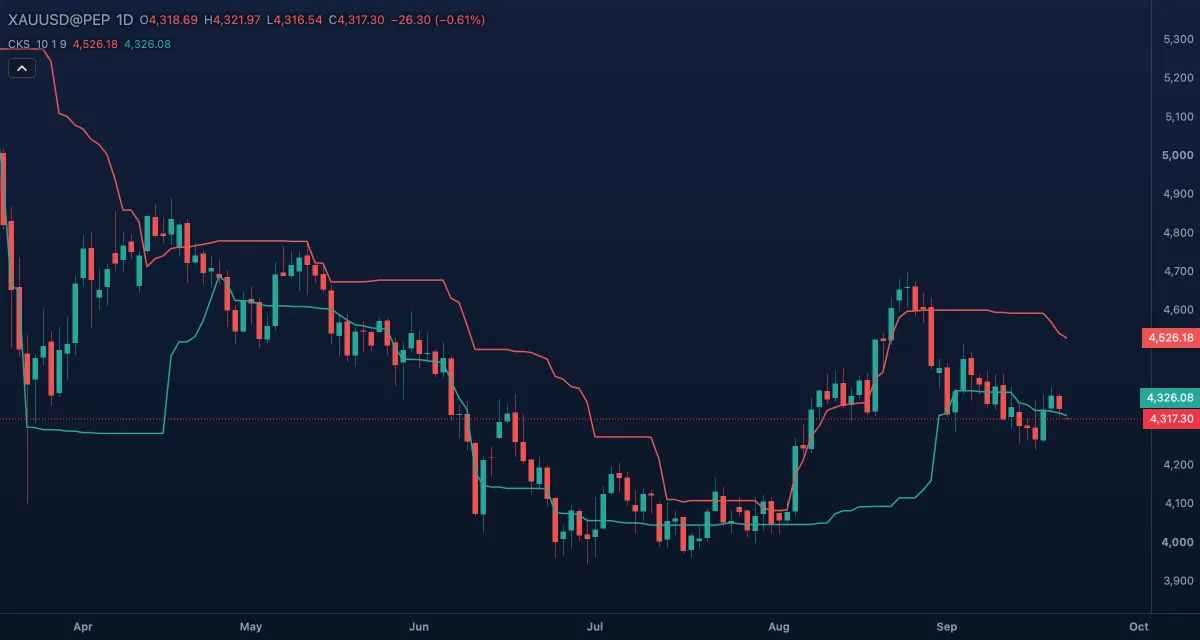
What it shows#
- Stop short — the red line: one ATR below the highest high of the window, held for nine bars. It is the stop of a short position — above the price in a down trend, below it in an up trend.
- Stop long — the green line: one ATR above the lowest low of the window, held for nine bars. It is the stop of a long position.
- Both lines are always drawn; nothing flips. Price above both reads as an up trend, below both as a down trend, between them as a quiet market with no position.
How it is calculated#
First, two raw stops: the highest high over ATR length bars minus ATR coefficient × ATR of that length, and the lowest low over the same bars plus the same distance. Then Stop short is the highest value of the first raw stop over Stop length bars, and Stop long the lowest value of the second over the same bars. Wilder's ATR is used. The defaults — 10, 1 and 9 — are the authors' values.
How traders use it#
- Hold a long while the closes stay above Stop long and leave on a close below it; hold a short while the closes stay below Stop short and leave on a close above it.
- Each side enters where the other is stopped: a close above the red line after a down trend is the usual long entry, a close below the green line after an up trend the short entry.
- The distance is in ATRs, so the stops widen in volatile markets and tighten in quiet ones without a change of settings.
- Raise the ATR coefficient to 2 or 3 to keep the stop further from the price; lengthen Stop length to let the lines hold their levels longer.
- Watch out: when the two lines are close together the price crosses in and out and the entries whipsaw. The lines are built from past highs and lows, so a fast reversal reaches the stop before it has moved.
Settings#
| Setting | Default | What it changes |
|---|---|---|
| ATR length | 10 | Bars in the ATR and in the highest-high and lowest-low windows. |
| ATR coefficient | 1 | How many ATRs the raw stops sit from the extremes. |
| Stop length | 9 | Bars over which each raw stop keeps its extreme value. |
| Colours and style | — | Stop short and Stop long set the colour of each line. |
Example on gold#
For example, gold has rallied to $4,340 with a daily ATR near $40. The red line sits about one ATR under the recent high, near $4,310, and the green line about one ATR above the lowest low of the past two weeks, near $4,220; both are below the price, which reads as an up trend. A trader who is long keeps the stop at the green line and lifts it whenever the line steps up. A close below $4,220 ends the trade; for a stop-and-reverse trader it is also the short entry.
What invalidates the reading: gold closing between the lines for days. The market is quiet, neither stop has been hit, and the next close outside the band decides.
Add it to your chart#
- Click Indicators in the top strip (on the Pro screen, press I).
- Type
chande krolland click Chande Kroll Stop. - Click its chip in the legend (CKS 10 1 9) to open the Inspector and change the settings; drag the chip to reorder; the dot hides it; × removes it.
Related#
- Average True Range (ATR) — the volatility measure behind the stops' distance
- Chandelier Exit — one ATR stop hung from the highest close of the trade
- ATR Trailing Stop — one ATR stop that flips side, with Buy and Sell marks
- Parabolic SAR — a trailing stop that tightens with the trend
- Alerts — an alert when the price crosses either line
- Adding and tuning indicators