Awesome Oscillator (AO)
What Bill Williams' Awesome Oscillator shows, the saucer and twin-peaks readings, its settings on MillionChart and an example on gold.
The Awesome Oscillator compares a short average of the bar's median price with a long one; the difference shows the market's momentum over roughly the last week of bars against the last month. It is measured in the symbol's price units and has no fixed range. Bill Williams published it in New Trading Dimensions (1998).
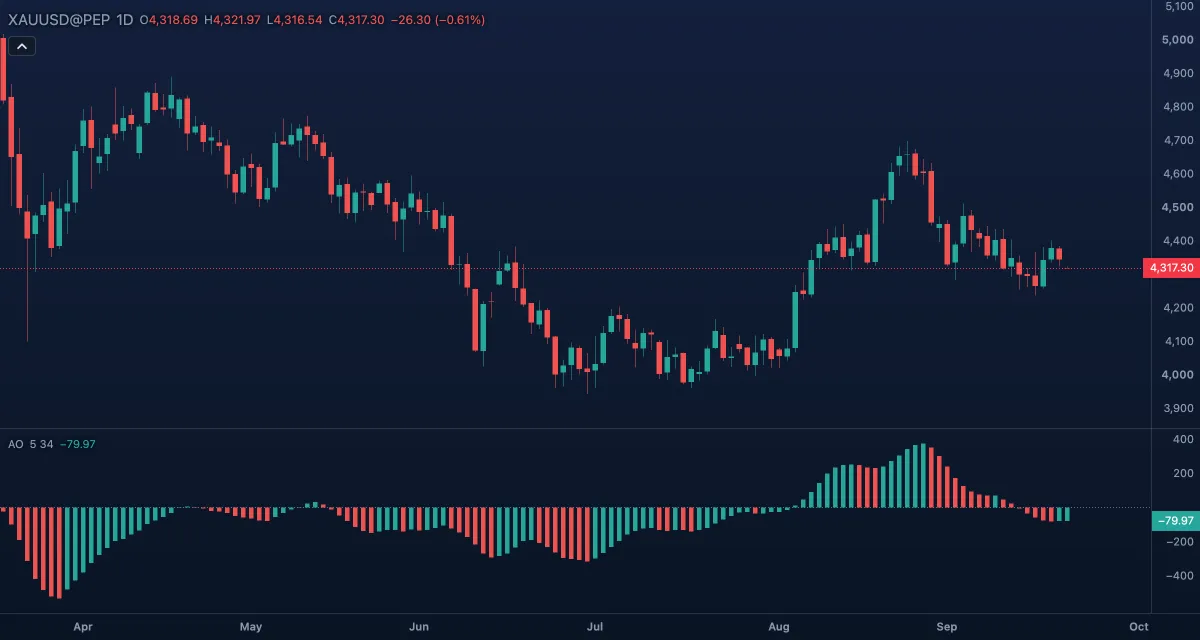
What it shows#
- AO — a histogram in its own pane. A bar is green when it is higher than the bar before (Rising bar) and red when it is lower or equal (Falling bar); the first bar after a gap in the data counts as green.
- Zero — a dotted line at zero. Above it the 5-bar average of the median price is above the 34-bar one; below it, under it.
How it is calculated#
For each bar the chart takes the median price, (high + low) / 2. AO is the simple average of that median over Fast length bars minus its simple average over Slow length bars. The close is not used. The indicator reads the high and low of each bar, so it has no Source setting.
How traders use it#
- The zero cross: AO rising through zero says the short average has crossed above the long one — a trend change in Williams' reading; falling through zero, the opposite.
- The saucer: above zero, a red bar, a lower red bar, then a green bar is his buy pattern — momentum dipped and resumed. Below zero the mirror (green, green, red) is the sell saucer.
- Twin peaks: two troughs below zero where the second is higher than the first, followed by a green bar, is a buy; two peaks above zero with the second lower, followed by a red bar, a sell.
- Divergence between the price and AO, as with MACD, warns a trend is tiring.
- Watch out: the 34-bar average lags a fast reversal, and in a range AO keeps crossing zero. In price units, compare its shape, not its height, across symbols or timeframes.
Settings#
| Setting | Default | What it changes |
|---|---|---|
| Fast length | 5 | Bars of the short average of the median price. |
| Slow length | 34 | Bars of the long average. Williams' 5 and 34 are the defaults; both are inputs here. |
| Colours and style | — | The colours of the Rising bar, the Falling bar and the Zero line; the bar width under Look in the Inspector. |
Example on gold#
Gold, for example, has been falling for a month on the daily chart, from $4,450 to $4,250, and AO (5, 34) is well below zero. The bars stop growing, a first trough forms at about −60, the price bounces, then dips again to $4,260 while AO makes a shallower trough at about −35 and prints a green bar. That is a twin-peaks buy in Williams' terms: the second leg down had less momentum than the first. A trader takes it with a stop under the recent low, and looks for AO to climb through zero as the move develops.
What would invalidate it: AO making a new low under −60 — the second trough was not shallower after all — or the price closing under the recent low.
Add it to your chart#
- Click Indicators in the top strip (on the Pro screen, press I).
- Type
aoand click the indicator, or press Enter for the first result. - Click its chip in the legend to open the Inspector and change the settings; drag the chip to reorder; the dot hides it; × removes it.
Related#
- Accelerator Oscillator — AO minus its own average: the change of momentum
- MACD — the same idea with exponential averages of the close and a signal line
- Alligator — the trend filter of Williams' method
- Alerts — an alert when AO crosses zero
- Adding and tuning indicators